PlanX Suitability Lab
Academic Reference Manual
PlanX Suitability Lab is a QGIS processing plugin providing 69 raster-based multi-criteria decision analysis (MCDA) algorithms for land suitability modelling. It spans the full decision workflow: data harmonisation, criterion weighting (subjective and objective), compensatory and non-compensatory composite scoring, uncertainty quantification, explainable AI diagnostics, scenario comparison, and decision reporting. All algorithms operate on single-band raster layers aligned to a common grid. Outputs are GeoTIFF (Float32 or Int16/Byte) and GeoPackage vector tables.
Step-by-Step Guide: Essential Suitability (14 criteria)
worked example 14 criteria two-stage AHP + WLC real screenshots
Overview
This guide walks through the Essential Suitability model flow from an empty project to a ranked list of candidate settlement sites. It uses 14 criteria and a real study area (728 × 584 cells at 30 m, EPSG:32635, about 38,000 ha). Every number in this guide was produced by running the steps on the example data with the plugin's own algorithms; every dialog and map is a real render from QGIS 3.44 LTR.
About the screenshots. Dialogs are rendered from the actual Processing dialogs with the parameters filled in exactly as in the steps. The QGIS main window is omitted so that every parameter stays readable. Maps are rendered with QGIS map-rendering code from the real output rasters.
Requirements
- QGIS 3.40 LTR or newer (tested here on 3.44 LTR) with PlanX Suitability Lab installed and enabled. The plugin adds a Processing provider and a dock called Production Console.
- The example data package:
yerlesilebilirlik_OGRENCI_PAKETI.zip. Unzip it to a short path such asC:\suitability_guide\data. - About 500 MB of free disk space for intermediate rasters.
The route in the plugin
Open the dock from Plugins → PlanX Suitability Lab, choose Essential Suitability on the Model Flow tab. The five stages are your checklist:
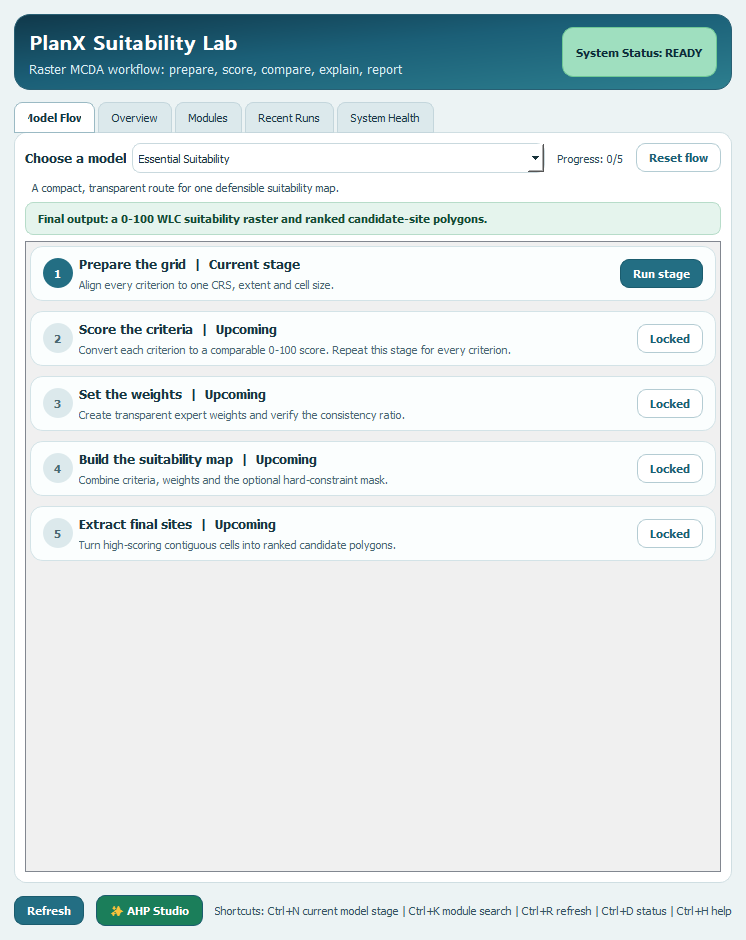
| Console stage | Algorithm | Where in this guide |
|---|---|---|
| 1 Prepare the grid | Data Harmonizer | Step 2 |
| 2 Score the criteria | Normalizer/Reclassifier | Step 3 |
| 3 Set the weights | AHP Weights (and AHP Studio) | Step 4 |
| 4 Build the suitability map | WLC Suitability | Steps 5 and 7 |
| 5 Extract final sites | Candidate Site Extractor | Step 8 |
Why two stages?
The compose tools (WLC, OWA, TOPSIS, VIKOR) accept up to 20 criterion rasters per run, so a flat 14-criterion model is technically possible. The model is still built hierarchically on purpose: a flat AHP over 14 criteria needs 91 pairwise judgements and is very hard to keep consistent (CR ≤ 0.10). Instead the 14 criteria are grouped into four themes (components), each weighted by its own small AHP (3 or 4 items, 3–6 judgements), and the four components are weighted by a top-level AHP.
| Component | Criteria | Count |
|---|---|---|
| Terrain | C01, C02, C03 | 3 |
| Water and fault risk | C04, C05, C06 | 3 |
| Vegetation and climate | C07, C08, C09, C10 | 4 |
| Access and built fabric | C11, C12, C13, C14 | 4 |
| Code | Criterion | Source raster | Unit | Direction | Component |
|---|---|---|---|---|---|
| C01 | Slope | 02_egim_derece.tif | degrees | higher is worse | Terrain |
| C02 | TPI (absolute) | 05_tpi_150m.tif | m | higher is worse | Terrain |
| C03 | Elevation | 01_dem_yukseklik.tif | m | higher is worse | Terrain |
| C04 | HAND | 12_hand_m.tif | m | higher is better | Water and fault risk |
| C05 | TWI | 14_twi_islaklik_indeksi.tif | ln | higher is worse | Water and fault risk |
| C06 | Distance to active fault | 72_mesafe_diri_fay_m.tif | m | higher is better | Water and fault risk |
| C07 | EVI (summer 2024) | 25_evi_yaz_2024.tif | index | higher is better | Vegetation and climate |
| C08 | Land surface temperature | 20_lst_yaz_ortalama.tif | deg C | higher is worse | Vegetation and climate |
| C09 | Albedo | 23_albedo_yaz.tif | 0-1 | higher is better | Vegetation and climate |
| C10 | Cropland probability | 39_dw_tarim_olasiligi.tif | 0-1 | higher is worse | Vegetation and climate |
| C11 | Distance to roads | 65_mesafe_yol_m.tif | m | higher is worse | Access and built fabric |
| C12 | Distance to main roads | 66_mesafe_ana_karayolu_m.tif | m | higher is worse | Access and built fabric |
| C13 | Distance to buildings | 68_mesafe_bina_m.tif | m | higher is worse | Access and built fabric |
| C14 | Building density | 69_bina_yogunlugu_300m.tif | 0-1 | higher is better | Access and built fabric |
Raster file names in the data package are abbreviated and partly non-English. Glossary: egim = slope, yukseklik = elevation, mesafe = distance, diri fay = active fault, yaz = summer, tarim = agriculture, bina = building, yogunlugu = density, orani = ratio, yol = road, ana karayolu = main highway, su sikligi = water frequency, kisit = constraint, ova koruma = plain protection, arazi kullanimi = land use, kirpik = clipped, calisma alani = study area.
1Load the data and check the grid
- Create a new QGIS project and set the project CRS to EPSG:32635 (bottom-right corner).
- Use Layer → Add Layer → Add Raster Layer (Ctrl+Shift+R) and add the 14 rasters listed in the table above from the
02_RASTERLARfolder. Also add03_egim_yuzde.tif(slope in percent) and15_gsw_su_sikligi.tif(surface-water frequency), which are used for the constraint mask. - Add the vector layers from
01_CALISMA_ALANI:kisit_vektorleri_kirpik.gpkg(layers02_buyuk_ova_korumaand05_arazi_kullanimi_cdp100k) anddiri_fay_2026.gpkg(active faults). - Open Layer Properties → Information for each raster and confirm the same CRS, size and pixel size.
Measured on the example data: all 14 criterion rasters are 728 × 584 cells at 30 m in EPSG:32635, with NoData = −9999. They already share one grid, so Step 2 will confirm this rather than change anything.
diri_fay_2026.gpkg is stored in EPSG:5253, not EPSG:32635. Using it without reprojecting shifts the faults by roughly 1.7 km. Step 6 reprojects it explicitly.2Align all criteria — Data Harmonizer
Open Processing Toolbox → PlanX Suitability Lab → Core → Data Harmonizer. Even when rasters look identical, harmonizing produces a manifest you can attach to your report.
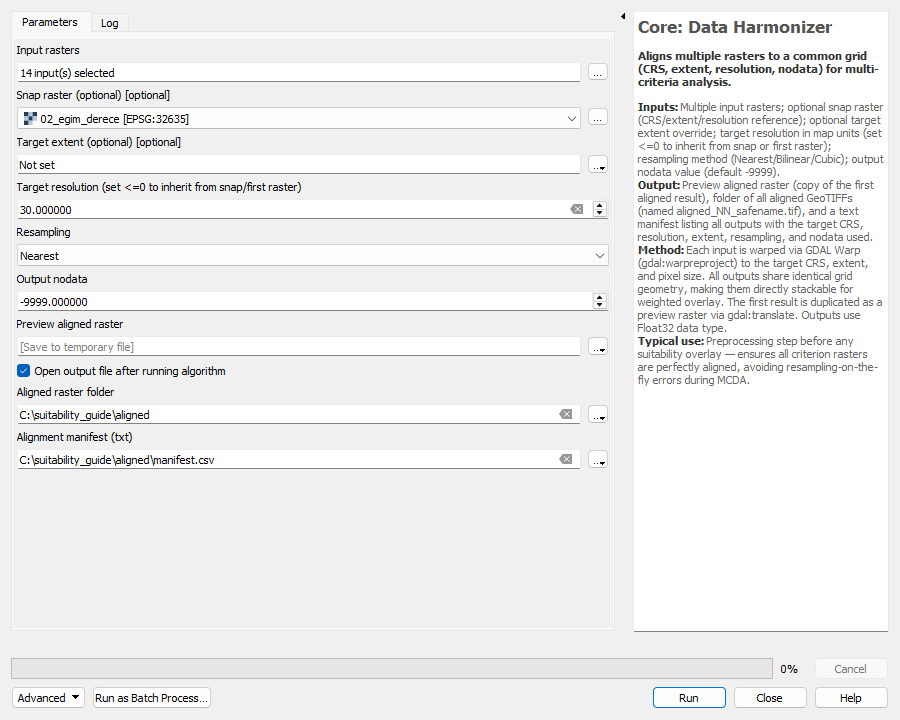
| Parameter | Value | Why |
|---|---|---|
| Input rasters | the 14 criterion rasters (click … and tick them) | All criteria that will be scored |
| Snap raster | 02_egim_derece | Defines the master grid, so cells never shift |
| Target extent | empty | The snap raster extent is used |
| Target resolution | 30 | Native cell size; no resampling needed |
| Resampling | Nearest neighbour | Safe default; use Bilinear only for smooth continuous data that really needs resampling |
| NoData | −9999 | Matches the data package |
| Aligned raster folder | a new folder, for example C:\suitability_guide\aligned | Aligned copies are written here |
| Manifest | manifest.csv in the same folder | Audit trail |
Click Run. The manifest reported: 14 inputs, target CRS EPSG:32635, resolution 30 m, extent 550620, 4209540 : 572460, 4227060, resampling Nearest, NoData −9999.
In this guide the following steps use the original rasters (they were already aligned). With your own data, use the files written to the aligned folder instead.
3Score every criterion on one 0–100 scale — Normalizer
Different criteria have different units, so each one is converted to a continuous 0–100 suitability score (100 = most suitable) with the plugin's own tool: Processing Toolbox → PlanX Suitability Lab → Core → Normalizer/Reclassifier.
How the settings are chosen
- Method. Use Fuzzy Linear (Benefit) when a higher value is better and Fuzzy Linear (Cost) when a higher value is worse. The score is a straight ramp between the two bounds and is clipped to 0–100.
- Low / High bound. The two breakpoints of the ramp: at or beyond the “bad” bound the score is 0, at or beyond the “good” bound it is 100. Pick them from the data distribution (here, roughly the 5th–95th percentile) or from a legal standard.
- Fuzzy Gaussian (Benefit) is a bell curve around the Midpoint with width Spread. It suits criteria where a target value is best and both directions are worse, such as signed TPI.
- Midpoint and Spread are ignored by the linear methods; Low and High are ignored by the Gaussian method.
- NoData cells of the input stay NoData in the output.
Worked example, C01 Slope (degrees, lower is better): ramp from 12° (score 0) down to 0° (score 100).
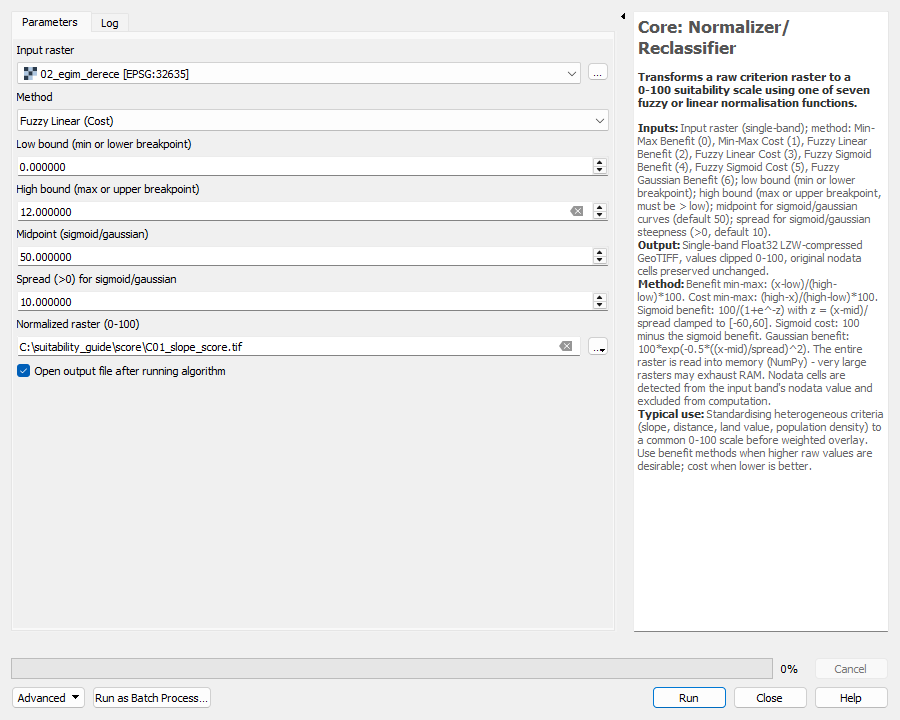
Repeat the Normalizer for all 14 criteria with the settings in the sections below. The bounds are teaching values chosen from the data distribution; replace them with legal or local standards where those exist.
C01 — Slope
Input: 02_egim_derece.tif. Direction: higher value is worse. Steep ground raises grading cost and landslide exposure. Gentle slopes score highest.
| Setting | Value |
|---|---|
| Method | Fuzzy Linear (Cost) |
| Parameters | Low bound 0, High bound 12 |
| Source p5 / p50 / p95 | 0.2038 / 2.9 / 26.3 |
| Score p5 / p50 / p95 | 0.0 / 75.8 / 98.3 |
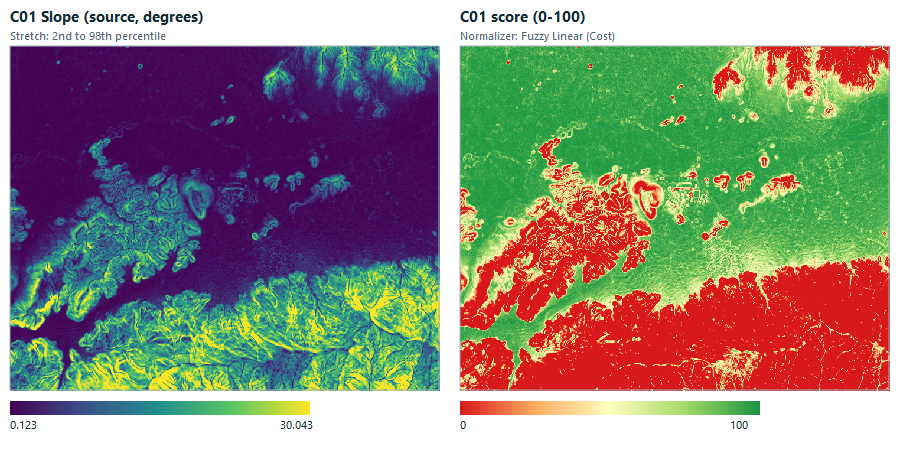
Output name: C01_slope_score.tif
C02 — TPI (absolute)
Input: 05_tpi_150m.tif. Direction: higher value is worse. Topographic Position Index at 150 m. Large positive or negative values mark ridges and hollows, so the absolute value is scored.
No absolute-value step is needed. TPI is signed (ridges positive, hollows negative) and flat ground is best. A Fuzzy Gaussian (Benefit) curve centred on 0 scores both extremes low symmetrically, so the raw TPI raster is used as is.
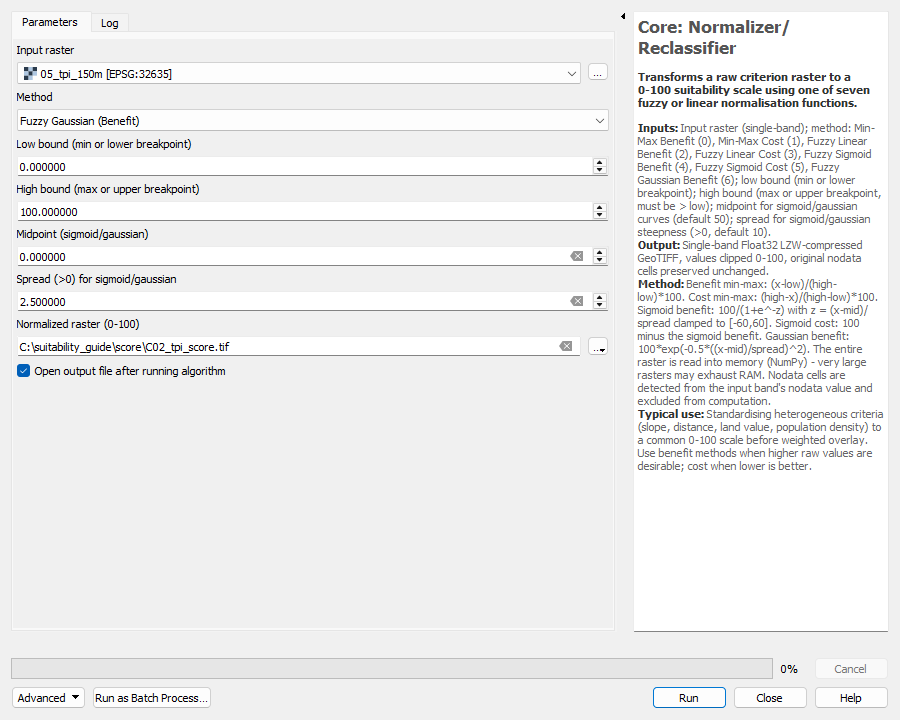
| Setting | Value |
|---|---|
| Method | Fuzzy Gaussian (Benefit) |
| Parameters | Midpoint 0, Spread 2.5 (Low/High are not used by this method) |
| Source p5 / p50 / p95 | -9.051 / -0.1007 / 10.04 |
| Score p5 / p50 / p95 | 0.0 / 94.0 / 100.0 |
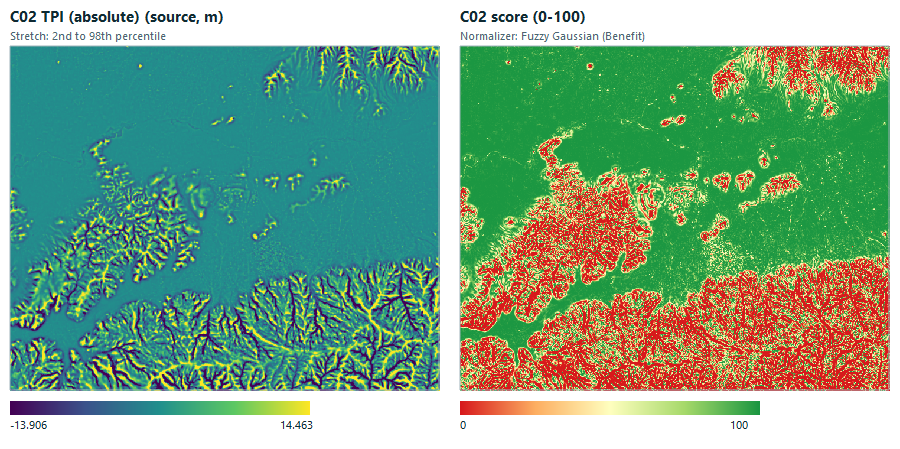
Output name: C02_tpi_score.tif
C03 — Elevation
Input: 01_dem_yukseklik.tif. Direction: higher value is worse. Higher ground costs more to serve with infrastructure and is more exposed. The study area spans roughly 21 m to 1,144 m.
| Setting | Value |
|---|---|
| Method | Fuzzy Linear (Cost) |
| Parameters | Low bound 0, High bound 300 |
| Source p5 / p50 / p95 | 28.83 / 85.2 / 925 |
| Score p5 / p50 / p95 | 0.0 / 71.6 / 90.4 |
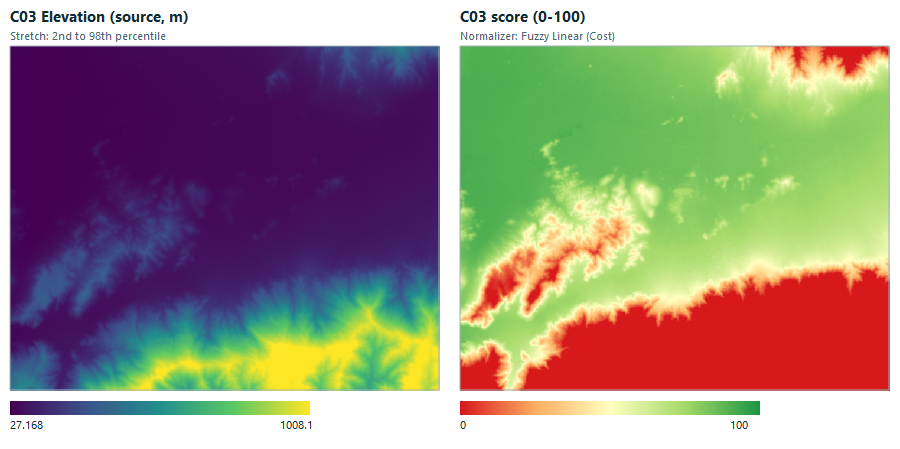
Output name: C03_elevation_score.tif
C04 — HAND
Input: 12_hand_m.tif. Direction: higher value is better. Height Above Nearest Drainage. Cells that sit well above the drainage network are safer from flooding.
| Setting | Value |
|---|---|
| Method | Fuzzy Linear (Benefit) |
| Parameters | Low bound 0, High bound 20 |
| Source p5 / p50 / p95 | 0.2847 / 10.47 / 279.2 |
| Score p5 / p50 / p95 | 1.4 / 52.3 / 100.0 |
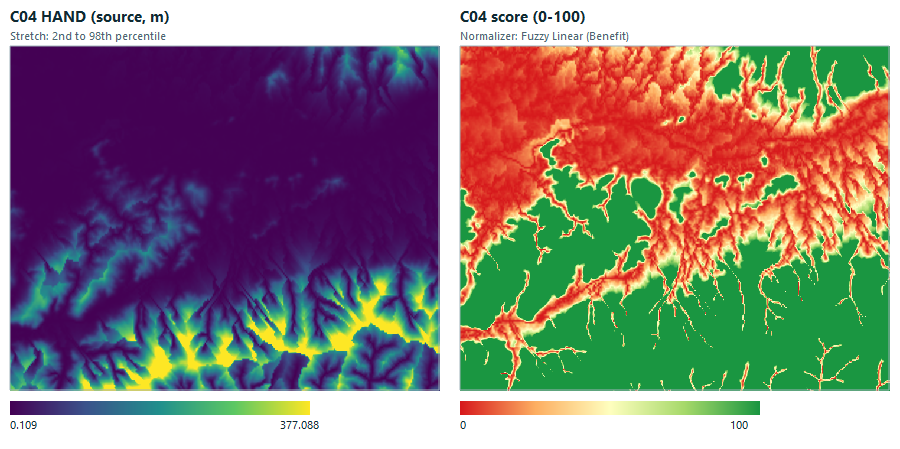
Output name: C04_hand_score.tif
C05 — TWI
Input: 14_twi_islaklik_indeksi.tif. Direction: higher value is worse. Topographic Wetness Index. A high index means water accumulates, which is unfavourable for building.
| Setting | Value |
|---|---|
| Method | Fuzzy Linear (Cost) |
| Parameters | Low bound 7, High bound 13 |
| Source p5 / p50 / p95 | 5.607 / 8.917 / 15.46 |
| Score p5 / p50 / p95 | 0.0 / 68.1 / 100.0 |
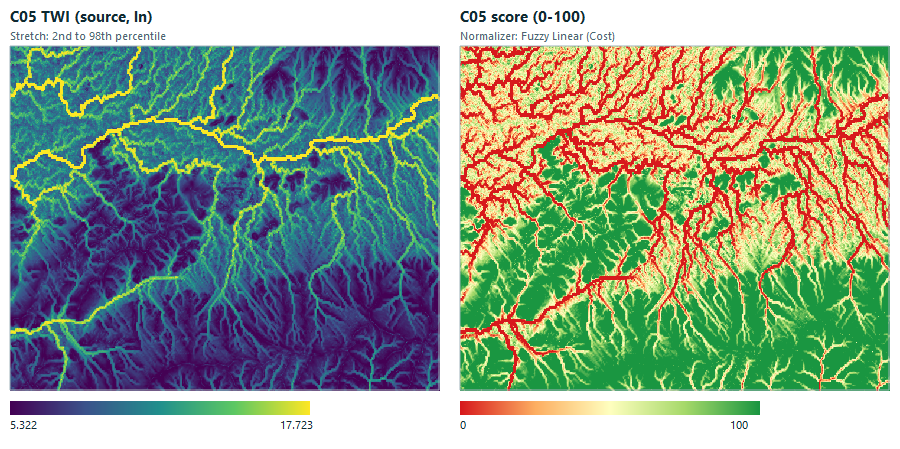
Output name: C05_twi_score.tif
C06 — Distance to active fault
Input: 72_mesafe_diri_fay_m.tif. Direction: higher value is better. Distance to the nearest active fault. Farther is safer. Most of the area is far from the three mapped faults, so most cells score 100.
| Setting | Value |
|---|---|
| Method | Fuzzy Linear (Benefit) |
| Parameters | Low bound 0, High bound 1000 |
| Source p5 / p50 / p95 | 402.5 / 4381 / 1.146e+04 |
| Score p5 / p50 / p95 | 40.2 / 100.0 / 100.0 |
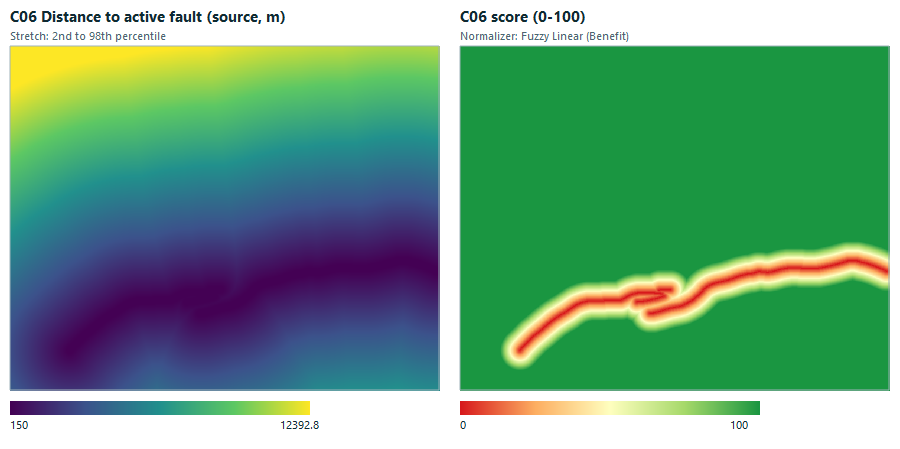
Output name: C06_distance_to_active_fault_score.tif
C07 — EVI (summer 2024)
Input: 25_evi_yaz_2024.tif. Direction: higher value is better. Enhanced Vegetation Index for summer 2024. Denser vegetation indicates healthier, cooler surroundings and scores higher.
| Setting | Value |
|---|---|
| Method | Fuzzy Linear (Benefit) |
| Parameters | Low bound 0.1, High bound 0.45 |
| Source p5 / p50 / p95 | 0.1098 / 0.3041 / 0.5833 |
| Score p5 / p50 / p95 | 2.8 / 58.3 / 100.0 |
Direction is set to higher = better here. If your policy treats vegetated land as something to protect from building, reverse the direction.
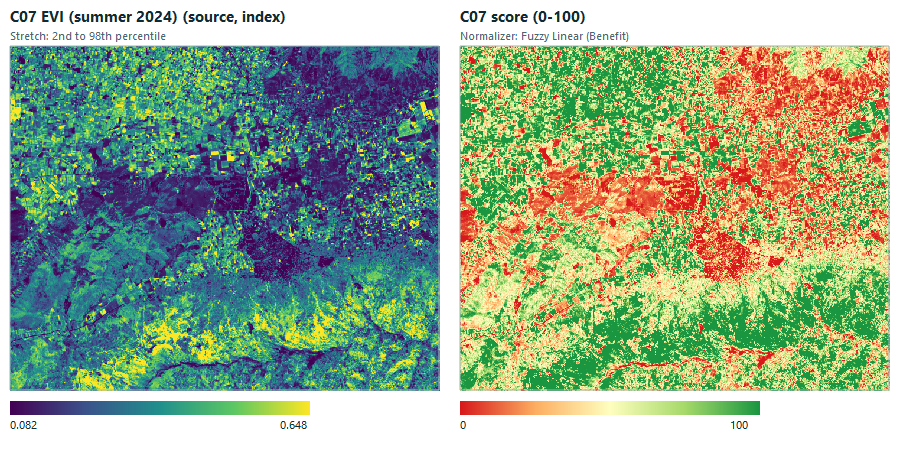
Output name: C07_evi_score.tif
C08 — Land surface temperature
Input: 20_lst_yaz_ortalama.tif. Direction: higher value is worse. Summer land surface temperature (Landsat). Hot cells score lower because they add to urban heat load.
| Setting | Value |
|---|---|
| Method | Fuzzy Linear (Cost) |
| Parameters | Low bound 36, High bound 48 |
| Source p5 / p50 / p95 | 33.46 / 42.37 / 48.98 |
| Score p5 / p50 / p95 | 0.0 / 46.9 / 100.0 |
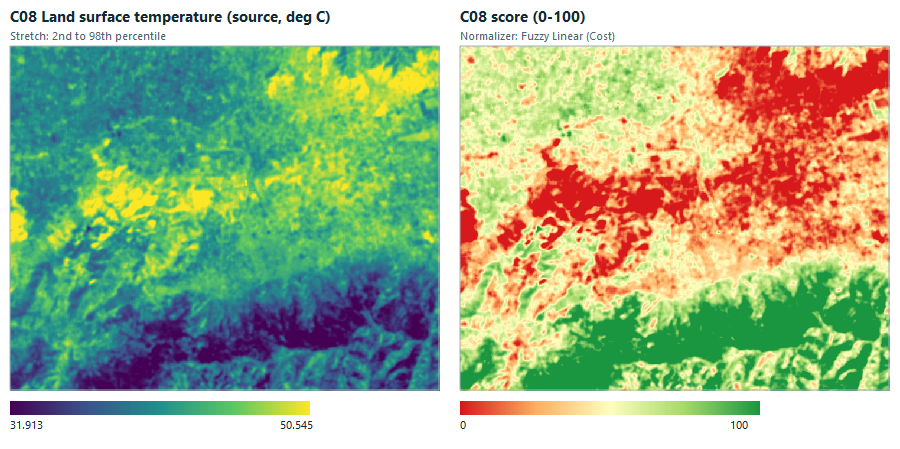
Output name: C08_land_surface_temperature_score.tif
C09 — Albedo
Input: 23_albedo_yaz.tif. Direction: higher value is better. Summer surface albedo. Brighter surfaces reflect more heat, so higher albedo scores higher.
| Setting | Value |
|---|---|
| Method | Fuzzy Linear (Benefit) |
| Parameters | Low bound 0.14, High bound 0.24 |
| Source p5 / p50 / p95 | 0.1296 / 0.1834 / 0.2318 |
| Score p5 / p50 / p95 | 0.0 / 43.4 / 91.8 |
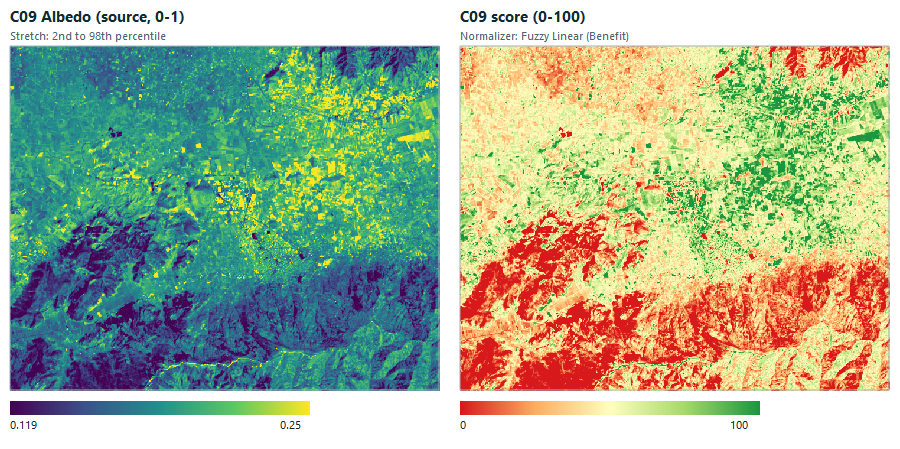
Output name: C09_albedo_score.tif
C10 — Cropland probability
Input: 39_dw_tarim_olasiligi.tif. Direction: higher value is worse. Dynamic World probability of cropland. Productive agricultural land should be kept open, so a high probability scores lower.
| Setting | Value |
|---|---|
| Method | Fuzzy Linear (Cost) |
| Parameters | Low bound 0, High bound 0.6 |
| Source p5 / p50 / p95 | 0.03921 / 0.2951 / 0.6149 |
| Score p5 / p50 / p95 | 0.0 / 50.8 / 93.5 |
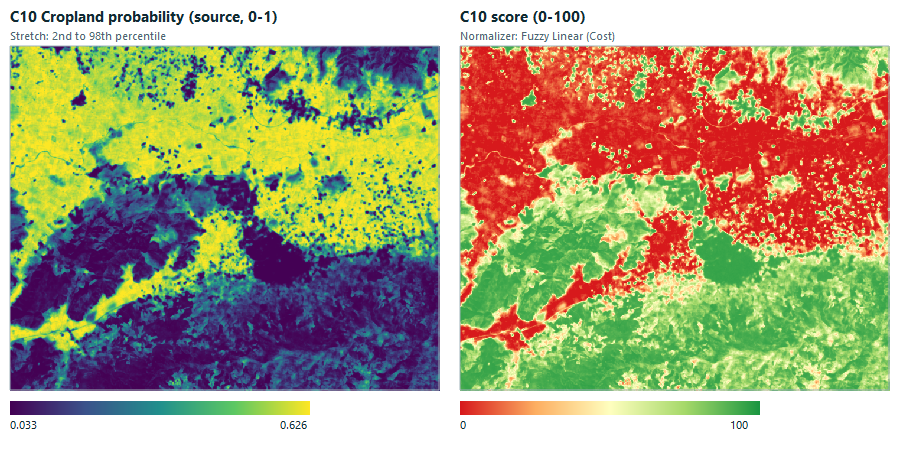
Output name: C10_cropland_probability_score.tif
C11 — Distance to roads
Input: 65_mesafe_yol_m.tif. Direction: higher value is worse. Distance to any road. Settling close to the road network lowers servicing cost.
| Setting | Value |
|---|---|
| Method | Fuzzy Linear (Cost) |
| Parameters | Low bound 0, High bound 1000 |
| Source p5 / p50 / p95 | 30 / 400.2 / 3091 |
| Score p5 / p50 / p95 | 0.0 / 60.0 / 97.0 |
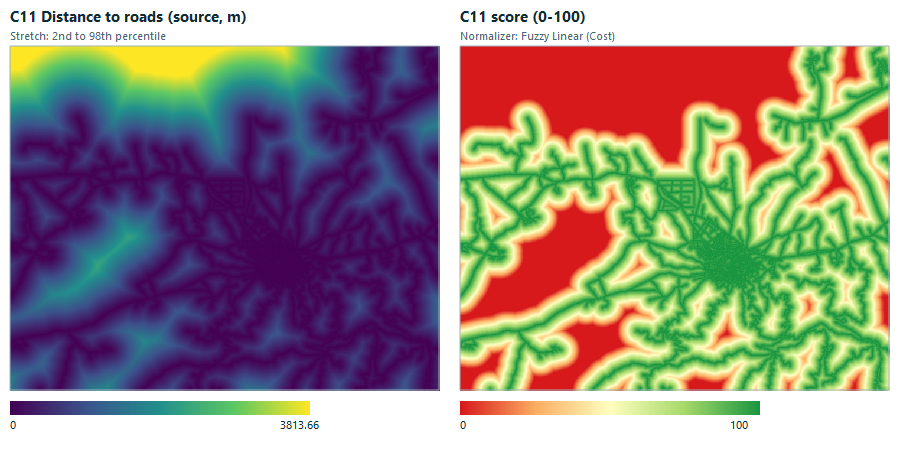
Output name: C11_distance_to_roads_score.tif
C12 — Distance to main roads
Input: 66_mesafe_ana_karayolu_m.tif. Direction: higher value is worse. Distance to main highways. Close to a main highway is treated as better connected, but see the note on direction below.
| Setting | Value |
|---|---|
| Method | Fuzzy Linear (Cost) |
| Parameters | Low bound 0, High bound 3000 |
| Source p5 / p50 / p95 | 42.43 / 737.9 / 2922 |
| Score p5 / p50 / p95 | 2.6 / 75.4 / 98.6 |
Direction is set to high = bad, meaning the nearer a main highway the better. A planning team may instead want a buffer away from highways: flip the direction if so.
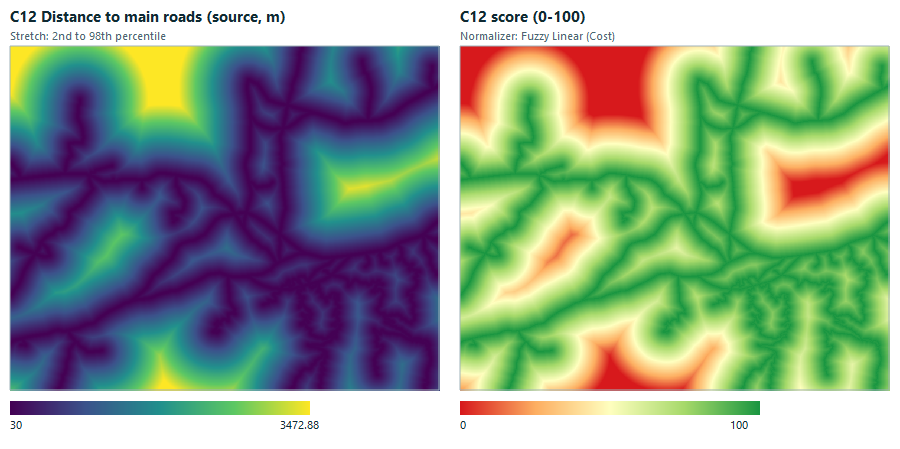
Output name: C12_distance_to_main_roads_score.tif
C13 — Distance to buildings
Input: 68_mesafe_bina_m.tif. Direction: higher value is worse. Distance to the nearest existing building. Cells next to existing fabric are cheaper to connect.
| Setting | Value |
|---|---|
| Method | Fuzzy Linear (Cost) |
| Parameters | Low bound 0, High bound 1000 |
| Source p5 / p50 / p95 | 30 / 339.4 / 3265 |
| Score p5 / p50 / p95 | 0.0 / 66.1 / 97.0 |
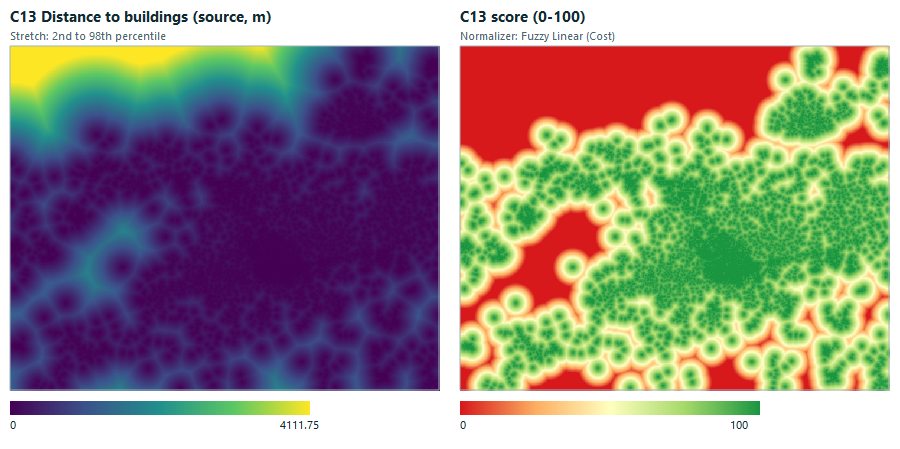
Output name: C13_distance_to_buildings_score.tif
C14 — Building density
Input: 69_bina_yogunlugu_300m.tif. Direction: higher value is better. Share of built-up area in a window of about 600 m. Denser surroundings mean existing urban fabric.
| Setting | Value |
|---|---|
| Method | Fuzzy Linear (Benefit) |
| Parameters | Low bound 0, High bound 0.01 |
| Source p5 / p50 / p95 | 0 / 0 / 0.03351 |
| Score p5 / p50 / p95 | 0.0 / 0.0 / 100.0 |
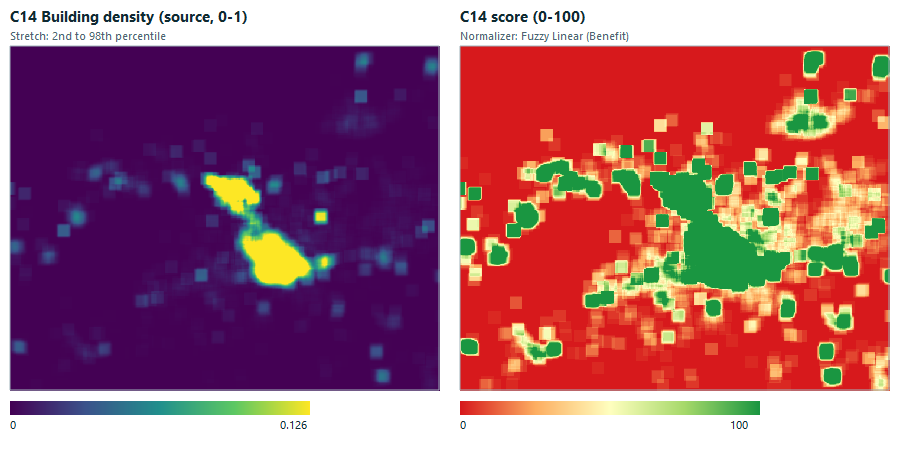
Output name: C14_building_density_score.tif
4Derive weights with AHP
AHP turns pairwise judgements into weights. Compare each pair using Saaty's scale: 1 = equal, 3 = moderate, 5 = strong, 7 = very strong, 9 = extreme; use the reciprocal (1/3, 0.5, …) when the second item matters more. Rows are compared against columns. The consistency ratio (CR) must be at or below 0.10.
Option A — AHP Studio (interactive)
Click AHP Studio in the dock. Pick the criteria, move the sliders or click the scale buttons for each pair, and read the weights and the CR badge live.
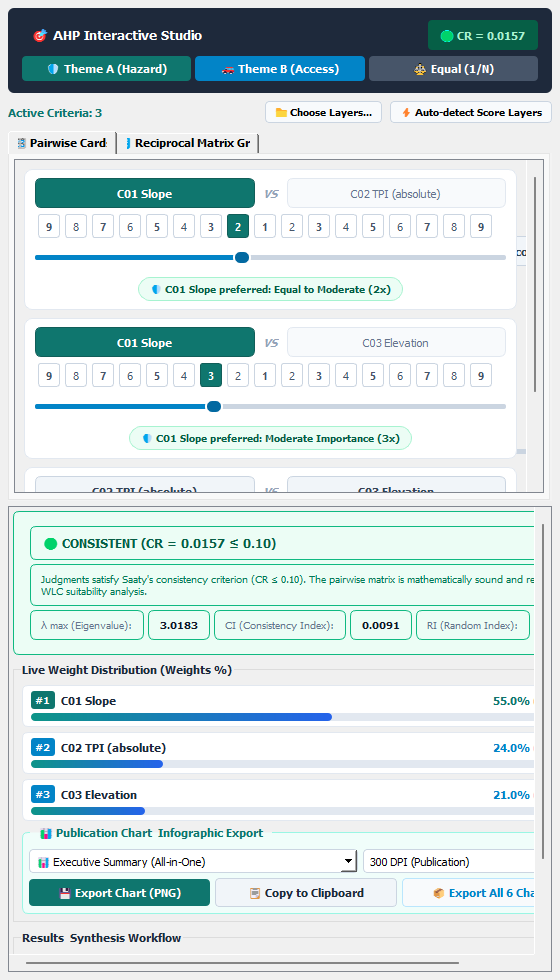
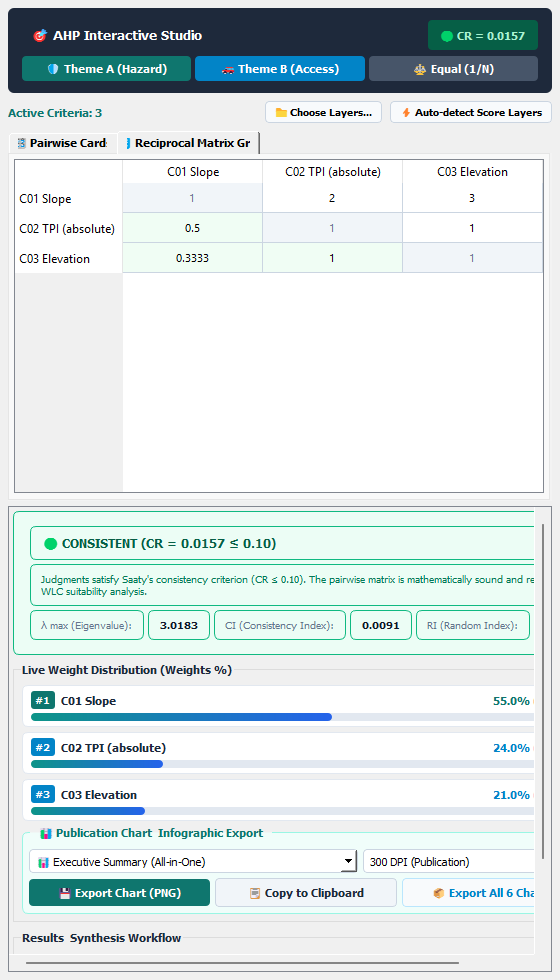
Option B — AHP Weights algorithm (repeatable)
Open Processing Toolbox → PlanX Suitability Lab → Weights → AHP Weights. Paste the matrix as JSON and (optionally) list the criterion names. The output table has criterion_id, weight, cr and cr_ok.
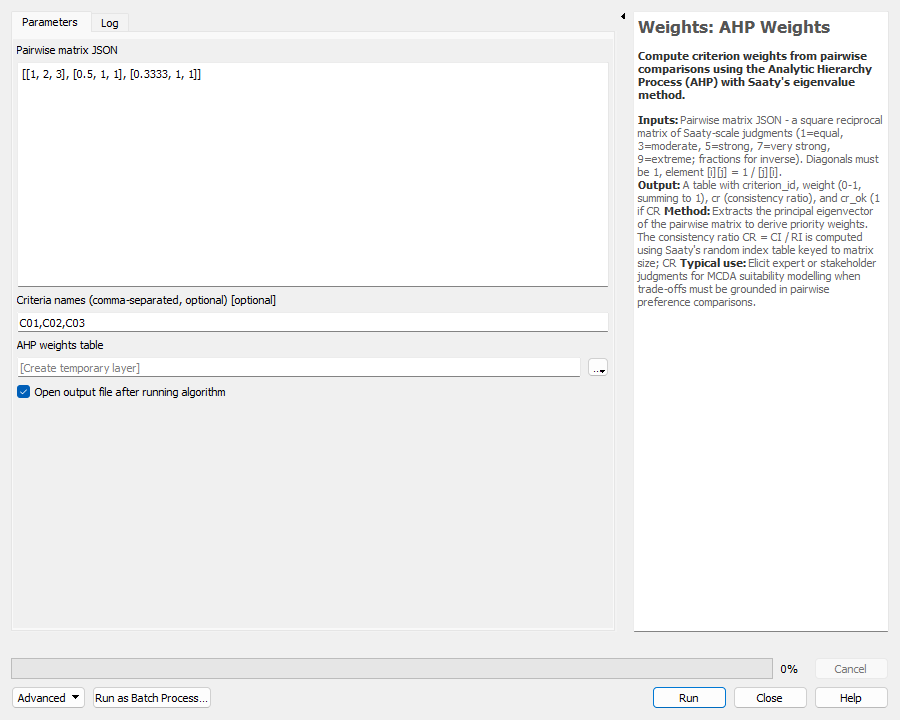
Run it once per component. The four component analyses:
Component 1: Terrain
Criteria: C01 Slope, C02 TPI (absolute), C03 Elevation.
Pairwise matrix (rows are compared with columns)
| C01 | C02 | C03 | |
|---|---|---|---|
| C01 | 1 | 2 | 3 |
| C02 | 0.5 | 1 | 1 |
| C03 | 0.3333 | 1 | 1 |
Resulting weights — CR = 0.0157 (consistent)
| Criterion | Weight |
|---|---|
| C01 Slope | 0.550 |
| C02 TPI (absolute) | 0.240 |
| C03 Elevation | 0.210 |
Component 2: Water and fault risk
Criteria: C04 HAND, C05 TWI, C06 Distance to active fault.
Pairwise matrix (rows are compared with columns)
| C04 | C05 | C06 | |
|---|---|---|---|
| C04 | 1 | 3 | 1 |
| C05 | 0.3333 | 1 | 0.3333 |
| C06 | 1 | 3 | 1 |
Resulting weights — CR = 0.0000 (consistent)
| Criterion | Weight |
|---|---|
| C04 HAND | 0.429 |
| C05 TWI | 0.143 |
| C06 Distance to active fault | 0.429 |
Component 3: Vegetation and climate
Criteria: C07 EVI (summer 2024), C08 Land surface temperature, C09 Albedo, C10 Cropland probability.
Pairwise matrix (rows are compared with columns)
| C07 | C08 | C09 | C10 | |
|---|---|---|---|---|
| C07 | 1 | 0.5 | 1 | 0.5 |
| C08 | 2 | 1 | 2 | 1 |
| C09 | 1 | 0.5 | 1 | 0.5 |
| C10 | 2 | 1 | 2 | 1 |
Resulting weights — CR = 0.0000 (consistent)
| Criterion | Weight |
|---|---|
| C07 EVI (summer 2024) | 0.167 |
| C08 Land surface temperature | 0.333 |
| C09 Albedo | 0.167 |
| C10 Cropland probability | 0.333 |
Component 4: Access and built fabric
Criteria: C11 Distance to roads, C12 Distance to main roads, C13 Distance to buildings, C14 Building density.
Pairwise matrix (rows are compared with columns)
| C11 | C12 | C13 | C14 | |
|---|---|---|---|---|
| C11 | 1 | 2 | 1 | 2 |
| C12 | 0.5 | 1 | 1 | 1 |
| C13 | 1 | 1 | 1 | 1 |
| C14 | 0.5 | 1 | 1 | 1 |
Resulting weights — CR = 0.0225 (consistent)
| Criterion | Weight |
|---|---|
| C11 Distance to roads | 0.347 |
| C12 Distance to main roads | 0.204 |
| C13 Distance to buildings | 0.246 |
| C14 Building density | 0.204 |
5Combine each component — WLC Suitability
Open Processing Toolbox → PlanX Suitability Lab → Compose → WLC Suitability. Select the score rasters of one component, paste the weights as a comma-separated list in the same order as the rasters are listed, leave the constraint empty for now, and save the output.
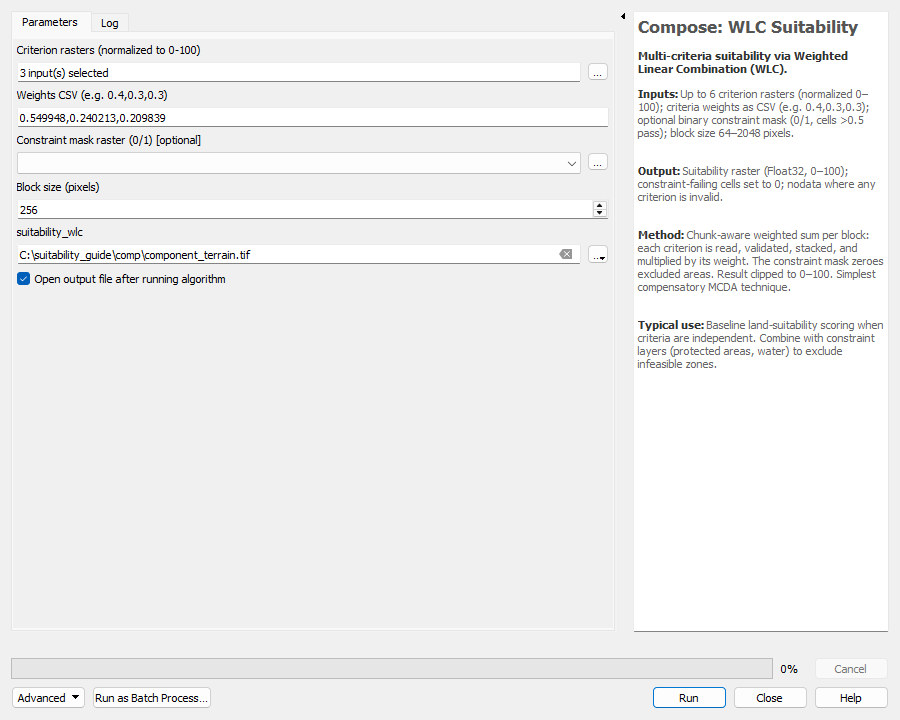
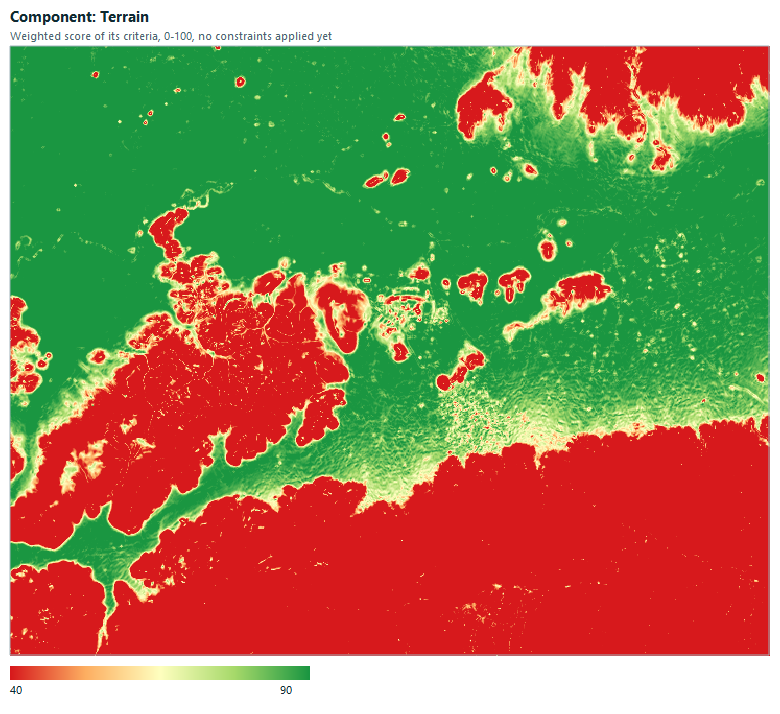
1. Terrain
Rasters: C01_slope_score.tif, C02_tpi_score.tif, C03_elevation_score.tif
Weights CSV: 0.549948,0.240213,0.209839
Output: component_terrain.tif
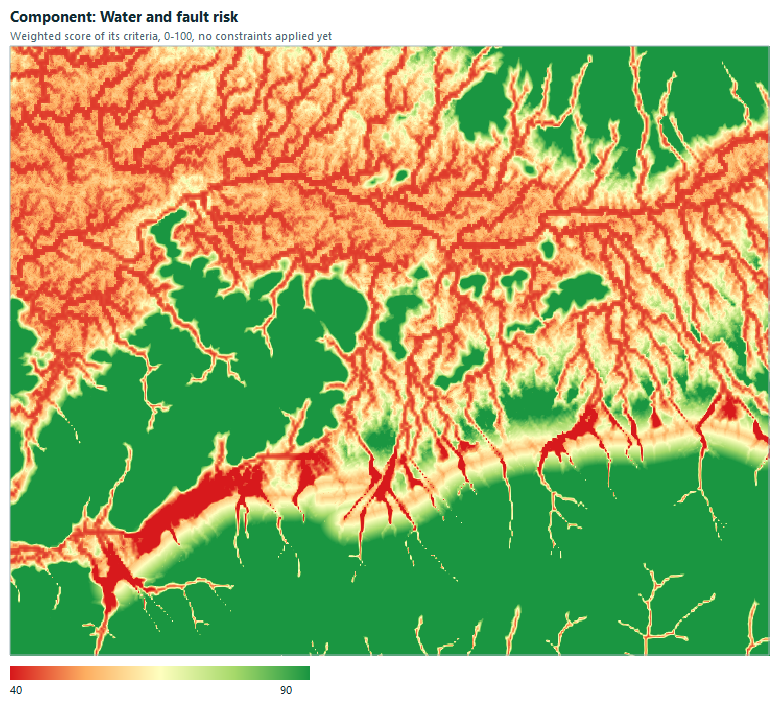
2. Water and fault risk
Rasters: C04_hand_score.tif, C05_twi_score.tif, C06_distance_to_active_fault_score.tif
Weights CSV: 0.428576,0.142849,0.428576
Output: component_water.tif
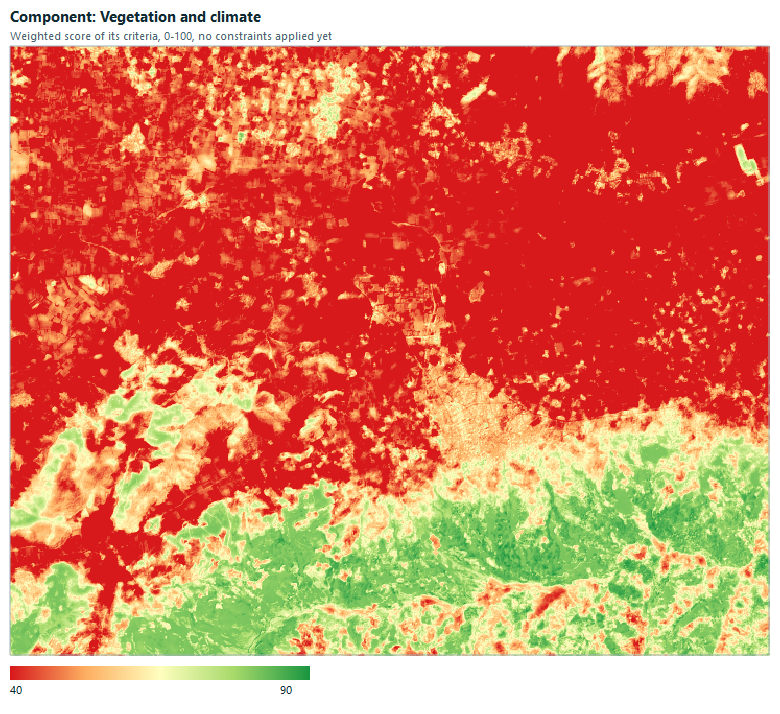
3. Vegetation and climate
Rasters: C07_evi_score.tif, C08_land_surface_temperature_score.tif, C09_albedo_score.tif, C10_cropland_probability_score.tif
Weights CSV: 0.166667,0.333333,0.166667,0.333333
Output: component_vegetation.tif
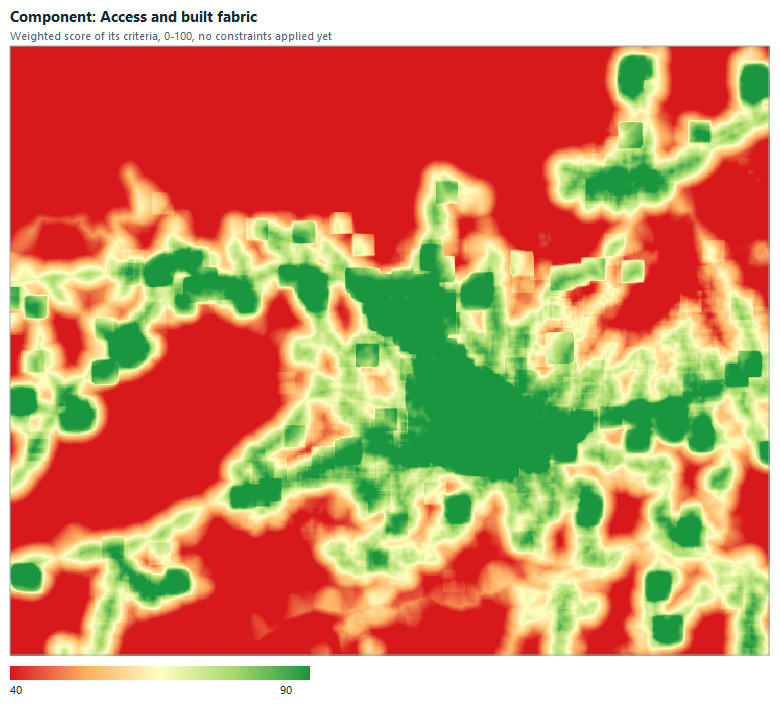
4. Access and built fabric
Rasters: C11_distance_to_roads_score.tif, C12_distance_to_main_roads_score.tif, C13_distance_to_buildings_score.tif, C14_building_density_score.tif
Weights CSV: 0.346543,0.203595,0.246266,0.203595
Output: component_access.tif
6Build the hard-constraint mask
Hard constraints are cells where settlement is not allowed at all, whatever the score. The mask is a single raster: 1 = settleable, 0 = excluded. Six constraints are combined (all thresholds are teaching assumptions; replace them with your legal limits):
| Constraint | Rule | Source |
|---|---|---|
| Large-plain protection | the whole polygon layer is excluded | 02_buyuk_ova_koruma |
| Steep slope | slope > 20 % | 03_egim_yuzde.tif |
| Forest | expression "KULLANIM_TEXT" LIKE 'ORMAN%' | 05_arazi_kullanimi_cdp100k |
| Archaeological site, 1st degree | expression "KULLANIM_TEXT" LIKE '1. DERECE ARKEOLOJ%' | 05_arazi_kullanimi_cdp100k |
| Active fault buffer | 100 m buffer around reprojected faults | diri_fay_2026.gpkg |
| Permanent water | surface-water frequency ≥ 50 | 15_gsw_su_sikligi.tif |
The land-use text field stores Turkish characters as ?, which is why the patterns stop before the first accented letter. Check the exact spelling in the attribute table with Select by expression first.
6.1 Select forest and archaeological polygons
Run Extract by expression twice on 05_arazi_kullanimi_cdp100k using the two expressions above. Measured: 5 forest polygons and 1 archaeological polygon.
6.2 Reproject and buffer the faults
Run Reproject layer on diri_fay_2026 with target CRS EPSG:32635 (14 fault lines), then Buffer with distance 100 m, segments 8, Dissolve result ticked.
6.3 Merge and dissolve the vector constraints
Run Merge vector layers with the plain layer, the forest layer, the archaeology layer and the fault buffer (destination CRS EPSG:32635). Then Dissolve the merged layer into constraints_dissolved.
6.4 Rasterize the dissolved constraints — Vector Rasterizer
Open PlanX Suitability Lab → Core → Vector Rasterizer. Burn 0 into the constrained cells and give every other cell the background value 1. Setting the reference raster puts the result exactly on the analysis grid, so no extent has to be typed.
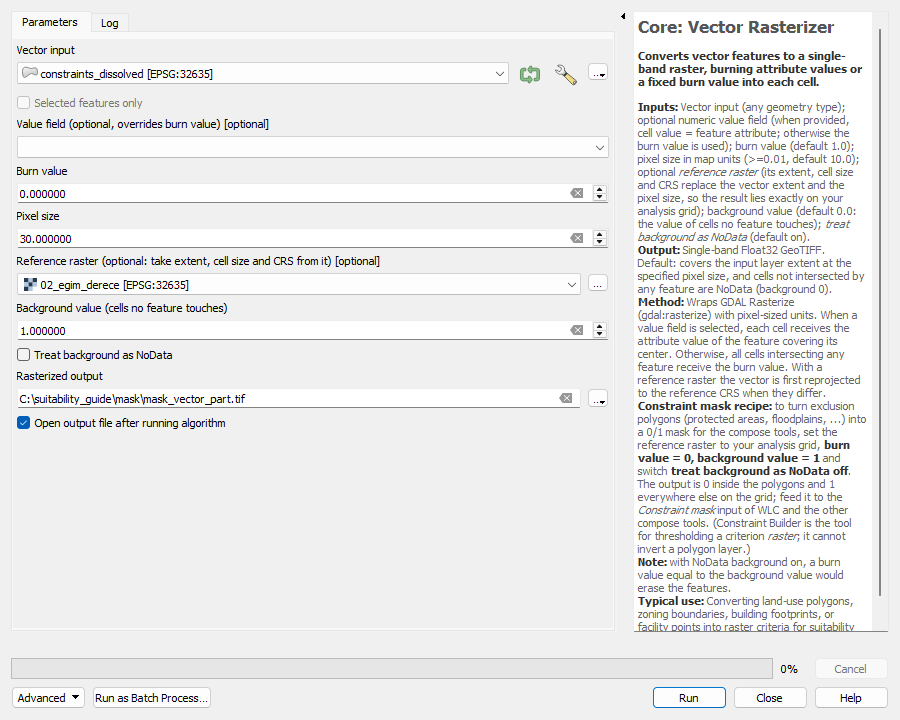
| Parameter | Value |
|---|---|
| Vector input | constraints_dissolved |
| Value field | empty (the burn value is used) |
| Burn value | 0 |
| Pixel size | 30 (ignored once a reference raster is set) |
| Reference raster | 02_egim_derece |
| Background value | 1 |
| Treat background as NoData | off |
6.5 Turn slope and water into masks — Normalizer + Constraint Builder
Constraint Builder marks cells at or above a threshold as 1 (pass). To express “slope must not exceed 20 %” or “water frequency must stay below 50”, first turn the raster into a score where passing cells are high:
- Run Normalizer on
03_egim_yuzdewith Fuzzy Linear (Cost), low bound 0, high bound 40. A slope of 20 % scores exactly 50.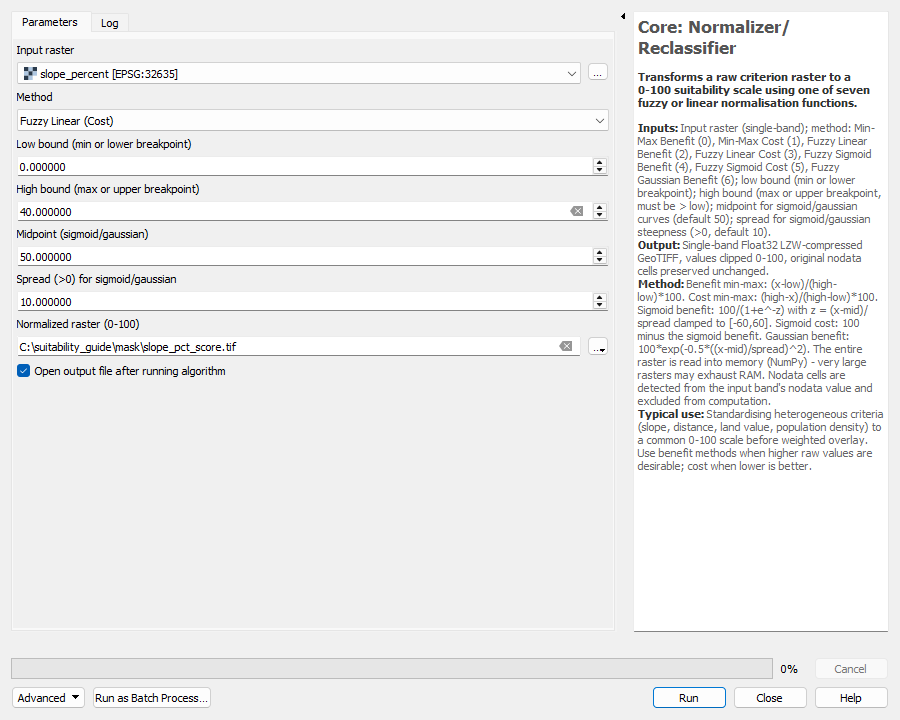
Normalizer on slope in percent: Fuzzy Linear (Cost), 0 to 40. - Run Core → Constraint Builder on that score with threshold 50. Cells with slope ≤ 20 % become 1, steeper cells become 0.
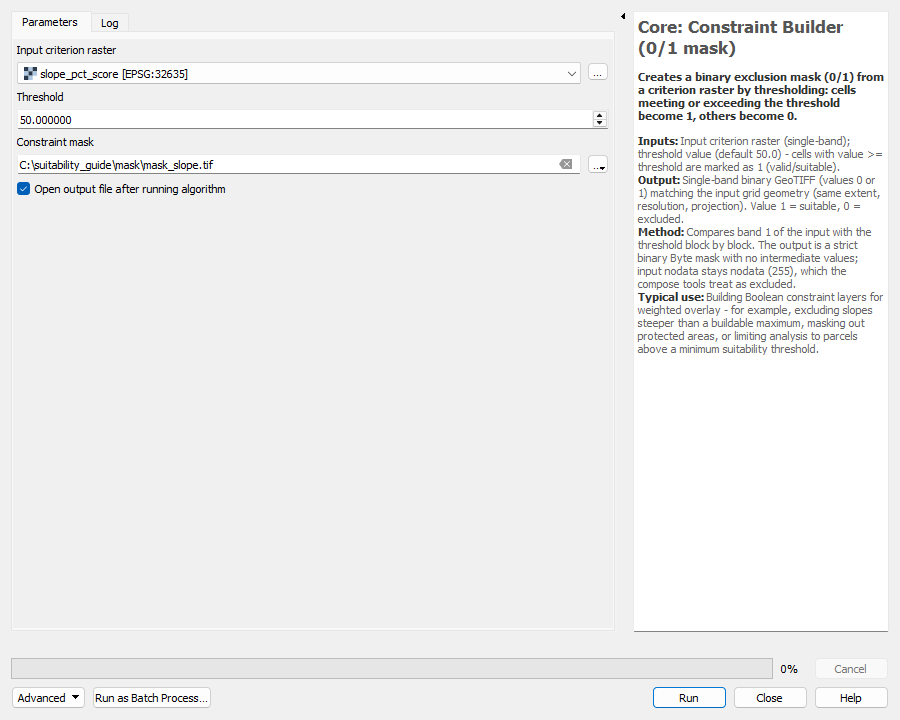
Constraint Builder: threshold 50 on the slope score. - Repeat for
15_gsw_su_sikligi: Normalizer with Fuzzy Linear (Cost), low 0, high 100 (score = 100 − frequency), then Constraint Builder with threshold 50.0001, so only frequencies below 50 pass.
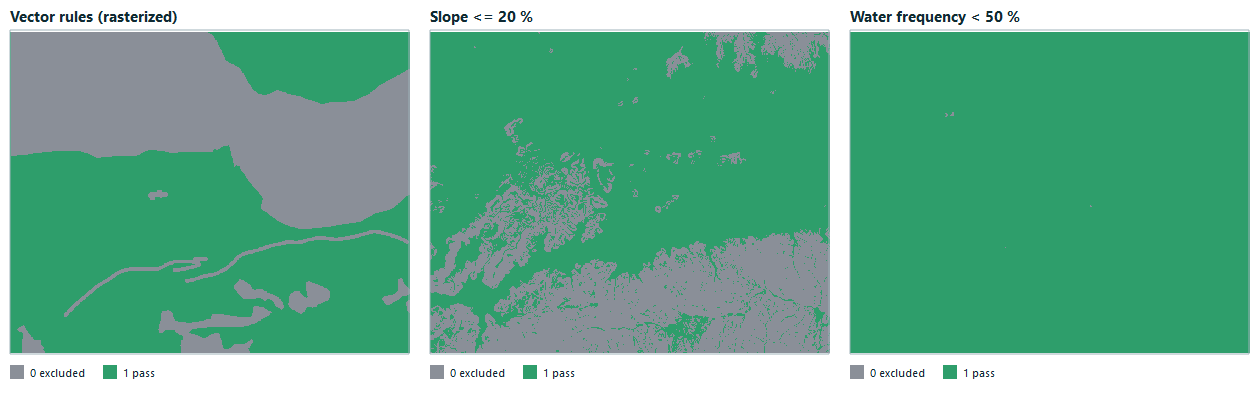
6.6 Combine the masks — WLC Suitability + Constraint Builder
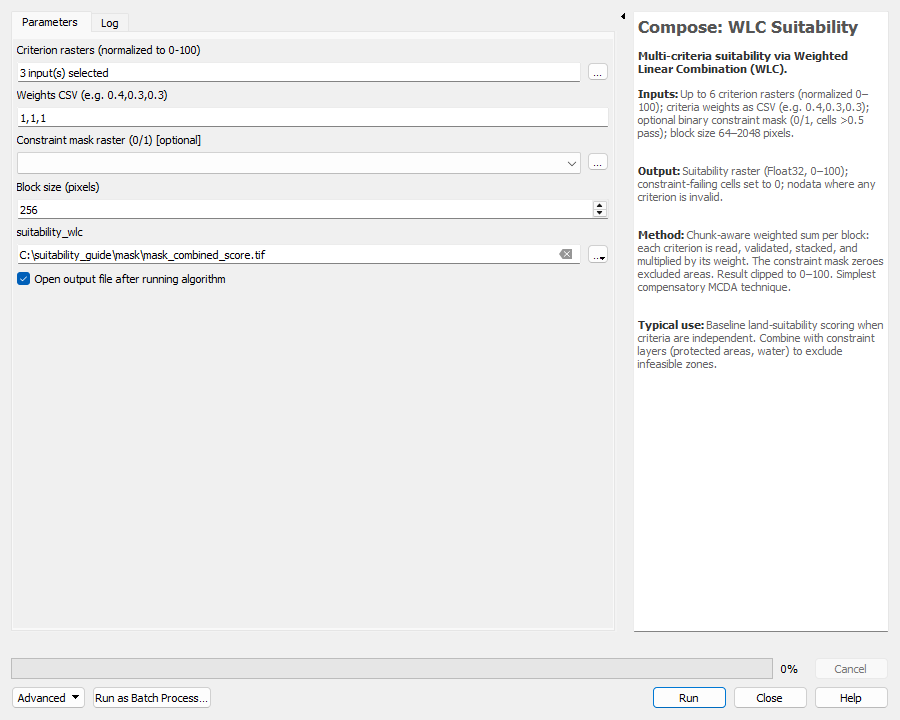
A cell must pass all three masks. Run WLC Suitability on the three mask rasters with weights 1,1,1 (they are normalised, so the result is the share of rules passed: 1 only when every rule passes, at most 0.67 otherwise). Then run Constraint Builder on that raster with threshold 0.99 to obtain the final 0/1 mask.
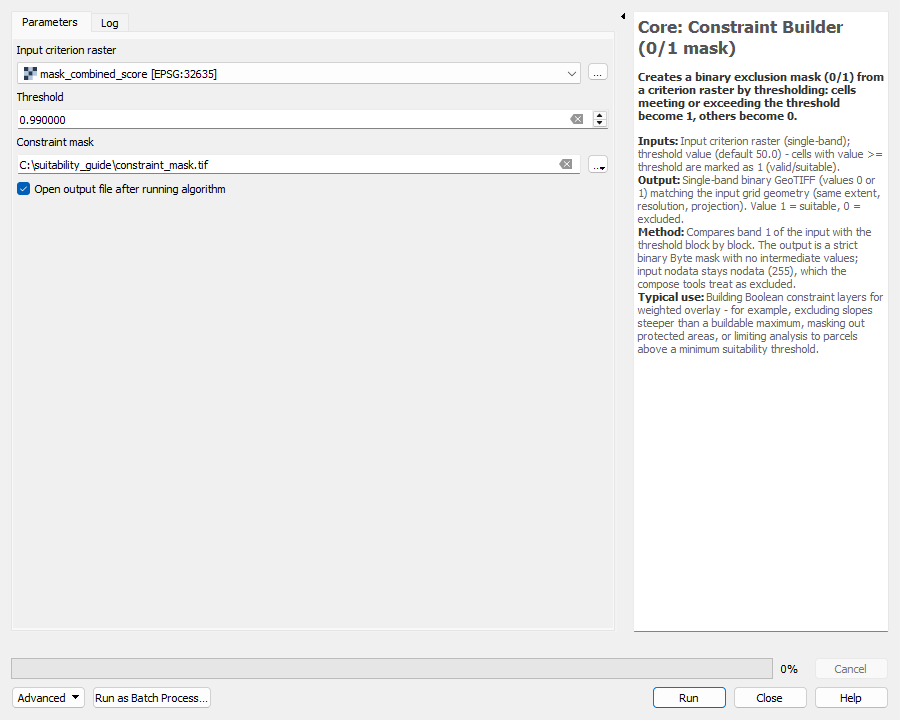
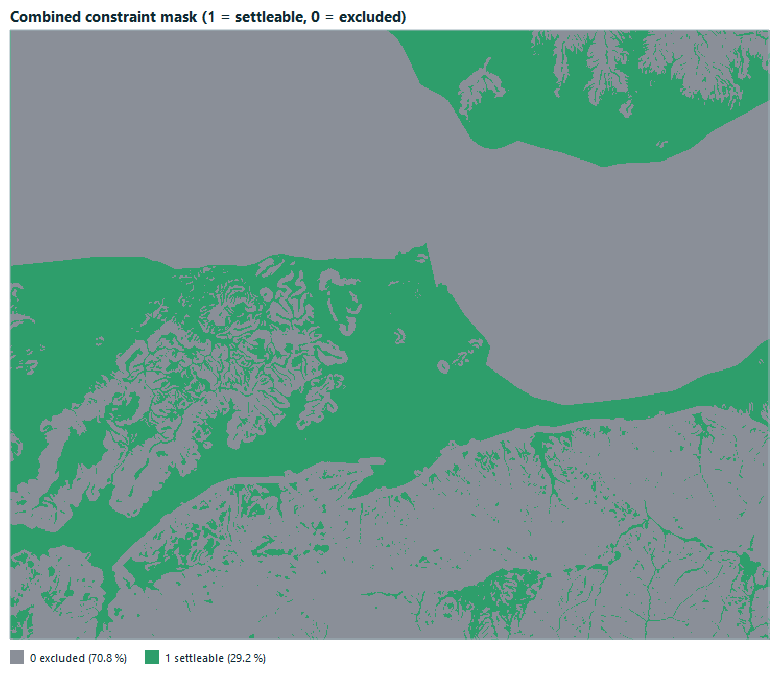
Measured result: 29.2 % of the grid is settleable (about 11,171 ha) and 70.8 % is excluded. Slope > 20 % alone removes 32.8 %; the vector constraints together remove 42.1 %; permanent water removes 0.0 %.
7Weight the components and build the final map
7.1 Top-level AHP
Compare the four components with another AHP Weights run. Use the matrix below.
| Terrain | Water and fault risk | Vegetation and climate | Access and built fabric | |
|---|---|---|---|---|
| Terrain | 1 | 0.5 | 2 | 1 |
| Water and fault risk | 2 | 1 | 4 | 3 |
| Vegetation and climate | 0.5 | 0.25 | 1 | 0.5 |
| Access and built fabric | 1 | 0.3333 | 2 | 1 |
Weights — CR = 0.0076 (consistent)
| Component | Weight |
|---|---|
| Terrain | 0.216 |
| Water and fault risk | 0.480 |
| Vegetation and climate | 0.108 |
| Access and built fabric | 0.196 |
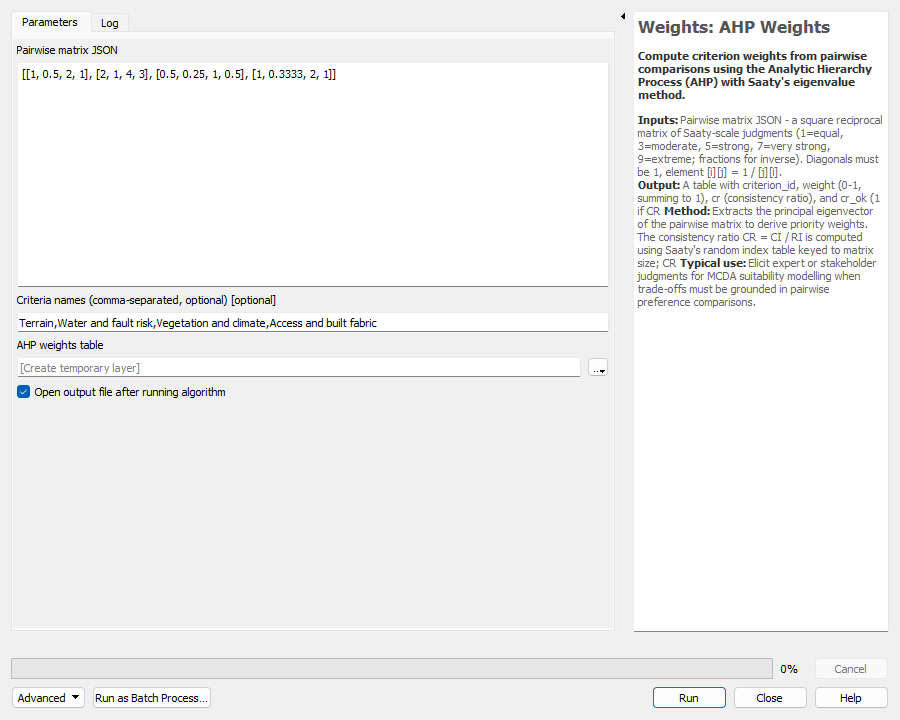
Reading the matrix: water and fault risk is judged 2× as important as terrain, 4× as important as vegetation and climate, and 3× as important as access. That is a hazard-first policy. A different priority only needs a different matrix.
7.2 Final WLC with the constraint mask
Run WLC Suitability again. Select the four component rasters in the order Terrain, Water and fault risk, Vegetation and climate, Access and built fabric, paste the top-level weights, and now set the constraint mask raster.
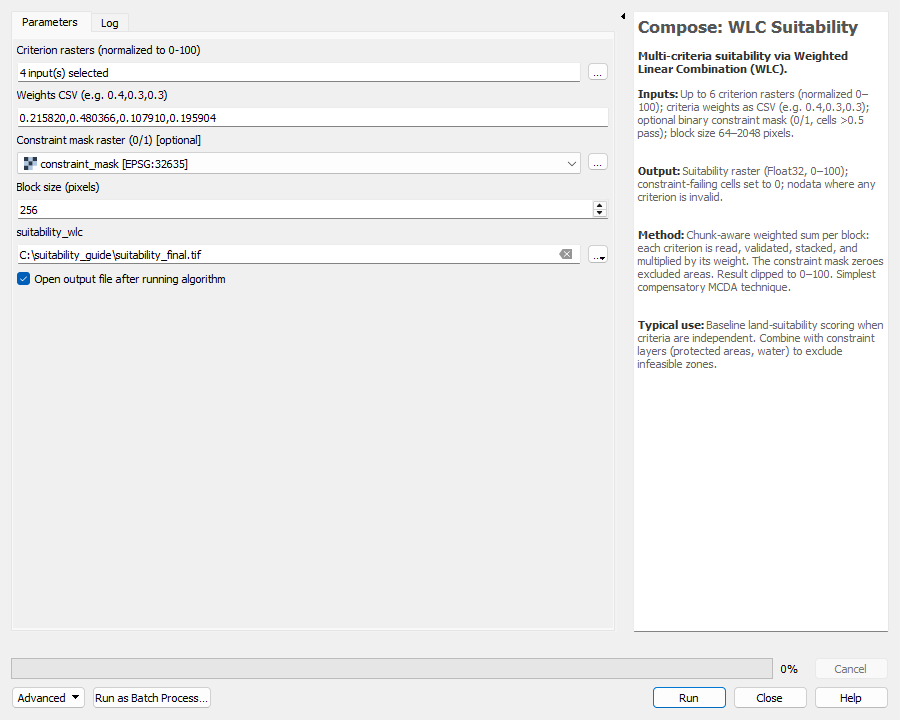
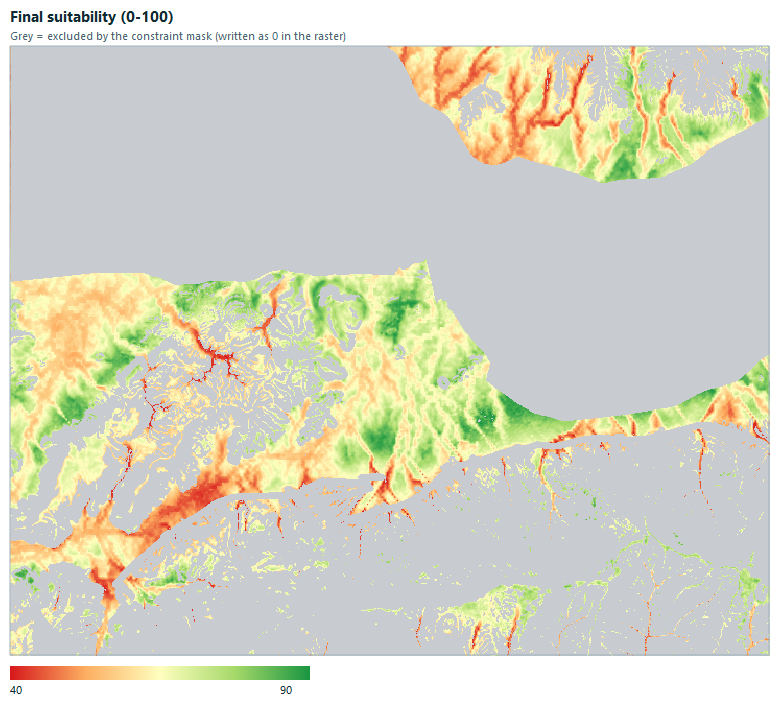
Two-stage versus single-stage: the hierarchical result is not identical to a single WLC with 14 flat weights, because the hierarchy deliberately weights themes rather than individual layers. This is intended, and is why each AHP stays small enough to judge reliably.
8Extract candidate sites
Open Compose → Candidate Site Extractor.
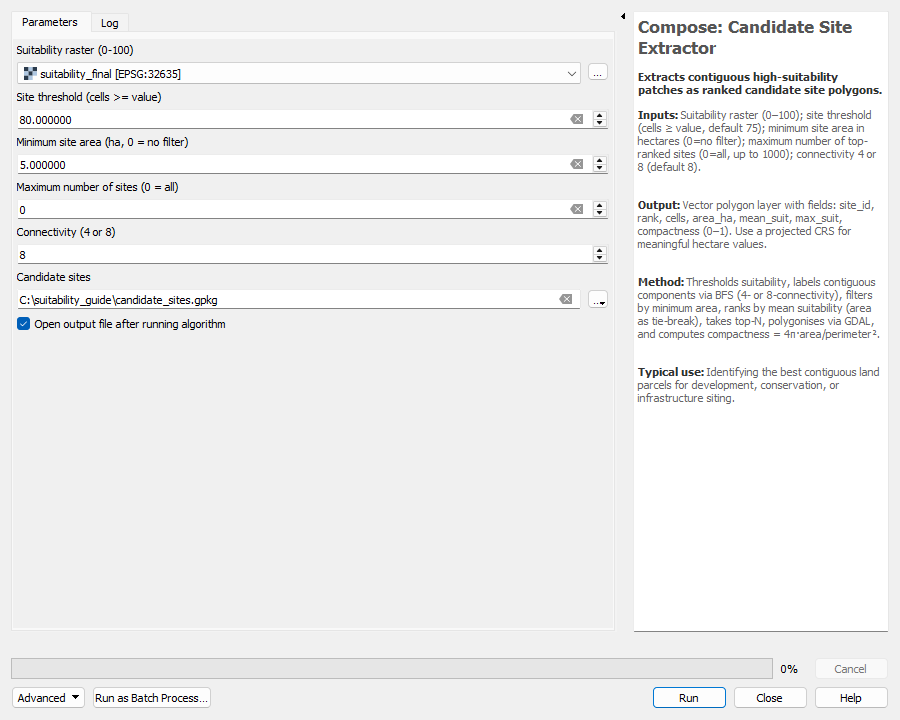
| Parameter | Value | Why |
|---|---|---|
| Suitability raster | suitability_final | The 0–100 map from Step 7 |
| Site threshold | 80 | Roughly the top 5 % of settleable cells (p95 = 80.4). A threshold of 90 would return almost nothing because only 3 ha reach 90. |
| Minimum site area | 5 ha | Drops specks that are too small to plan |
| Maximum number of sites | 0 | 0 means keep all |
| Connectivity | 8 | Diagonal neighbours join one site |
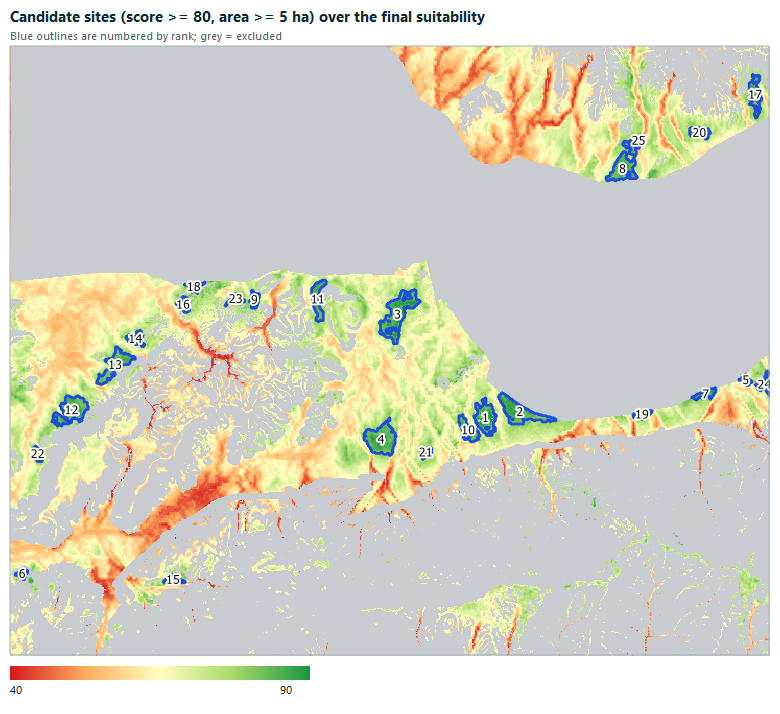
Measured: 25 sites. The attribute table has site_id, rank, cells, area_ha, mean_suit, max_suit and compactness.
| Rank | Site | Area (ha) | Mean score | Max score |
|---|---|---|---|---|
| 3 | 3 | 68.6 | 84.3 | 89.9 |
| 4 | 4 | 57.5 | 84.2 | 89.5 |
| 2 | 2 | 53.1 | 84.5 | 89.1 |
| 12 | 12 | 48.5 | 83.0 | 88.2 |
| 1 | 1 | 39.1 | 84.8 | 91.2 |
| 8 | 8 | 37.9 | 83.5 | 88.5 |
area_ha (the table above is sorted that way).9Check and read the result
| Score class | Area (ha, settleable cells only) |
|---|---|
| <40 | 25 |
| 40-60 | 2,994 |
| 60-70 | 4,889 |
| 70-80 | 2,656 |
| 80-90 | 605 |
| >=90 | 1 |
- 5th / 50th / 95th percentile of settleable cells: 49.4 / 65.1 / 80.4; range 27.5 – 91.2.
- Most settleable land falls between 60 and 80, as is typical for a weighted average of many criteria: extreme scores need every criterion to agree, so they are rare.
- Look at the map, not only the numbers. High scores should sit where you would expect them (gentle slopes, away from faults, near roads). If they do not, re-check the direction of each criterion.
- Run the Sensitivity tools of the plugin (Uncertainty → Weight sensitivity) on the four top-level weights to see how stable the best sites are.
- Export a report with the plugin's reporting algorithms, and keep the harmonizer manifest, all matrices and the breakpoint tables as the methods appendix.
10Try other aggregation models on the same inputs
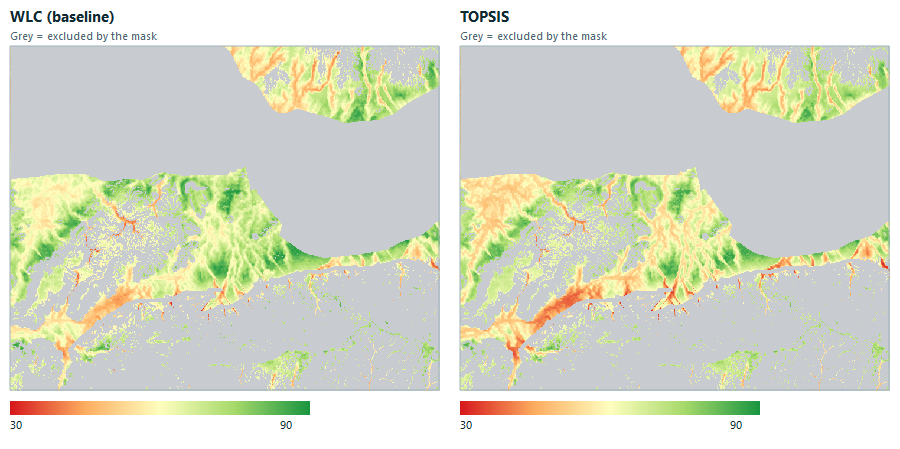
WLC adds weighted scores, so a very bad value in one component can be offset by good values elsewhere. Other models in the plugin treat that trade-off differently. They all take the same four component rasters, the same top-level weights and the same constraint mask you already have, so changing the model takes one dialog each. Compare the results instead of trusting one formula.
| Model | Idea | Use it when |
|---|---|---|
| WLC | Weighted average; good scores compensate bad ones | Baseline, easy to explain |
| TOPSIS | Closeness to the best possible cell and distance from the worst | You want a ranking relative to the study area’s own best and worst |
| VIKOR | Compromise between overall performance and the single worst weighted gap | One very poor component should count against a cell |
| OWA | Sorts each cell’s component scores, then weights by rank (risk attitude) | You want to dial between “all must be good” and “one strength is enough” |
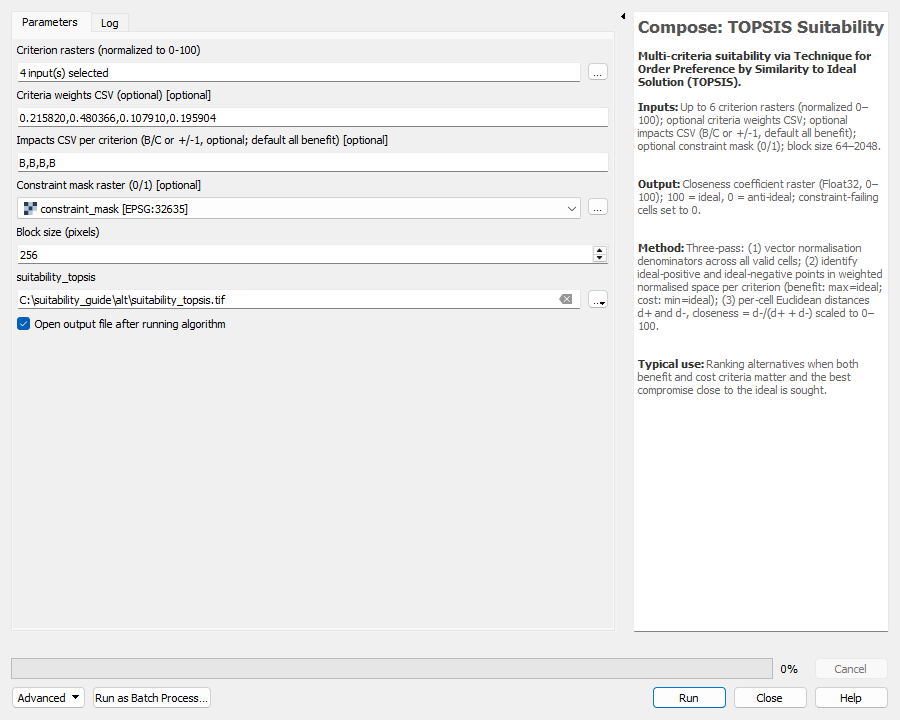
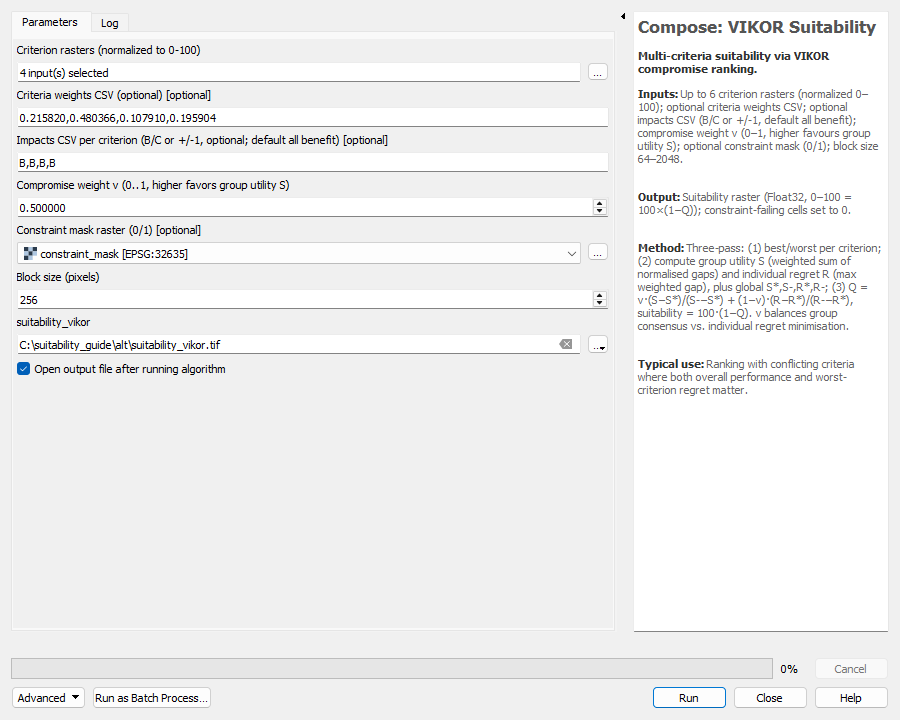
Settings that stay the same in every dialog: criterion rasters = the four component rasters (Terrain, Water and fault risk, Vegetation and climate, Access and built fabric, in that order), weights = 0.215820,0.480366,0.107910,0.195904, constraint mask = constraint_mask, block size 256.
10.1 TOPSIS
Open PlanX Suitability Lab → Compose → TOPSIS Suitability. Leave Impacts as B,B,B,B: every component is a benefit (higher score is better). Use C only for a layer where higher is worse.
10.2 VIKOR
Open Compose → VIKOR Suitability. Same inputs plus v, the compromise weight: values near 1 favour overall (group) utility, values near 0 favour minimising the worst individual regret. Keep the default 0.5 unless you can justify another value.
10.3 OWA — choose your risk attitude
Open Compose → OWA Suitability. Besides the criteria weights it needs order weights, which are applied to each cell’s scores after sorting, not to specific components. The example uses 0.5,0.3,0.15,0.05:
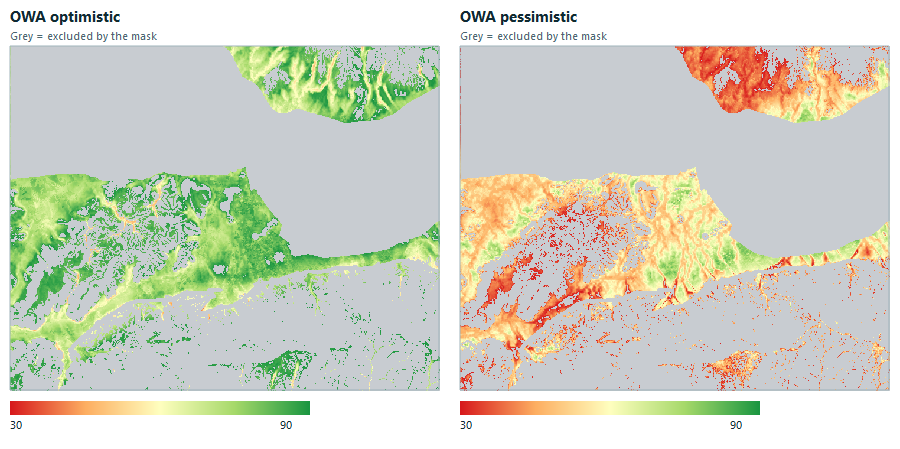
- Ordering mode = Ascending (lowest score first): half of the weight goes to the cell’s weakest component. This is pessimistic (AND-like): a cell only scores high if every component is acceptable.
- Ordering mode = Descending with the same order weights: half of the weight goes to the strongest component. This is optimistic (OR-like): one strong theme lifts the cell.
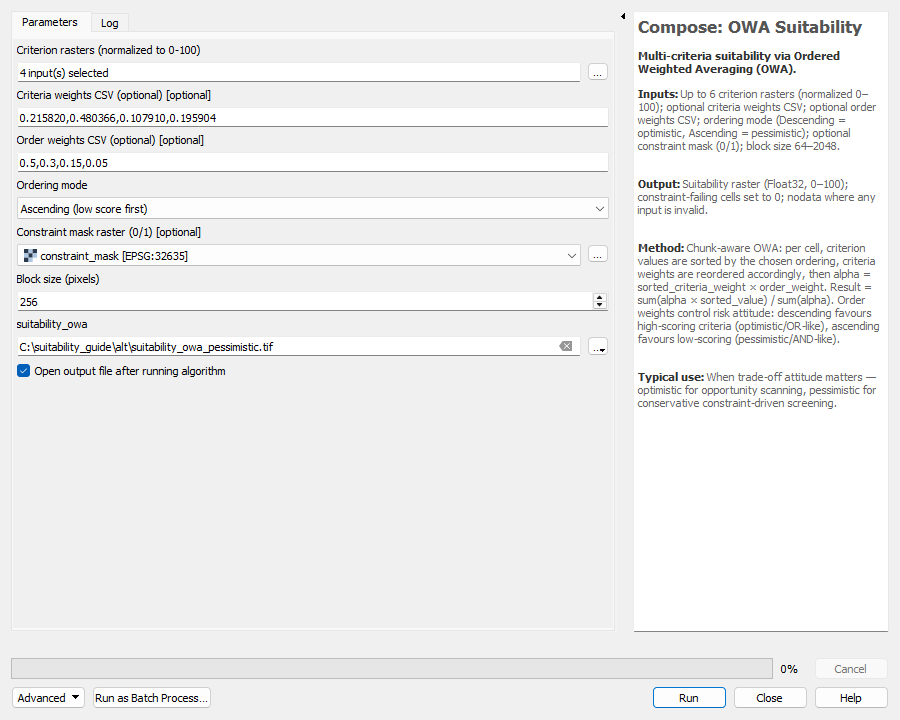
Run it twice (once per ordering mode, with different output names) and compare.
10.4 Compare the models
Different formulas produce different score scales, so compare patterns (correlation, overlap of the best cells), not raw values. The overlap column is the share of WLC’s best 10 % of settleable cells (1,117 ha) that the other model also puts in its own best 10 %.
| Model | Score p5 / p50 / p95 | Range | Correlation with WLC | Overlap of top 10 % with WLC |
|---|---|---|---|---|
| WLC (baseline) | 49.4 / 65.1 / 80.4 | 27.5 – 91.2 | 1.00 | 100 % |
| TOPSIS | 45.9 / 63.7 / 78.1 | 26.2 – 90.0 | 0.94 | 90 % |
| VIKOR (v = 0.5) | 38.8 / 62.5 / 85.0 | 0.9 – 99.8 | 0.93 | 85 % |
| OWA pessimistic | 30.3 / 49.7 / 69.4 | 15.2 – 84.3 | 0.75 | 63 % |
| OWA optimistic | 62.3 / 78.6 / 90.7 | 38.7 – 96.8 | 0.84 | 62 % |
10.5 Ensemble — where do the models agree?
Open Compose → Ensemble Suitability and give it 2–8 suitability rasters: here WLC, TOPSIS, VIKOR and OWA pessimistic, with equal weights (leave the weights empty). It writes five rasters: mean, standard deviation, 10th and 90th percentile, and a confidence index (100 − standard deviation; higher means the models agree).
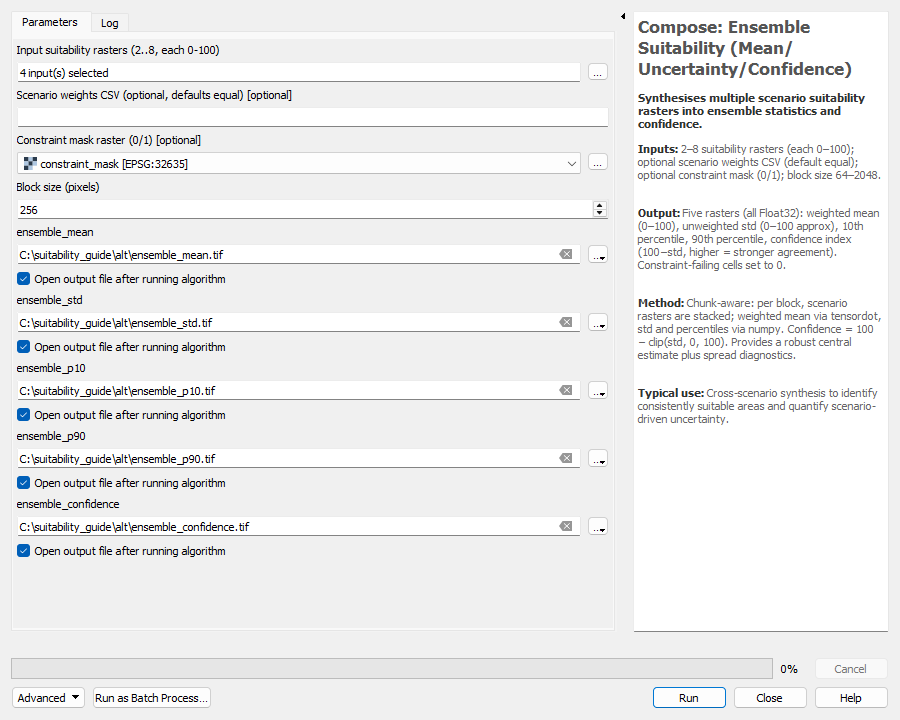
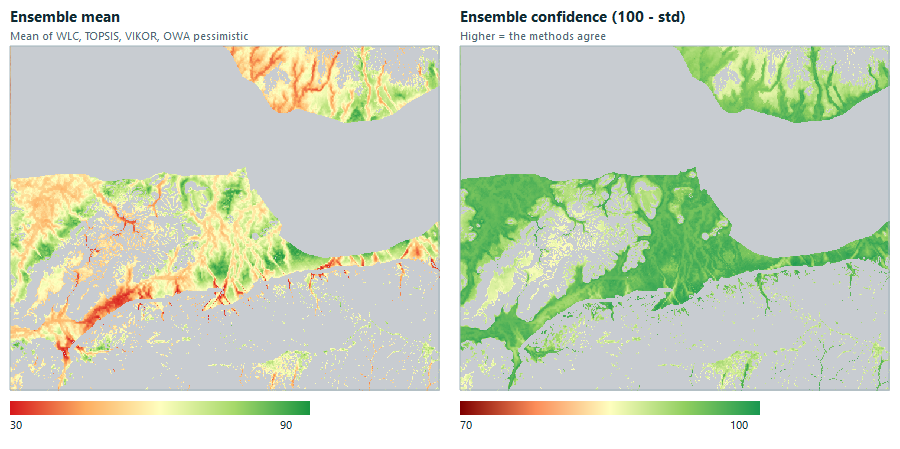
Measured: ensemble mean p5 / p50 / p95 = 42.6 / 59.3 / 77.6; confidence p5 / p50 / p95 = 86.6 / 94.2 / 97.4. Where confidence is low, treat the result as model-dependent and look at the field.
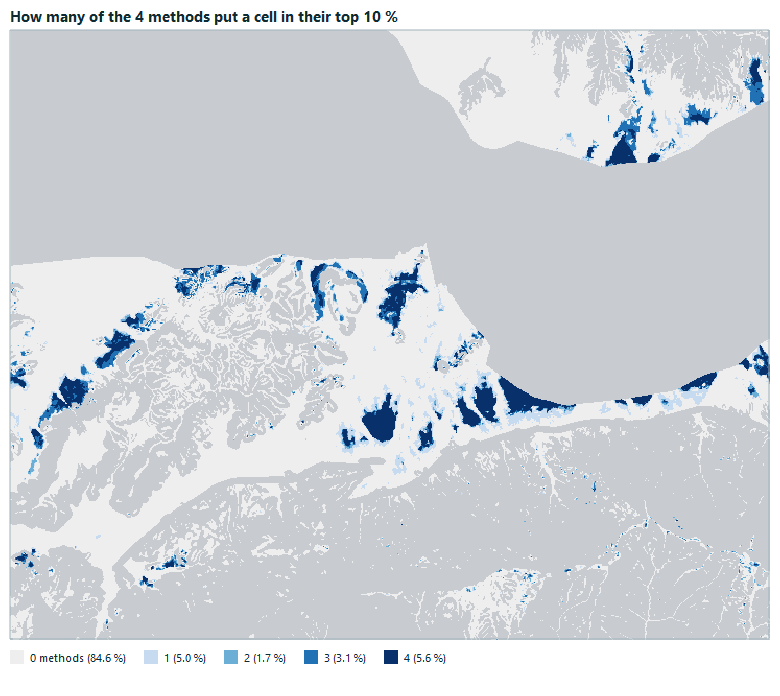
The map below counts how many of the four models place a cell in their own top 10 %. All four agree on 625 ha (5.6 % of settleable cells); at least one model picks 1,717 ha. The dark areas are the robust candidates.
10.6 Weight sensitivity
Open Uncertainty → Weight Sensitivity (OAT). It changes one weight at a time by ±20 % (the others are rescaled) and measures how the suitability map moves. The optional change raster shows where the focus criterion (here 2, Water and fault risk) matters most.
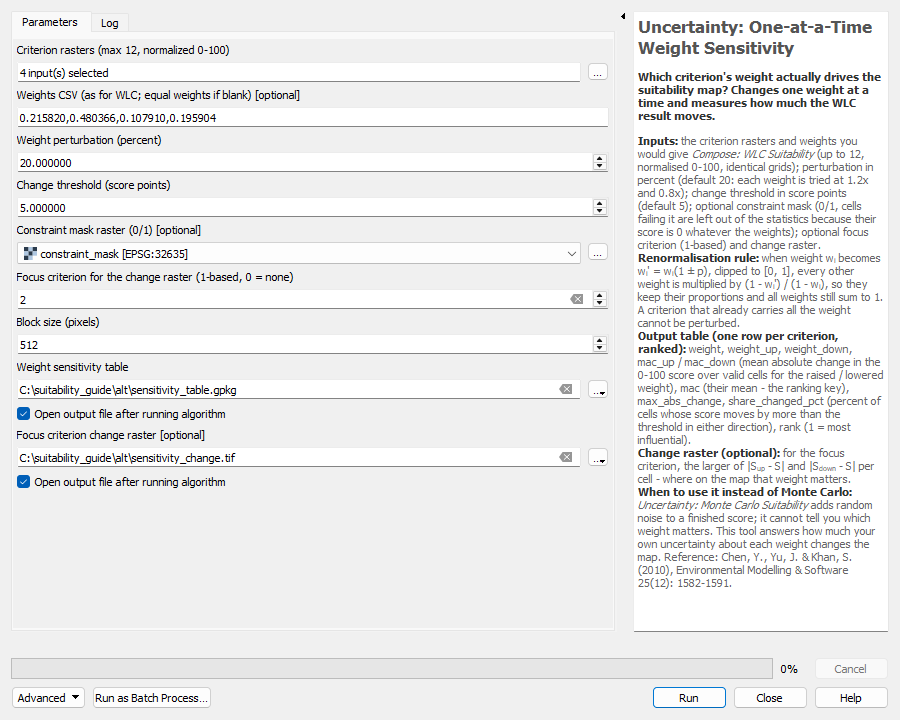
| Rank | Component | Weight | Mean abs. change (points) | Max change (points) | Cells changing > 5 points |
|---|---|---|---|---|---|
| 1 | Water and fault risk | 0.480 | 2.87 | 8.4 | 18.6 % |
| 2 | Terrain | 0.216 | 1.32 | 3.9 | 0.0 % |
| 3 | Access and built fabric | 0.196 | 1.04 | 3.2 | 0.0 % |
| 4 | Vegetation and climate | 0.108 | 0.61 | 1.7 | 0.0 % |
Water and fault risk, the heaviest component, is by far the most influential: a 20 % change in its weight moves the average cell by about 2.9 points and changes 18.6 % of cells by more than 5 points. The other components barely move the map. If the final ranking matters, spend your effort justifying that one judgement.
10.7 Candidate sites per model
Run Candidate Site Extractor on each model output. Because score scales differ, use each model’s own 95th percentile as the threshold (minimum area 5 ha, all sites, 8-connectivity):
| Model | Threshold | Sites |
|---|---|---|
| WLC | 80 | 25 |
| TOPSIS | 78.1 | 20 |
| VIKOR | 85.0 | 21 |
| OWA pessimistic | 69.4 | 20 |
Which model should you report?
- Use WLC as the main, explainable result and TOPSIS or VIKOR as a check that the formula does not drive the answer.
- Use OWA pessimistic for conservative screening when a single failing component must disqualify land; use OWA optimistic to scan for opportunities.
- Report the ensemble agreement map and the weight-sensitivity table with the final sites, so a reader sees how robust they are.
Pitfalls and assumptions
| Symptom | Cause | Fix |
|---|---|---|
| WLC says it accepts at most N criteria | More than 20 rasters in one run | Group criteria into components first (as in this guide), then run a top-level WLC |
| Weights count error | Number of weights differs from number of rasters | Paste exactly one weight per raster, in raster order |
| Raster dimensions error | Criteria are not on one grid | Run Data Harmonizer with a snap raster |
| Faults appear 1.7 km away from where they should be | Fault file is in EPSG:5253 | Reproject to EPSG:32635 first |
| Averages look far too low | Excluded cells are 0 | Compute statistics only where the mask is 1 |
| Almost no candidate sites | Threshold too high for a weighted-average score | Use 80–85 and inspect the percentiles first |
| A criterion score is 0 (or 100) almost everywhere | Normalizer bounds do not fit the data (for example a density raster with a very long tail) | Set the bounds near the 5th and 95th percentile of the source raster |
| CR above 0.10 | Judgements contradict each other | Revise the judgements for the most inconsistent pair and run again |
Assumptions to state in your report: normalizer bounds and the 20 % slope, 100 m fault buffer and 50 % water-frequency thresholds are teaching values; the pairwise judgements express one possible planning priority; the model ranks relative suitability and does not replace legal approvals or field surveys.
Quick checklist
- Project in EPSG:32635; 14 criterion rasters, slope in percent and water frequency loaded.
- Data Harmonizer run with a snap raster; manifest saved.
- 14 score rasters made with the Normalizer (TPI with the Gaussian method), percentiles checked.
- Four AHP runs for the components, all CR ≤ 0.10; four component WLC rasters.
- Constraint mask built (fault layer reprojected); settleable share around 29.2 %.
- Top-level AHP, then final WLC with the mask.
- Candidate Site Extractor with threshold 80, minimum 5 ha, all sites.
- Statistics computed on settleable cells only.
Interactive Dashboard
guided model flows module browser run log system health
Alongside the 69 Processing algorithms documented below, the plugin ships a docked SuitabilityDashboard panel with five tabs, opened from its own toolbar action rather than the Processing Toolbox:
| Tab | Purpose |
|---|---|
| Model Flow | Walks a curated, guided sequence of algorithms for one of three built-in flows — Essential Suitability, Robust Decision Map, and Scenario Comparison — tracking step-by-step progress and a running outcome summary. A Reset flow button restarts the sequence. |
| Overview | A rendered summary of the plugin and its algorithm groups. |
| Modules | A searchable, filterable grid of all 69 algorithm cards, with a group filter and a Favorites-only toggle, for browsing the full catalogue outside a guided flow. |
| Recent Runs | A log of previously executed algorithms in this QGIS session, with a Clear Run Log action. |
| System Health | Readiness diagnostics for the current project/environment. |
1. Core Preprocessing Algorithms
The Core group provides seven algorithms for raster data preparation: alignment, vector-to-raster conversion, proximity computation, value normalisation, constraint masking, synthetic test-data generation, and end-to-end pipeline verification.
1.1 Data Harmonizer
GDAL Warp grid alignment preprocessing
Theoretical Background
Multi-criteria raster analysis requires all input layers to share identical spatial reference systems, pixel resolution, extent, and nodata conventions. Misaligned rasters cause resampling-on-the-fly during overlay operations, introducing positional error and artefacts. The Data Harmonizer applies GDAL's gdalwarp reprojection engine to enforce strict grid conformity, which is a prerequisite for any cell-by-cell MCDA combination. The algorithm serves the role of the “harmonisation” step described in Malczewski (1999) as the foundational preprocessing phase without which weighted linear combination yields meaningless results.
Mathematical Formulation
Let \(\mathcal{R} = \{R_1, R_2, \ldots, R_m\}\) be the set of input rasters. A snap raster \(S\) or explicit parameters define the target grid \(G = (\text{CRS}_G, \text{Extent}_G, \Delta x_G, \Delta y_G, \nu_G)\) where:
The warp operator \(\mathcal{W}\) performs coordinate transformation, resampling (nearest-neighbour, bilinear, or cubic convolution), and nodata filling. Outputs share identical grid geometry, guaranteeing \(R_i^{\text{aligned}}[c, r]\) and \(R_j^{\text{aligned}}[c, r]\) refer to the same geographic location for any column-row index pair \((c, r)\).
Parameters
| Parameter | Type | Default | Description |
|---|---|---|---|
| Input rasters | Multiple raster layers | — | Raster layers to align |
| Snap raster | Raster layer (optional) | None | Reference for CRS, extent, and resolution |
| Target extent | Extent (optional) | None | Override output bounding box |
| Target resolution | Double | 0.0 | Pixel size in map units; ≤0 inherits from snap or first raster |
| Resampling | Enum | Nearest | Nearest / Bilinear / Cubic |
| Output nodata | Double | -9999.0 | Nodata fill value |
| Preview aligned raster | Raster destination | — | Copy of first aligned result |
| Aligned raster folder | Folder | — | Directory for all aligned GeoTIFFs |
| Alignment manifest | File (.txt) | — | Text log of alignment parameters and outputs |
Output Description
Produces \(m\) aligned GeoTIFF files named aligned_NN_safename.tif in the output folder, a preview copy of the first aligned raster, and a plain-text manifest documenting the target CRS, resolution, extent, resampling method, and nodata value used.
Interpretation Guide
- Identical grids confirmed: Open any two aligned rasters in QGIS; they should overlay perfectly with no shift.
- Resampling artefacts: Nearest-neighbour preserves categorical boundaries; bilinear/cubic smooths continuous fields. Use Nearest for land-cover classes, Bilinear for DEM-derived criteria.
- Nodata propagation: Cells outside the original raster extent receive the specified nodata value. Verify the manifest confirms expected coverage.
References
- Malczewski, J. (1999). GIS and Multicriteria Decision Analysis. Wiley. [ISBN 978-0-471-32944-2]
- GDAL/OGR Contributors (2024). GDAL Warp documentation. GDAL Documentation. [https://gdal.org/programs/gdalwarp.html]
- Eastman, J.R. (2012). IDRISI Selva Manual. Clark Labs, Clark University.
- Tomlin, C.D. (1990). Geographic Information Systems and Cartographic Modeling. Prentice Hall.
- Longley, P.A. et al. (2015). Geographic Information Science and Systems, 4th ed. Wiley.
- Neteler, M. & Mitasova, H. (2008). Open Source GIS: A GRASS GIS Approach, 3rd ed. Springer. DOI: 10.1007/978-0-387-68574-8
- Kennedy, H. (Ed.) (2016). QGIS 2 Cookbook. Packt Publishing.
1.2 Vector Rasterizer
GDAL Rasterize vector-to-raster attribute burn
Theory & Method
Converts vector features (points, lines, polygons) to a single-band Float32 raster via GDAL's gdal_rasterize. A specified attribute field or constant burn value is assigned to cells whose centre falls within a feature. This is the primary bridge from vector GIS data to the raster MCDA domain.
| Parameter | Default | Role |
|---|---|---|
| Vector input | — | Any geometry type |
| Value field | optional | Attribute to burn; overrides burn value |
| Burn value | 1.0 | Constant value when no field is specified |
| Pixel size | 10.0 | Cell size in map units |
Interpretation: Output extent matches the input vector layer bounds. Cells not covered by any feature are nodata (0). For categorical land-use data, use the field containing the suitability score directly.
- GDAL/OGR Contributors (2024). gdal_rasterize. GDAL Documentation.
- Burrough, P.A. & McDonnell, R.A. (1998). Principles of Geographical Information Systems. Oxford.
- De Smith, M.J., Goodchild, M.F. & Longley, P.A. (2018). Geospatial Analysis, 6th ed. [https://www.spatialanalysisonline.com/]
1.3 Proximity Builder
GDAL Proximity Euclidean distance continuous surface
Theory & Method
Computes Euclidean distance from every cell to the nearest target pixel (cells whose band-1 value matches user-specified integer targets). The algorithm uses the two-pass chamfer distance transform internal to GDAL Proximity with Euclidean metric, producing a continuous proximity surface.
| Parameter | Default | Role |
|---|---|---|
| Input raster | — | Single-band source |
| Target pixel values | "1" | Comma-separated integers; cells to measure from |
| Distance units | Georeferenced | Map units or Pixels |
| Max distance | 0.0 | 0 = unlimited; caps distance values |
Typical use: Distance to roads, transit stops, water bodies, or hazard zones — as normalisable suitability criteria.
- Danielsson, P.-E. (1980). Euclidean distance mapping. Computer Graphics and Image Processing, 14(3), 227–248. DOI: 10.1016/0146-664X(80)90054-4
- Borgefors, G. (1986). Distance transformations in digital images. Computer Vision, Graphics, and Image Processing, 34(3), 344–371. DOI: 10.1016/S0734-189X(86)80047-0
- GDAL/OGR Contributors (2024). gdal_proximity. GDAL Documentation.
1.4 Normalizer / Reclassifier
fuzzy membership min-max sigmoid gaussian
Theoretical Background
Multi-criteria evaluation requires commensurate criterion scales. Raw environmental variables (elevation in metres, distance in kilometres, land value in currency) cannot be directly combined. The Normalizer transforms each raw criterion raster to the standardised \([0, 100]\) suitability scale through a membership function \(\mu: \mathbb{R} \to [0, 100]\). The choice of function encodes the decision-maker's value judgment about how desirability changes with the raw measurement. Following Zadeh's fuzzy set theory, the membership grade represents the degree to which a cell belongs to the “suitable” set. Seven functions are provided, spanning both crisp (min-max linear) and fuzzy (sigmoid, Gaussian) forms, with benefit (higher is better) and cost (lower is better) orientations.
Mathematical Formulation
Let \(x_{i,j}\) be the raw criterion value at cell \((i,j)\), and let parameters \(L\) (low), \(H\) (high), \(M\) (midpoint), and \(\sigma\) (spread) be user-specified.
The sigmoid midpoint \(M\) defines the inflection point (50% membership). The spread \(\sigma\) controls steepness: smaller \(\sigma\) produces sharper transitions, modelling stricter thresholds. The Gaussian function is symmetric about \(M\) and is appropriate when an optimal range exists with declining suitability on both sides (e.g., optimal temperature or elevation). Output is clamped to \([0, 100]\) and original nodata cells are preserved.
Parameters
| Parameter | Type | Default | Description |
|---|---|---|---|
| Input raster | Raster layer | — | Single-band raw criterion |
| Method | Enum (0–6) | 0 (Min-Max Benefit) | One of seven normalisation functions |
| Low bound | Double | 0.0 | Minimum raw value or lower breakpoint |
| High bound | Double | 100.0 | Maximum raw value or upper breakpoint (must > Low) |
| Midpoint | Double | 50.0 | Inflection point for sigmoid/Gaussian |
| Spread | Double | 10.0 | Steepness parameter (>0) for sigmoid/Gaussian |
| Output raster | Raster destination | — | Normalised GeoTIFF (Float32, LZW, 0–100) |
Output Description
Single-band Float32 LZW-compressed GeoTIFF with values in \([0, 100]\). Nodata cells from the input are preserved with their original nodata value. The data type and compression ensure compatibility with downstream NumPy-based processing.
Interpretation Guide
- 0 = completely unsuitable, 100 = ideal: A value of 50 represents the midpoint of desirability.
- Linearity assumption (min-max): Implies constant marginal change in suitability per unit change in the raw value. This is the most common but least behaviourally nuanced choice.
- Sigmoid: Models threshold behaviour: little change in suitability at extremes, rapid change near the midpoint. Suitable for regulatory thresholds (e.g., minimum distance to protected areas).
- Gaussian: Penalises deviation from an optimum. Use when both “too little” and “too much” are undesirable (e.g., slope for agriculture: too flat = poor drainage; too steep = erosion risk).
References
- Zadeh, L.A. (1965). Fuzzy sets. Information and Control, 8(3), 338–353. DOI: 10.1016/S0019-9958(65)90241-X
- Jiang, H. & Eastman, J.R. (2000). Application of fuzzy measures in multi-criteria evaluation in GIS. IJGIS, 14(2), 173–184. DOI: 10.1080/136588100240903
- Malczewski, J. (2006). GIS-based multicriteria decision analysis: a survey of the literature. IJGIS, 20(7), 703–726. DOI: 10.1080/13658810600661508
- Eastman, J.R. & Jiang, H. (1996). Fuzzy measures in multi-criteria evaluation. Proceedings, 2nd Int. Symposium on Spatial Accuracy Assessment, 527–534.
- Zimmermann, H.-J. (2001). Fuzzy Set Theory and Its Applications, 4th ed. Springer. DOI: 10.1007/978-94-010-0646-0
- Gorsevski, P.V. et al. (2012). Integrating multi-criteria evaluation techniques with GIS for landfill site selection. Waste Management, 32(2), 287–296. DOI: 10.1016/j.wasman.2011.09.011
- Rashed, T. & Weeks, J. (2003). Assessing vulnerability to earthquake hazards through spatial multicriteria analysis. Geographical Analysis, 35(4), 305–325.
1.5 Constraint Builder (0/1 Mask)
Boolean mask thresholding exclusion
Theory & Method
Applies a Boolean threshold \(R(x,y) \ge \tau\) to a criterion raster, producing a binary mask where 1 = suitable (passes constraint) and 0 = excluded (fails constraint). This implements the “hard constraint” layer in GIS-MCDA: areas that are absolutely infeasible regardless of other criteria scores (e.g., protected areas, water bodies, slopes exceeding regulatory limits).
| Parameter | Default | Role |
|---|---|---|
| Input criterion raster | — | Single-band |
| Threshold | 50.0 | Cells ≥ threshold become 1 |
Multiple constraint masks can be multiplied to create a composite exclusion layer. Constraint-failing cells in MCDA scoring are forced to 0.
- Malczewski, J. (1999). GIS and Multicriteria Decision Analysis. Wiley.
- Eastman, J.R. et al. (1995). Raster procedures for MCE. Photogrammetric Engineering & Remote Sensing, 61(5), 539–547.
- Geneletti, D. (2010). Combining stakeholder analysis and spatial MCA. Land Use Policy, 27(2), 550–559. DOI: 10.1016/j.landusepol.2009.07.009
1.6 Synthetic Sample Raster Pack
test data smoke test synthetic
Theory & Method
Generates five synthetic Float32 GeoTIFFs (four criteria rasters with controlled spatial patterns and one binary constraint mask) for pipeline testing without real data. Each criterion is computed from normalised coordinate grids with distinct spatial structures: eastward decay, northward increase, diagonal ridge, and radial hotspot, all with Gaussian noise (seed = 7). The constraint mask excludes the bottom-left 15% by 10% of the study area. All rasters are EPSG:3857, clipped 0–100, nodata -9999.
| Parameter | Default | Role |
|---|---|---|
| Study extent | — | Bounding box |
| Pixel size | 30.0 | Cell size in map units |
Output files: criterion_1.tif through criterion_4.tif and constraint_mask.tif.
- Beinat, E. (1997). Value Functions for Environmental Management. Springer. DOI: 10.1007/978-94-015-8885-0
1.7 Synthetic End-to-End Pipeline Runner
integration test smoke test verification
Theory & Method
Chain-runs 35+ sub-algorithms in deterministic sequence: synthetic data generation, four MCDA methods (WLC, OWA, TOPSIS, VIKOR) with equal weights, Monte Carlo uncertainty (120 iterations, sigma 0.08), AHP/PCA/Entropy/CRITIC weight derivation, ensemble synthesis, scenario consensus/disagreement/quadrant/intervention mapping, risk-opportunity matrix, regret fragility, opportunity loss, priority zoning (baseline + refined), multi-scenario benchmarking, robustness ranking, budget phasing, deployment readiness gating, and the full reporting suite (HTML report, Markdown brief, beta evidence HTML). Produces 70+ output files.
| Parameter | Default | Role |
|---|---|---|
| Study extent | — | Bounding box |
| Pixel size | 30.0 | Cell size in map units |
Typical use: One-click verification that every algorithm executes correctly after installation or dependency updates.
- Meyer, B. (2008). Seven principles of software testing. IEEE Computer, 41(8), 99–101. DOI: 10.1109/MC.2008.306
2. Weight Derivation Algorithms
The Weights group provides seven algorithms spanning subjective pairwise comparison (AHP), data-driven objective methods (PCA, Entropy, CRITIC), and weight management (consolidation, scenario packaging, cross-method consensus auditing).
2.1 AHP Weights
Saaty eigenvalue pairwise comparison consistency ratio
Theoretical Background
The Analytic Hierarchy Process (AHP), developed by Saaty (1977, 1980), is the most widely used subjective weighting method in GIS-MCDA. It derives criterion weights from a pairwise comparison matrix \(A = [a_{ij}]_{n \times n}\) where each element \(a_{ij}\) expresses the decision-maker's judgment of how many times more important criterion \(i\) is relative to criterion \(j\), using Saaty's fundamental 1–9 scale. The matrix is reciprocal (\(a_{ji} = 1/a_{ij}\)) with unit diagonal (\(a_{ii} = 1\)). The priority vector \(\mathbf{w}\) is the principal right eigenvector of \(A\), normalised to sum to unity. A consistency check ensures judgments are not randomly contradictory.
Mathematical Formulation
Where \(RI_n\) is the Random Index for matrix size \(n\). Saaty's published table covers \(n \le 15\) — RI(1)=0.00, RI(2)=0.00, RI(3)=0.58, RI(4)=0.90, RI(5)=1.12, RI(6)=1.24, RI(7)=1.32, RI(8)=1.41 … RI(15)=1.59 — and this tool continues it with Alonso & Lamata's (2006) values up to its maximum of 20 criteria: RI(16)=1.5978, RI(17)=1.6086, RI(18)=1.6181, RI(19)=1.6265, RI(20)=1.6341. No random index is published beyond \(n = 20\), so CR cannot be evaluated honestly there; matrices larger than \(20 \times 20\) are rejected rather than approximated (the \(1.98(n-2)/n\) shortcut used in the literature inflates \(RI\), which understates \(CR\) and can pass an inconsistent matrix). Judgments are considered acceptably consistent when \(CR \le 0.10\); otherwise, the analyst should revisit the pairwise comparisons.
Parameters
| Parameter | Type | Default | Description |
|---|---|---|---|
| Pairwise matrix JSON | String (multiline) | [[1,2,3],[0.5,1,2],[0.3333,0.5,1]] | Square reciprocal matrix of Saaty-scale judgments |
| Output table | Vector destination | — | GeoPackage with criterion_id, weight, cr, cr_ok |
Output Description
A GeoPackage attribute table (no geometry) with columns: criterion_id (integer), weight (0–1, sum = 1), cr (consistency ratio), cr_ok (1 if CR ≤ 0.10, else 0). A warning is emitted when CR exceeds the threshold.
Interpretation Guide
- CR ≤ 0.10: Judgments are coherent; weights can be used with confidence.
- CR > 0.10 but < 0.20: Borderline. Consider revising the most inconsistent pairwise comparisons.
- CR ≥ 0.20: Judgments are effectively random. Restructure the hierarchy or re-elicit comparisons.
- Weight distribution: If one weight dominates (>0.50), verify that criterion truly outweighs all others 2:1+.
References
- Saaty, T.L. (1977). A scaling method for priorities in hierarchical structures. Journal of Mathematical Psychology, 15(3), 234–281. DOI: 10.1016/0022-2496(77)90033-5
- Saaty, T.L. (1980). The Analytic Hierarchy Process. McGraw-Hill.
- Saaty, T.L. (2008). Decision making with the analytic hierarchy process. Int. J. Services Sciences, 1(1), 83–98. DOI: 10.1504/IJSSCI.2008.017590
- Malczewski, J. (2006). GIS-based multicriteria decision analysis: a survey of the literature. IJGIS, 20(7), 703–726. DOI: 10.1080/13658810600661508
- Forman, E.H. & Gass, S.I. (2001). The analytic hierarchy process—an exposition. Operations Research, 49(4), 469–486. DOI: 10.1287/opre.49.4.469.11231
- Vaidya, O.S. & Kumar, S. (2006). Analytic hierarchy process: an overview of applications. EJOR, 169(1), 1–29. DOI: 10.1016/j.ejor.2004.04.028
- Boroushaki, S. & Malczewski, J. (2008). Implementing an extension of AHP using OWA operators with fuzzy quantifiers. Computers & Geosciences, 34(4), 399–410. DOI: 10.1016/j.cageo.2007.04.003
- Alonso, J.A. & Lamata, M.T. (2006). Consistency in the analytic hierarchy process: a new approach. Int. J. Uncertainty, Fuzziness and Knowledge-Based Systems, 14(4), 445–459. DOI: 10.1142/S0218488506004114 — source of the RI values for 16–20 criteria.
2.2 PCA-derived Weights (Variance Proxy)
eigendecomposition PC1 loading data-driven
Theory & Method
Samples up to ~8000 cells from the aligned raster stack, standardises (z-score), and computes the covariance matrix. Eigendecomposition yields principal components; the absolute loadings of PC1, scaled by its explained variance ratio, become the weights. This variance-proxy approach assigns higher weight to criteria driving the largest spatial differences. If fewer than 3 valid sample cells exist, equal weights are returned.
| Parameter | Default | Role |
|---|---|---|
| Criterion rasters | — | Multiple aligned rasters |
Interpretation: High weight = criterion strongly loads on the dominant spatial-variance axis. Low weight = criterion is spatially uniform or anti-correlated with the dominant pattern. This method rewards criteria with high spatial variability, which may not always align with decision relevance.
- Jolliffe, I.T. (2002). Principal Component Analysis, 2nd ed. Springer. DOI: 10.1007/b98835
- Abdi, H. & Williams, L.J. (2010). Principal component analysis. WIREs Computational Statistics, 2(4), 433–459. DOI: 10.1002/wics.101
- Zhu, X. & Dale, A.P. (2001). JavaAHP: a web-based decision tool. Environmental Modelling & Software, 16(3), 251–260.
2.3 Entropy Weights
Shannon entropy information theory discriminating power
Theoretical Background
Entropy-based weighting originates in information theory (Shannon, 1948) and was adapted to MCDM by Zeleny (1982) and Hwang & Yoon (1981). The principle is that a criterion with greater value dispersion across alternatives carries more decision information and should therefore receive higher weight. A criterion that is nearly constant across the study area contributes little to differentiating suitable from unsuitable locations and is down-weighted. Entropy weights are purely data-driven and require no subjective judgment.
Mathematical Formulation
For a raster stack with \(n\) criteria and \(K\) sampled cells, the min-max normalised value for criterion \(i\) at cell \(k\) is:
Higher entropy \(e_i \to 1\) means the criterion is uniform (all cells have similar values). Low entropy means distinctive, concentrated values. The weight \(w_i\) is proportional to \(d_i\): criteria with concentrated, discriminating value distributions receive larger weights.
Parameters
| Parameter | Type | Default | Description |
|---|---|---|---|
| Criterion rasters | Multiple raster layers | — | Aligned single-band rasters |
| Output table | Vector destination | — | GeoPackage with criterion_id, weight |
Interpretation Guide
- Near-zero weight: The criterion is spatially homogeneous. It adds no discriminating power. Consider removing it to simplify the model.
- Dominant weight (>0.50): One criterion has vastly more contrast than others. Verify this is meaningful, not an artefact of scale or outliers.
- Complementary role: Entropy weights are best used alongside subjective weights (AHP) to identify discrepancies between “what experts think matters” and “what the data says varies.”
References
- Shannon, C.E. (1948). A mathematical theory of communication. Bell System Technical Journal, 27(3), 379–423. DOI: 10.1002/j.1538-7305.1948.tb01338.x
- Zeleny, M. (1982). Multiple Criteria Decision Making. McGraw-Hill.
- Hwang, C.L. & Yoon, K. (1981). Multiple Attribute Decision Making: Methods and Applications. Springer. DOI: 10.1007/978-3-642-48318-9
- Lotfi, F.H. & Fallahnejad, R. (2010). Imprecise Shannon's entropy and multi-attribute decision making. Entropy, 12(1), 53–62. DOI: 10.3390/e12010053
- Wang, T.C. & Lee, H.D. (2009). Developing a fuzzy TOPSIS approach. Expert Systems with Applications, 36(5), 8980–8985. DOI: 10.1016/j.eswa.2008.11.035
- Deng, H., Yeh, C.H. & Willis, R.J. (2000). Inter-company comparison using modified TOPSIS. Computers & Operations Research, 27(10), 963–973. DOI: 10.1016/S0305-0548(99)00069-6
- Malczewski, J. & Rinner, C. (2015). Multicriteria Decision Analysis in Geographic Information Science. Springer. DOI: 10.1007/978-3-540-74757-4
2.4 CRITIC Objective Weights
contrast intensity inter-criterion correlation penalises redundancy
Theoretical Background
The CRITIC (CRiteria Importance Through Intercriteria Correlation) method, proposed by Diakoulaki, Mavrotas, and Papayannakis (1995), derives objective weights by combining two information-theoretic properties: (1) contrast intensity, measured by the standard deviation of each criterion, and (2) conflict, measured by the sum of (1 − correlation) with all other criteria. A criterion that is both high-variance and uncorrelated with others receives the highest weight; a criterion that is redundant with others (high correlation) is penalised. This distinguishes CRITIC from pure entropy weighting, which does not consider inter-criterion relationships.
Mathematical Formulation
Let \(\mathbf{x}_i\) be the normalised values of criterion \(i\) across \(K\) sampled cells, with \(\bar{x}_i\) and \(\sigma_i\) as the mean and standard deviation. Let \(\rho_{ij}\) be the Pearson correlation between criteria \(i\) and \(j\).
Parameters
| Parameter | Type | Default | Description |
|---|---|---|---|
| Criterion rasters | Multiple raster layers | — | Aligned single-band rasters |
| Impacts CSV | String | "" (all benefit) | B/C or +/-1 per criterion |
| Output table | Vector destination | — | GeoPackage with criterion_id, weight, std_dev, contrast, critic_score |
Interpretation Guide
- High CRITIC score: Criterion is both high-contrast and uncorrelated — it contributes unique discriminating information.
- Low CRITIC score: Either the criterion is spatially uniform (low std) or strongly correlated with other criteria (redundant).
- Redundancy penalty: Two criteria with \(\rho > 0.90\) will both be penalised. This is the method's key advantage over entropy alone.
References
- Diakoulaki, D., Mavrotas, G. & Papayannakis, L. (1995). Determining objective weights in multiple criteria problems: the CRITIC method. Computers & Operations Research, 22(7), 763–770. DOI: 10.1016/0305-0548(94)00059-H
- Krishnan, A.R. et al. (2021). A modified CRITIC method... Sustainability, 13(3), 1492. DOI: 10.3390/su13031492
- Jahan, A. et al. (2012). A comprehensive VIKOR method for material selection. Materials & Design, 39, 262–268. DOI: 10.1016/j.matdes.2012.02.043
- Zardari, N.H. et al. (2015). Weighting Methods and Their Effects on MCDM Outcomes. Springer. DOI: 10.1007/978-3-319-12586-2
- Mukhametzyanov, I. (2021). Specific character of objective methods. Procedia Computer Science, 182, 99–106.
2.5 Weight Consolidator
normalisation activation step
Reads any weight table (from AHP, PCA, Entropy, or CRITIC) and re-normalises all weights to sum to 1. This is a pass-through activation step: relative proportions are preserved, but the output is guaranteed ready for downstream MCDA scoring. Guards against zero-sum edges by substituting a divisor of 1.0 when the total sum is zero. Output: criterion_id, weight. Reference: Malczewski (1999).
2.6 Scenario Weight Pack
multi-method merge blended average sensitivity analysis
Merges AHP, PCA, Entropy, and CRITIC weight tables into a unified scenario pack. Each method's weights are independently normalised to sum to 1. An additional BLENDED_AVG scenario computes the per-criterion arithmetic mean of normalised weights across all supplied methods, creating a simple ensemble that balances subjective and objective approaches. Output columns: method, criterion_id, weight_raw, weight_norm. Use: Prepare multi-scenario weight sets for sensitivity analysis or consensus auditing.
- Roy, B. (1996). Multicriteria Methodology for Decision Aiding. Springer. DOI: 10.1007/978-1-4757-2500-1
- Belton, V. & Stewart, T.J. (2002). Multiple Criteria Decision Analysis: An Integrated Approach. Springer. DOI: 10.1007/978-1-4615-1495-4
2.7 Weight Consensus Audit
coefficient of variation cross-method agreement robustness
Computes per-criterion descriptive statistics (mean, median, min, max, range, population std) and the coefficient of variation \(CV = \sigma / \bar{w} \times 100\%\) across all weighting methods in a Scenario Weight Pack. Agreement labels: HIGH (CV ≤ 10%), MEDIUM (CV ≤ 25%), LOW (CV > 25%). Identifies robust criteria (weight stable regardless of method) vs. contested criteria (weight depends strongly on the method), guiding stakeholder discussion.
- Saltelli, A. et al. (2004). Sensitivity Analysis in Practice. Wiley. DOI: 10.1002/0470870958
- Butler, J., Jia, J. & Dyer, J. (1997). Simulation techniques for the sensitivity analysis of MCDM. EJOR, 103(3), 537–548. DOI: 10.1016/S0377-2217(96)00304-9
- Chen, Y. et al. (2010). Sensitivity analysis of MCDA weights. IJGIS, 24(7), 1077–1100.
3. Composite Scoring (Compose) Algorithms
The Compose group contains 16 algorithms spanning the core MCDA methods (WLC, OWA, TOPSIS, VIKOR, Ensemble), post-hoc spatial diagnostics (opportunity loss, consensus/disagreement mapping, decision quadrants, risk-opportunity matrices, regret fragility, intervention conflict), scenario comparison, and derived action products (candidate site extraction, priority zoning, uncertainty-adjusted suitability).
3.1 WLC Suitability
weighted linear combination compensatory additive
Theoretical Background
Weighted Linear Combination (WLC) is the most widely used MCDA method in GIS (Malczewski, 1999). It is a fully compensatory additive model: a low score on one criterion can be offset by high scores on others. The method assumes mutual preferential independence of criteria and a linear value function. WLC is computationally simple, transparent, and easy to explain to stakeholders, making it the de facto baseline for many land-suitability studies.
Mathematical Formulation
For \(n\) criterion rasters \(X_i(x,y)\) normalised to \([0,100]\), and weights \(w_i\) with \(\sum w_i = 1\):
With a Boolean constraint mask \(C(x,y) \in \{0,1\}\):
The algorithm processes the raster in configurable pixel blocks (default 256×256) for memory efficiency. Constraint-failing cells are set to 0; cells where any criterion is nodata are propagated as nodata.
Parameters
| Parameter | Type | Default | Description |
|---|---|---|---|
| Criterion rasters | Multiple raster (max 6) | — | Normalised 0–100, same grid |
| Weights CSV | String | "" (equal) | Comma-separated, e.g. "0.4,0.3,0.3" |
| Constraint mask | Raster (optional) | None | 0/1 binary; cells >0.5 pass |
| Block size | Integer 64–2048 | 256 | Processing chunk size in pixels |
| Output raster | Raster destination | — | suitability_wlc.tif (Float32, LZW) |
Interpretation Guide
- 0–100 scale: Values near 0 indicate the least suitable cells; values near 100 indicate the most suitable.
- Compensatory bias: A cell scoring 0 on three criteria but 100 on one with weight 0.25 scores 25. WLC cannot express the idea that one bad criterion disqualifies a site. For non-compensatory logic, use OWA with ascending order weights or the Constraint Builder.
- Spatial smoothness: If input criteria are smooth (proximity surfaces, DEM), WLC output is smooth. If criteria are patchy (land cover classes), the output may show sharp boundaries.
References
- Malczewski, J. (1999). GIS and Multicriteria Decision Analysis. Wiley.
- Malczewski, J. (2000). On the use of WLC in GIS. IJGIS, 14(4), 365–382. DOI: 10.1080/13658810050024328
- Malczewski, J. (2006). Ordered weighted averaging with fuzzy quantifiers: GIS-based MCE. Applied Geography, 26(1), 40–57. DOI: 10.1016/j.apgeog.2005.09.003
- Jiang, H. & Eastman, J.R. (2000). Application of fuzzy measures in MCE in GIS. IJGIS, 14(2), 173–184. DOI: 10.1080/136588100240903
- Drobne, S. & Lisec, A. (2009). Multi-attribute decision analysis in GIS: WLC and OWA. Informatica, 33(4), 459–474.
- Feick, R.D. & Hall, G.B. (2004). A method for examining the spatial dimension of multi-criteria weight sensitivity. IJGIS, 18(8), 815–840. DOI: 10.1080/13658810412331280185
- Greene, R. et al. (2011). GIS-based MCDA: a survey. Computers, Environment and Urban Systems, 35(6), 463–473.
3.2 OWA Suitability
ordered weighted averaging risk attitude Yager operator
Theoretical Background
Ordered Weighted Averaging (OWA), introduced by Yager (1988), extends WLC by adding a second set of weights (order weights) that are applied to criterion values after sorting them at each cell. This decouples criterion importance (the standard weights) from risk attitude (the order weights). By adjusting order weights, the analyst can span the continuum from fully optimistic (OR-like, favouring the highest-scoring criterion at each cell) to fully pessimistic (AND-like, the lowest score dominates). This makes OWA the most flexible compensatory/non-compensatory bridge in the plugin.
Mathematical Formulation
Let \(c_i(x,y)\) be the criterion values at cell \((x,y)\), sorted in descending (or ascending) order. Let \(v_i\) be the criterion weights (reordered to match the sorted values) and \(u_j\) be the order weights (fixed, applied to sorted positions). The OWA operator is:
Where \(c_{(i)}\) denotes the \(i\)-th sorted criterion value. The combined weight \(\alpha_i = v_i \cdot u_i / \sum(v_j \cdot u_j)\) ensures normalisation. Descending sort (high values first) paired with descending order weights produces optimistic aggregation; descending sort with ascending order weights produces pessimistic (AND-like) aggregation.
The OWA operator's orness measure quantifies risk attitude:
orness = 1: Pure OR (optimistic, max); orness = 0: Pure AND (pessimistic, min); orness = 0.5: Neutral (equivalent to WLC).
Parameters
| Parameter | Type | Default | Description |
|---|---|---|---|
| Criterion rasters (max 6) | Multiple raster | — | Normalised 0–100 |
| Criteria weights CSV | String | "" | Standard importance weights |
| Order weights CSV | String | "" | Risk-attitude weights |
| Ordering mode | Enum | Descending | High score first (optimistic) or Ascending |
| Constraint mask | Raster (optional) | None | 0/1 binary |
| Block size | Integer | 256 | 64–2048 pixels |
| Output raster | Raster destination | — | Float32 0–100 |
Interpretation Guide
- Descending + uniform order weights = WLC: If order weights are all equal, OWA reduces to WLC.
- Descending + front-loaded order weights: High-scoring criteria dominate; optimistic risk posture. Use for opportunity scanning.
- Descending + back-loaded order weights: Low-scoring criteria dominate; pessimistic. Use for conservative screening where no criterion can fail badly.
- Map OWA−WLC delta: Run Scenario Comparator to visualise where and how much risk attitude changes the outcome.
References
- Yager, R.R. (1988). On ordered weighted averaging aggregation operators in MCDM. IEEE Trans. Systems, Man, and Cybernetics, 18(1), 183–190. DOI: 10.1109/21.87068
- Malczewski, J. (2006). Ordered weighted averaging with fuzzy quantifiers: GIS-based multicriteria evaluation for land-use suitability analysis. Int. J. Applied Earth Observation and Geoinformation, 8(4), 270–277. DOI: 10.1016/j.jag.2006.01.003
- Boroushaki, S. & Malczewski, J. (2008). Implementing an extension of AHP using OWA operators with fuzzy quantifiers. Computers & Geosciences, 34(4), 399–410. DOI: 10.1016/j.cageo.2007.04.003
- Yager, R.R. (1996). Quantifier guided aggregation using OWA operators. IJIS, 11(1), 49–73.
- Malczewski, J. & Rinner, C. (2005). Exploring multicriteria decision strategies in GIS with linguistic quantifiers. Journal of Geographical Systems, 7(2), 249–268. DOI: 10.1007/s10109-005-0159-2
- Xu, Z. (2005). An overview of methods for determining OWA weights. Int. J. Intelligent Systems, 20(8), 843–865. DOI: 10.1002/int.20097
3.3 TOPSIS Suitability
vector normalisation ideal/anti-ideal distance benefit-cost
Theoretical Background
TOPSIS (Technique for Order Preference by Similarity to Ideal Solution), developed by Hwang & Yoon (1981), ranks alternatives by their Euclidean distance to a hypothetical ideal point (best value on every criterion) and anti-ideal point (worst on every criterion). The best alternative is simultaneously closest to the ideal and farthest from the anti-ideal. In spatial MCDA, each cell is treated as an independent alternative. TOPSIS requires vector normalisation, which preserves the relative ordering and ratio properties of the data, and explicitly handles benefit and cost criteria.
Mathematical Formulation
Pass 1: Vector normalisation denominator
Pass 2: Weighted normalised matrix and ideal points
Pass 3: Separation measures and closeness coefficient
Parameters
| Parameter | Type | Default | Description |
|---|---|---|---|
| Criterion rasters (max 6) | Multiple raster | — | Normalised 0–100 |
| Weights CSV | String | "" | Criteria weights |
| Impacts CSV | String | "" (all B) | B/C or +/-1 per criterion |
| Constraint mask | Raster (optional) | None | 0/1 |
| Block size | Integer | 256 | 64–2048 |
| Output raster | Raster destination | — | Closeness coefficient 0–100 |
Interpretation Guide
- \(C \approx 100\): Cell is very close to the ideal and far from the anti-ideal — excellent on all criteria.
- \(C \approx 50\): Cell is equidistant from ideal and anti-ideal — mediocre.
- \(C \approx 0\): Near the anti-ideal on most criteria.
- Comparison with WLC: TOPSIS is non-compensatory in the sense that a large deficit on one criterion cannot be completely offset by strengths on others; the Euclidean distance penalises extreme deviations non-linearly.
References
- Hwang, C.L. & Yoon, K. (1981). Multiple Attribute Decision Making. Springer. DOI: 10.1007/978-3-642-48318-9
- Behzadian, M. et al. (2012). A state-of-the-art survey of TOPSIS applications. Expert Systems with Applications, 39(17), 13051–13069. DOI: 10.1016/j.eswa.2012.05.056
- Malczewski, J. & Rinner, C. (2015). Multicriteria Decision Analysis in Geographic Information Science. Springer.
- Chen, S.J. & Hwang, C.L. (1992). Fuzzy Multiple Attribute Decision Making. Springer. DOI: 10.1007/978-3-642-46768-4
- Yoon, K. (1987). A reconciliation among discrete compromise solutions. JORS, 38(3), 277–286. DOI: 10.1057/jors.1987.44
- Shih, H.S., Shyur, H.J. & Lee, E.S. (2007). An extension of TOPSIS for group decision making. Mathematical and Computer Modelling, 45(7-8), 801–813. DOI: 10.1016/j.mcm.2006.03.023
3.4 VIKOR Suitability
compromise ranking group utility individual regret
Theoretical Background
VIKOR (VlseKriterijumska Optimizacija I Kompromisno Resenje, meaning “multi-criteria optimisation and compromise solution”), developed by Opricovic (1998), focuses on ranking and selecting from a set of alternatives in the presence of conflicting criteria. Unlike TOPSIS, which seeks the alternative closest to the ideal, VIKOR seeks a compromise solution that balances (i) maximum group utility (overall performance across all criteria) and (ii) minimum individual regret (the worst-criterion gap). The compromise weight \(v\) controls the balance: \(v = 1\) emphasises group utility (majority rule), \(v = 0\) emphasises individual regret (veto/minimax).
Mathematical Formulation
Pass 1: Best/worst per criterion
Pass 2: Group utility \(S\) and individual regret \(R\)
Pass 3: Compromise measure and suitability score
Where \(S^* = \min S\), \(S^- = \max S\); \(R^* = \min R\), \(R^- = \max R\). The transformation \(100(1-Q)\) converts the compromise measure (lower is better) to a suitability score (higher is better).
Parameters
| Parameter | Type | Default | Description |
|---|---|---|---|
| Criterion rasters (max 6) | Multiple raster | — | Normalised 0–100 |
| Weights CSV | String | "" | Criteria weights |
| Impacts CSV | String | "" | B/C or +/-1 per criterion |
| Compromise weight \(v\) | Double 0–1 | 0.5 | 2/3=>majority; smaller=>veto |
| Constraint mask | Raster (optional) | None | 0/1 |
| Block size | Integer | 256 | 64–2048 |
| Output raster | Raster destination | — | 100(1−Q) 0–100 |
Interpretation Guide
- \(v = 0.5\) (default): Balanced compromise. Most appropriate when neither group consensus nor individual veto is prioritised.
- \(v > 0.5\): Favours majority opinion. A cell that scores well on most criteria is ranked highly even if it fails badly on one.
- \(v < 0.5\): Favours veto. A single poor criterion can severely penalise the cell. Use when regulatory minima must be respected.
- VIKOR vs. TOPSIS: VIKOR explicitly models the “worst-criterion regret” through \(R\), while TOPSIS treats all deviations equally in the Euclidean sum. VIKOR is preferred when the decision-maker wants to guard against catastrophic single-criterion failure.
References
- Opricovic, S. (1998). Multicriteria Optimization of Civil Engineering Systems. PhD Thesis, Belgrade.
- Opricovic, S. & Tzeng, G.H. (2004). Compromise solution by MCDM methods: a comparative analysis of VIKOR and TOPSIS. EJOR, 156(2), 445–455. DOI: 10.1016/S0377-2217(03)00020-1
- Opricovic, S. & Tzeng, G.H. (2007). Extended VIKOR method in comparison with outranking methods. EJOR, 178(2), 514–529. DOI: 10.1016/j.ejor.2006.01.020
- Gul, M. et al. (2016). A state of the art literature review of VIKOR. Applied Soft Computing, 46, 60–89. DOI: 10.1016/j.asoc.2016.04.040
- Mardani, A. et al. (2015). VIKOR technique: a systematic review. Expert Systems with Applications, 42(14), 6022–6036.
3.5 Ensemble Suitability (Mean / Uncertainty / Confidence)
ensemble statistics cross-scenario synthesis confidence index
Theoretical Background
Ensemble methods aggregate multiple model outputs to produce a more robust estimate than any single model. Originating in machine learning (bagging, stacking) and climate science (multi-model ensembles), the principle applies to MCDA: different weighting schemes and aggregation methods (WLC, OWA, TOPSIS, VIKOR) represent different decision philosophies. The ensemble suitability algorithm synthesises 2–8 scenario rasters into five diagnostic products: weighted mean (central tendency), unweighted standard deviation (spread), percentiles (distribution tails), and a confidence index (inverse spread). This treats each scenario as a “model” in the ensemble.
Mathematical Formulation
For \(K\) scenario rasters \(S_k(x,y)\) and scenario weights \(\alpha_k\) (\(\sum \alpha_k = 1\)):
The confidence index is the complement of the standard deviation: \(C_{\text{conf}} \approx 100\) means all scenarios agree; \(C_{\text{conf}} \approx 0\) means extreme disagreement.
Parameters
| Parameter | Type | Default | Description |
|---|---|---|---|
| Scenario rasters (2–8) | Multiple raster | — | Suitability rasters 0–100 |
| Scenario weights CSV | String | "" | Equal weights if blank |
| Constraint mask | Raster (optional) | None | 0/1 |
| Block size | Integer | 256 | 64–2048 |
| Outputs (5 rasters) | Raster destination ×5 | — | mean, std, p10, p90, confidence |
Interpretation Guide
- High mean + high confidence: Robust opportunity — all scenarios agree the area is suitable.
- High mean + low confidence: Contested opportunity — some scenarios rate it highly, others do not. Needs further investigation.
- Wide P10–P90 gap: The cell's ranking is highly scenario-dependent. Use the Scenario Disagreement Attention map to drill down.
References
- Dietterich, T.G. (2000). Ensemble methods in machine learning. MCS 2000, LNCS 1857, 1–15. DOI: 10.1007/3-540-45014-9_1
- Kuncheva, L.I. (2004). Combining Pattern Classifiers. Wiley. DOI: 10.1002/0471660264
- Tebaldi, C. & Knutti, R. (2007). The use of the multi-model ensemble in probabilistic climate projections. Phil. Trans. R. Soc. A, 365(1857), 2053–2075. DOI: 10.1098/rsta.2007.2076
- Ligmann-Zielinska, A. & Jankowski, P. (2014). Spatially-explicit integrated uncertainty and sensitivity analysis of criteria weights in multicriteria land suitability evaluation. Environmental Modelling & Software, 57, 235–247. DOI: 10.1016/j.envsoft.2014.03.007
- Dormann, C.F. et al. (2013). Collinearity: a review of methods to deal with it. Ecography, 36(1), 27–46. DOI: 10.1111/j.1600-0587.2012.07348.x
3.6 Opportunity Loss Map (Hard Constraint Trade-off)
constraint relaxation potential forfeited trade-off quantification
Theory & Method
Quantifies suitability forfeited by hard constraints by computing, for each constraint-failing cell, the suitability value that would have been assigned if the constraint were removed (the “opportunity loss”). This information supports constraint-revision negotiations: if high-suitability land is blocked by a modifiable constraint, the loss map provides quantitative evidence for policy reconsideration.
| Parameter | Default | Role |
|---|---|---|
| Suitability raster | — | 0–100 |
| Constraint mask | — | 0/1 required |
| Medium-loss threshold | 40 | Class break low/medium |
| High-loss threshold | 70 | Class break medium/high |
Output: loss score (0–100) and loss class (0=no loss, 1=low, 2=medium, 3=high).
- Geneletti, D. (2010). Combining stakeholder analysis and spatial MCA for policy evaluation. Land Use Policy, 27(2), 550–559.
- Malczewski, J. & Rinner, C. (2015). MCDA in Geographic Information Science. Springer.
- Ferretti, V. & Pomarico, S. (2012). An integrated approach for studying the land suitability. Land Use Policy, 29(2), 395–406.
3.7 Candidate Site Extractor
connected components BFS labelling polygonisation compactness
Theory & Method
Thresholds suitability, labels contiguous components via BFS (4- or 8-connectivity), filters by minimum area (hectares), ranks by mean suitability (area as tie-break), takes top-N, polygonises via GDAL, and computes compactness (\(4\pi A/P^2\)). The BFS component labelling is implemented directly in NumPy/stdlib for testability. Outputs a vector layer with site_id, rank, cells, area_ha, mean_suit, max_suit, and compactness.
| Parameter | Default | Role |
|---|---|---|
| Suitability raster | — | 0–100 |
| Site threshold | 75 | Cells ≥ value included |
| Min area (ha) | 1.0 | 0 = no filter |
| Max sites | 20 | 0 = all, up to 1000 |
| Connectivity | 8 | 4 or 8 |
- Rosenfeld, A. & Pfaltz, J.L. (1966). Sequential operations in digital picture processing. JACM, 13(4), 471–494. DOI: 10.1145/321356.321357
- Haralick, R.M. & Shapiro, L.G. (1992). Computer and Robot Vision, Vol. I. Addison-Wesley.
- LaGro, J.A. (1991). Assessing patch shape in landscape mosaics. Photogrammetric Engineering & Remote Sensing, 57(3), 285–293.
3.8 Priority Zoning from Suitability
tiered planning three-axis fusion action zoning
Theory & Method
Fuses three spatial axes (suitability \(S\), confidence \(C\), opportunity loss \(O\)) into a priority index and a 5-class zone map. The index is \(\text{PI} = 0.60S + 0.30C - 0.20O\) (clipped 0–100). Zones: 4=constraint-revisit (high loss), 3=immediate priority (high S + high C), 2=detailed feasibility (medium S + C), 1=longlist (medium S), 0=low priority. Optional confidence and opportunity-loss rasters default to 75 and 0 respectively.
| Parameter | Default | Role |
|---|---|---|
| Suitability (required) | — | 0–100 |
| Confidence (optional) | defaults 75 | 0–100 |
| Opportunity loss (optional) | defaults 0 | 0–100 |
| Thresholds | S:50/75, C:60/80, O:70 | Zone cutoffs |
- Thill, J.-C. (Ed.) (2011). Spatial Multicriteria Decision Making and Analysis. Routledge.
- Malczewski, J. (2006). GIS-based MCDA: a survey. IJGIS, 20(7), 703–726.
- Keeney, R.L. & Raiffa, H. (1993). Decisions with Multiple Objectives. Cambridge. DOI: 10.1017/CBO9781139174084
3.9 Scenario Consensus Zone
agreement count cell-wise consensus planning zones
Theory & Method
Maps per-cell scenario agreement: counts how many scenarios meet medium (\(\ge\) med) and high (\(\ge\) high) suitability thresholds. Zones by agreement ratio: 0=none, 1=≥50% medium, 2=≥75% medium, 3=≥60% high, 4=≥85% near-unanimous high. Input: 2–10 scenario rasters. Threshold defaults: medium=60, high=75.
- Feick, R. & Hall, B. (2002). Balancing consensus and conflict in spatial MCDA. Cartography and GIS, 29(4), 321–337.
- Jankowski, P. & Nyerges, T. (2001). GIS-Supported Collaborative Decision Making. Taylor & Francis.
- Ligmann-Zielinska, A. & Jankowski, P. (2014). Spatially-explicit uncertainty and sensitivity analysis. CEUS, 47, 67–78.
3.10 Scenario Disagreement Attention
cross-scenario conflict std-based score critical conflict
Theory & Method
Quantifies cross-scenario conflict per cell as \(\text{score} = \min(100, (\sigma_S / \sigma_{\text{ref}}) \times 100)\). Attention classes: 0=low (<20), 1=watch (≥20), 2=review (≥40), 3=high conflict (≥60), 4=critical (≥75 with high mean suitability). The “critical” class flags cells that are both highly contested and highly suitable on average — high-stakes areas needing stakeholder deliberation.
- Ligmann-Zielinska, A. & Jankowski, P. (2014). Spatially-explicit uncertainty and sensitivity analysis. CEUS, 47, 67–78.
- Saltelli, A. et al. (2008). Global Sensitivity Analysis: The Primer. Wiley.
- Walker, W.E. et al. (2003). Defining uncertainty: a conceptual basis. Integrated Assessment, 4(1), 5–17.
3.11 Decision Quadrant Map
2×2 matrix strategic screening suitability vs. conflict
Theory & Method
Cross-classifies cells by suitability (high/low) and disagreement (high/low): 1=confident opportunity (high S, low D), 2=contested opportunity (high S, high D), 3=confident avoidance (low S, low D), 4=contested avoidance (low S, high D). This is the spatial analogue of a 2×2 strategic management matrix (e.g., BCG growth-share matrix adapted to spatial MCDA).
- Henderson, B. (1970). The product portfolio. Boston Consulting Group.
- Feick, R. & Hall, B. (2004). A method for examining spatial weight sensitivity. IJGIS, 18(8), 815–840.
- Jankowski, P. & Nyerges, T. (2001). GIS-Supported Collaborative Decision Making.
3.12 Intervention Conflict Matrix
action classification priority × conflict implementation guidance
Theory & Method
Fuses Priority Zoning (0–4) with Disagreement Attention (0–4) into seven intervention classes: 0=Hold, 1=Quick Win (high priority + low conflict), 2=Deliberate Design, 3=Resolve First (high priority + high conflict), 4=Monitor, 5=Co-Design, 6=Re-screen. This directly supports the “action prioritisation” phase of spatial planning workflows.
- Bryson, J.M. (2004). Strategic Planning for Public and Nonprofit Organizations. Jossey-Bass.
- Saunders, J. et al. (2008). Strategic Purchasing and Supply Chain Management. Pearson.
3.13 Risk-Opportunity Matrix Map
portfolio screening robust suitability × uncertainty investment logic
Theory & Method
Classifies cells by robust suitability (high/low) and uncertainty std (high/low): 1=Invest now (high S, low σ), 2=Validate then invest (high S, high σ), 3=Low strategic value (low S, low σ), 4=Defer and monitor (low S, high σ). This applies a mean-variance decision logic to spatial portfolio selection, conceptually related to Markowitz portfolio theory adapted from finance to spatial planning.
- Markowitz, H. (1952). Portfolio selection. J. Finance, 7(1), 77–91. DOI: 10.1111/j.1540-6261.1952.tb01525.x
- Ben-Haim, Y. (2006). Info-Gap Decision Theory, 2nd ed. Academic Press.
- Walker, W.E. et al. (2003). Defining uncertainty. Integrated Assessment, 4(1), 5–17.
3.14 Regret Fragility Map
spread fragility max-min range scenario sensitivity
Theory & Method
Maps per-cell spread (max − min) across 2–12 scenario rasters. Score = spread (0–100); classes: 0=stable (spread < low), 1=watch (between), 2=fragile (spread ≥ high). Identifies cells whose suitability is scenario-dependent: stable cells are reliable regardless of scenario choice; fragile cells need contingency plans.
- Loulou, R. & Kanudia, A. (1999). Minimax regret strategies for GHG emission reduction. Annals of Operations Research, 86, 107–126.
- Savage, L.J. (1951). The theory of statistical decision. JASA, 46(253), 55–67.
3.15 Uncertainty-Adjusted Suitability
mean-variance risk aversion lambda penalty
Theory & Method
Produces risk-adjusted suitability via the simplified mean-variance rule: \(S_{\text{robust}} = \text{clip}(S_{\text{mean}} - \lambda \cdot \sigma_S, \; 0, 100)\). The risk aversion factor \(\lambda\) (0–5) controls the uncertainty penalty: \(\lambda=0\) returns the mean unchanged; \(\lambda=1\) (default) subtracts one standard deviation; higher values increasingly penalise cells with large Monte Carlo spread, favouring proven, low-variance locations.
- Markowitz, H. (1952). Portfolio selection. J. Finance, 7(1), 77–91.
- Pratt, J.W. (1964). Risk aversion in the small and in the large. Econometrica, 32(1-2), 122–136. DOI: 10.2307/1913738
- Arrow, K.J. (1971). Essays in the Theory of Risk-Bearing. Markham.
3.16 Scenario Comparator (Delta)
pairwise comparison delta map B−A
Theory & Method
Computes a pairwise delta map (scenario B minus baseline A) with running summary statistics (valid cell count, min, max, mean delta). Chunk-aware block processing accumulates statistics across the entire raster. The delta can be negative (scenario B rates the cell lower). Use to map spatial patterns of gain/loss between two planning alternatives.
- Pontius, R.G. et al. (2008). Comparing the input, output, and validation maps. Annals of Regional Science, 42(1), 11–37. DOI: 10.1007/s00168-007-0138-2
- Visser, H. & de Nijs, T. (2006). The map comparison kit. Environmental Modelling & Software, 21(3), 346–358.
4. Uncertainty Quantification
4.1 Monte Carlo Suitability
Gaussian perturbation percentile envelopes stability index
Theoretical Background
Monte Carlo simulation addresses the fundamental question: how much does the suitability score change under plausible perturbations to the input data? Suitability models are subject to multiple uncertainty sources: measurement error in criterion values, imprecise weights, ambiguous normalisation breakpoints, and positional error. While a full uncertainty propagation through the entire MCDA chain requires distributional assumptions for every input, the Monte Carlo Suitability algorithm provides a pragmatic first-order approximation by perturbing the composite suitability score directly with multiplicative Gaussian noise. A fixed random seed (42) ensures reproducibility. The method follows the general framework of uncertainty and sensitivity analysis in spatial MCDA described by Ligmann-Zielinska & Jankowski (2014).
Mathematical Formulation
For a base suitability raster \(S_0(x,y) \in [0, 100]\) and \(N\) iterations:
Where \(\varepsilon_k \sim \mathcal{N}(0, \sigma)\) with \(\sigma\) as the noise sigma (default 0.08, range 0–0.5), and \(\tau(x,y) = \max(S_0(x,y)/100, 0.05)\) is a scale factor preventing near-zero cells from receiving effectively zero noise (which would mask their relative uncertainty).
The stability index is high when the 90% confidence interval is narrow, and low when the spread is wide. An SI of 100 means zero spread across all iterations (deterministic cell); an SI of 0 means the 90% interval spans the full 0–100 range.
Parameters
| Parameter | Type | Default | Description |
|---|---|---|---|
| Input suitability raster | Raster layer | — | 0–100 scale |
| Iterations | Integer (≥20) | 300 | Higher values improve percentile estimate stability |
| Noise sigma | Double 0–0.5 | 0.08 | Relative std of Gaussian perturbation |
| Block size | Integer | 256 | 64–2048 pixels |
| Outputs (6 rasters) | — | — | mean, std, p05, p50, p95, stability_index |
Interpretation Guide
- Low stability (SI < 60): The cell's suitability is fragile. A small perturbation flips its score significantly. Flag for field verification or higher-resolution data collection.
- High stability (SI > 90): The cell's suitability is robust to noise. Confident classification.
- P05 vs. P95 spread: The 90% confidence interval. A narrow interval (e.g., 65–75) indicates precise estimation; a wide interval (e.g., 20–80) indicates high uncertainty.
- Sigma calibration: σ = 0.08 means the perturbation has 8% relative standard deviation. For criteria with known measurement error (e.g., DEM RMSE), set σ to match the coefficient of variation of the error distribution.
References
- Metropolis, N. & Ulam, S. (1949). The Monte Carlo method. JASA, 44(247), 335–341. DOI: 10.1080/01621459.1949.10483310
- Ligmann-Zielinska, A. & Jankowski, P. (2014). Spatially-explicit integrated uncertainty and sensitivity analysis for MCDA. CEUS, 47, 67–78. DOI: 10.1016/j.compenvurbsys.2014.01.007
- Crosetto, M. & Tarantola, S. (2001). Uncertainty and sensitivity analysis: tools for GIS-based model implementation. IJGIS, 15(5), 415–437. DOI: 10.1080/13658810110053125
- Saltelli, A. et al. (2008). Global Sensitivity Analysis: The Primer. Wiley. DOI: 10.1002/9780470725184
- Heuvelink, G.B.M. (1998). Error Propagation in Environmental Modelling with GIS. Taylor & Francis.
- Refsgaard, J.C. et al. (2007). Uncertainty in the environmental modelling process. Environmental Modelling & Software, 22(11), 1543–1556. DOI: 10.1016/j.envsoft.2007.02.004
- Goovaerts, P. (2001). Geostatistical modelling of uncertainty in soil science. Geoderma, 103(1-2), 3–26. DOI: 10.1016/S0016-7061(01)00067-2
4.2 One-at-a-Time Weight Sensitivity
weight uncertainty proportional renormalisation WLC
Theoretical Background
Weights are the most subjective input of a weighted overlay, and the question a decision maker asks of them is concrete: if I am wrong about this weight by a fifth, does the map change? One-at-a-time (OAT) sensitivity answers it directly. Each criterion weight in turn is raised and lowered by a fixed percentage while the other weights keep their proportions, the WLC composite is recomputed, and the change against the baseline map is summarised per criterion and, optionally, mapped. The procedure follows Chen, Yu & Khan (2010), who applied it to GIS-based land suitability and showed that the spatial pattern of change, not only its average, is what separates influential from inert weights.
It answers a different question from Monte Carlo Suitability (Sec. 4.1): Monte Carlo adds noise to a finished score, so it cannot say which weight matters; OAT changes exactly one weight at a time and measures the consequence. OAT does not capture interactions between weights - two weights uncertain at once - for which a variance-based global method is required (Saltelli et al., 2008).
Mathematical Formulation
For criterion \(i\), weights \(w_1..w_n\) summing to 1 and perturbation \(p\) (default 0.20):
The rescaling keeps the untouched weights in their original ratios and makes the set sum to 1 again. A criterion already carrying all the weight (\(w_i = 1\)) cannot be perturbed.
\(V\) is the set of valid cells (all criteria defined; passing the constraint mask when one is given - excluded cells score 0 whatever the weights). The composite in (44b) is the one Compose: WLC Suitability publishes; the test suite checks that the WLC tool's output equals it. For two criteria the change is exact and linear: raising \(w_1\) by \(\delta\) lowers \(w_2\) by \(\delta\), so \(\Delta S = \delta\,(c_1 - c_2)\).
Parameters
| Parameter | Type | Default | Description |
|---|---|---|---|
| Criterion rasters | Raster layers | — | 2–12, normalised 0–100, identical grids |
| Weights CSV | String | equal | As for WLC; normalised to sum to 1 |
| Weight perturbation | Percent 1–90 | 20 | \(p\) in (44a); each weight is tried at \((1+p)\) and \((1-p)\) |
| Change threshold | Score points | 5 | Cells moving more than this count towards share_changed_pct |
| Constraint mask | Raster (0/1) | optional | Cells failing it are excluded from the statistics |
| Focus criterion | Integer | 0 (none) | 1-based; writes the change raster for that criterion |
| Outputs | — | — | Ranked table: weight, weight_up, weight_down, mac_up, mac_down, mac, max_abs_change, share_changed_pct, rank; optional change raster \(\max(\Delta S_i^+, \Delta S_i^-)\) |
Interpretation Guide
- Ranking: criteria at the top of the table are the weights worth defending - their value changes the map. Criteria with MAC near zero can be weighted loosely.
- MAC up vs. down: unequal values signal clipping (a weight near 0 or 1) or a criterion whose values differ strongly from the others only in part of the area.
- share_changed_pct: the fraction of the study area whose score moves by more than the threshold - a planning-relevant reading of "does this weight matter here".
- Change raster: shows where the focus weight matters. Change concentrates where that criterion disagrees most with the weighted mean of the others.
References
- Chen, Y., Yu, J. & Khan, S. (2010). Spatial sensitivity analysis of multi-criteria weights in GIS-based land suitability evaluation. Environmental Modelling & Software, 25(12), 1582–1591. DOI: 10.1016/j.envsoft.2010.06.001
- Saltelli, A. et al. (2008). Global Sensitivity Analysis: The Primer. Wiley. DOI: 10.1002/9780470725184
5. Explainability (XAI) Algorithms
5.1 Global Sensitivity
variance-based criterion ranking sampled importance
Theory & Method
Samples each criterion raster at a regular stride (default every 8 cells), computes spatial standard deviation, multiplies by weight to produce a weighted sensitivity proxy, and normalises to an importance score (0–1, sum = 1). Ranks criteria by contribution to overall suitability variation. Low-importance criteria with small weighted_std may be candidates for model simplification.
- Saltelli, A. et al. (2008). Global Sensitivity Analysis: The Primer. Wiley.
- Sobol', I.M. (2001). Global sensitivity indices for nonlinear mathematical models. Mathematics and Computers in Simulation, 55(1-3), 271–280. DOI: 10.1016/S0378-4754(00)00270-6
- Ligmann-Zielinska, A. (2013). Spatially-explicit sensitivity analysis of an agent-based model. JASSS, 16(1), 9.
5.2 Local Contribution Decomposition
per-cell breakdown contribution share dominance map
Theory & Method
Decomposes the final suitability into per-criterion contribution rasters. For each criterion \(j\), the absolute weighted contribution is \(|X_j \cdot w_j|\) and the percentage share is \((\text{abs\_contribution}_j / \sum_k \text{abs\_contribution}_k) \times 100\). Produces \(2n + 1\) rasters in an output folder: \(n\) absolute contribution rasters, \(n\) percentage rasters, and one denominator raster. A criterion contributing over 50% at a given cell warrants closer scrutiny at that location.
- Ribeiro, M.T., Singh, S. & Guestrin, C. (2016). "Why should I trust you?" Explaining the predictions of any classifier. KDD 2016, 1135–1144. DOI: 10.1145/2939672.2939778
- Lundberg, S.M. & Lee, S.-I. (2017). A unified approach to interpreting model predictions. NeurIPS 2017, 4765–4774.
5.3 GeoShapley Lite
Shapley value coalitional game theory spatial attribution marginal contribution
Theoretical Background
GeoShapley applies coalitional game theory to spatial MCDA: each criterion is treated as a “player” in a cooperative game where the “payout” is the suitability score produced by a coalition (subset) of criteria. The Shapley value (Shapley, 1953) computes each criterion's fair marginal contribution to the total suitability, averaged over all possible orders in which criteria could be added. Unlike simpler contribution measures, the Shapley value accounts for interactions: a criterion that is redundant with others (their joint contribution is not the sum of individual contributions) receives a lower value.
Where \(N\) is the full set of \(n\) criteria, \(T\) is a coalition (subset), and \(v(T)\) is the suitability score produced using only criteria in \(T\). The algorithm samples a regular grid of cells and computes the Shapley value per criterion from the weighted linear combination with the subset's weights re-normalised. Results are summarised as a table with criterion-level mean and median Shapley values.
Parameters
| Parameter | Default | Role |
|---|---|---|
| Criterion rasters | — | Normalised 0–100, aligned |
| Weights CSV | "" (equal) | Standard importance weights |
| Sampling stride | 4 | Cell sampling interval |
Interpretation Guide
- High Shapley value: Criterion uniquely contributes to explaining or driving the suitability pattern that no other criterion replicates.
- Low or zero Shapley value: Criterion is redundant (other criteria cover its information) or contributes negligibly.
- Compare with Global Sensitivity: A criterion may have high spatial variation (high importance in Global Sensitivity) but low Shapley value if that variation is perfectly correlated with another criterion. Shapley values penalise redundancy.
References
- Shapley, L.S. (1953). A value for n-person games. In: Contributions to the Theory of Games, Vol. 2, Princeton, 307–317.
- Strumbelj, E. & Kononenko, I. (2014). Explaining prediction models and individual predictions with feature contributions. Knowledge and Information Systems, 41(3), 647–665. DOI: 10.1007/s10115-013-0679-x
- Lundberg, S.M. & Lee, S.-I. (2017). A unified approach to interpreting model predictions. NeurIPS 2017, 4765–4774.
- Grabisch, M. (2016). Set Functions, Games and Capacities in Decision Making. Springer. DOI: 10.1007/978-3-319-30690-2
- Roth, A.E. (1988). The Shapley Value: Essays in Honor of Lloyd S. Shapley. Cambridge. DOI: 10.1017/CBO9780511528446
- Lipovetsky, S. & Conklin, M. (2001). Analysis of regression in game theory approach. Applied Stochastic Models in Business and Industry, 17(4), 319–330. DOI: 10.1002/asmb.446
- Owen, G. (1995). Game Theory, 3rd ed. Academic Press.
6. Reporting & Decision-Support Algorithms (34 algorithms)
The Reporting group provides 34 algorithms spanning quality assurance, area statistics, scenario diagnostics, decision recommendations, governance auditing, implementation planning, and narrative/HTML report generation. These algorithms consume raster outputs from the Core, Weights, Compose, Uncertainty, and XAI groups and produce actionable tables, metrics, and documents. Below is the complete catalogue with compact but thorough coverage.
6.1 Suitability HTML Report
composite report HTML output decision summary
Assembles a self-contained HTML document integrating project metadata, weight methodology description, QA summary, class area statistics, and reference paths to all intermediate diagnostic tables (similarity, dominance, benchmark, robustness, portfolio diversity, minimax regret, alignment audit, redundancy, constraint impact, transition matrix, fragmentation, consensus/attention/quadrant/intervention/risk/regret area stats, threshold curve, KPI, policy gate, scorecard, scenario selection, governance audit, wave plan, deployment gate, policy frontier, budget phasing, action playbook, and release narrative). Designed as a single-file decision briefing document.
- Malczewski, J. & Rinner, C. (2015). MCDA in Geographic Information Science. Springer.
- Ishizaka, A. & Nemery, P. (2013). Multi-Criteria Decision Analysis: Methods and Software. Wiley.
6.2 Numerical QA Check
quality assurance value range validation outlier detection
Performs numerical quality checks on a suitability raster against Monte Carlo percentile rasters: reports min, max, mean, std, count of valid cells, count outside 0–100, negative values, non-finite values, and the percentage of cells where the base suitability falls outside the P05–P95 envelope (potential outliers or constraint-affected cells). Outputs a plain-text QA summary string.
- ISO 19157:2013. Geographic information — Data quality.
- Veregin, H. (1999). Data quality parameters. In: Longley et al. (Eds.), Geographical Information Systems, 2nd ed., Wiley.
6.3 Beta Evidence Report
audit trail artifact inventory evidence pack
Generates an HTML evidence pack cataloguing all artifacts in an output directory, with pipeline summary text and embedded references to QA results, class statistics, weight audits, and all diagnostic tables. Designed as an auditable record of the complete suitability modelling workflow for regulatory or peer-review submission.
- Roy, B. (1996). Multicriteria Methodology for Decision Aiding. Springer.
- Ascough, J.C. et al. (2008). Future research challenges for incorporation of uncertainty. Agricultural Systems, 97(1-2), 1–14.
6.4 Scenario Markdown Brief
executive summary Markdown output
Produces a Markdown-formatted executive brief comparing a baseline scenario against one or more alternative scenarios, with embedded QA results, weight audit paths, scenario similarity and dominance tables, method benchmark leaderboard, robustness rankings, portfolio diversity, minimax regret, and governance audit references. Ready for direct inclusion in version-controlled documentation.
6.5 Suitability Class Area Stats
area tabulation class breaks zonal statistics
Classifies a suitability raster by user-specified break values (comma-separated, e.g. "20,40,60,80") and tabulates cell count, area (in raster units and hectares), and percentage of valid area per class. Block-processed for memory efficiency. Outputs a GeoPackage table plus a summary text string.
- Jenks, G.F. (1967). The data model concept in statistical mapping. International Yearbook of Cartography, 7, 186–190.
6.6 Scenario Similarity Matrix
cross-scenario correlation Pearson r cosine similarity
Computes the pairwise Pearson correlation coefficient and cosine similarity between 2–12 scenario rasters over all valid (non-nodata, mask-passing) cells. Outputs a GeoPackage matrix table with scenario pairs, Pearson r, cosine similarity, and the effective sample size. Block-processed for large rasters. High similarity (ρ > 0.95) indicates the scenarios are functionally identical; low similarity flags genuine differences in spatial prioritisation.
- Pearson, K. (1895). Note on regression and inheritance in the case of two parents. Proc. Royal Society of London, 58, 240–242.
- Pontius, R.G. & Millones, M. (2011). Death to Kappa. IJGIS, 25(10), 1525–1534. DOI: 10.1080/13658816.2011.575409
6.7 Scenario Dominance Matrix
pairwise dominance ε-dominance strict pareto
Computes a pairwise dominance matrix between scenarios: scenario A dominates B if A's suitability values are greater than or equal to B's for all valid cells, with strict inequality for at least an ε-fraction of cells (default ε = 0.5% of valid cells). Reports the dominance relation, the fraction of cells where A > B, A = B, A < B, and the mean difference. A scenario that dominates all others is the unambiguously preferred choice.
- Pareto, V. (1906). Manual of Political Economy. (Trans. 1971, Kelley).
- Deb, K. (2001). Multi-Objective Optimization Using Evolutionary Algorithms. Wiley.
6.8 Scenario Robustness Leaderboard
composite ranking multi-criterion synthesis
Synthesises the benchmark, dominance, minimax regret, and portfolio diversity tables into a weighted robustness score per scenario. Ranks scenarios from most robust to least. The composite ranking provides a single defensible ordering for decision-makers overwhelmed by multiple diagnostic metrics. Output: GeoPackage with scenario, benchmark_score, dominance_wins, minimax_regret, diversity, robustness_score, and rank.
6.9 Scenario Governance Audit
decision documentation governance trail multi-perspective audit
Audits the decision governance process by combining robustness ranking, benchmark performance, minimax regret, scenario selection recommendation, and deployment readiness status into a unified governance table. Documents which scenarios were evaluated, how they ranked, which was selected, and whether deployment conditions are satisfied.
6.10 Method Benchmark Leaderboard
multi-metric ranking high-suitability coverage mean/std ratio
Benchmarks 2–12 scenario rasters on five metrics: mean suitability, std, high-suitability area fraction (cells ≥ threshold, default 70), coefficient of variation (CV%), and a composite benchmark score. The composite score rewards high mean, high coverage, low CV, and moderate discrimination. Output: GeoPackage leaderboard with rank.
6.11 Scenario Portfolio Diversity
Shannon diversity scenario distinctiveness
Computes per-cell normalised suitability shares across scenarios, then calculates the Shannon entropy (diversity) of these shares. A cell where all scenarios agree has low diversity; a cell where scenarios strongly disagree has high diversity. Reports mean, median, and max diversity across the study area, plus the scenario-level marginal contribution to total diversity. Output: GeoPackage with scenario-level diversity statistics.
- Stirling, A. (2007). A general framework for analysing diversity in science, technology and society. J. Royal Society Interface, 4(15), 707–719. DOI: 10.1098/rsif.2007.0213
6.12 Minimax Regret Selector
Savage criterion robust decision rule worst-case optimisation
Applies the minimax regret decision criterion (Savage, 1951): for each cell, compute the regret of choosing scenario \(k\) as the difference between the best achievable suitability (across all scenarios) and scenario \(k\)'s value. The scenario that minimises the maximum regret across the study area is the minimax-optimal choice. Reports per-scenario max regret, mean regret, and a minimax rank. This is the most conservative scenario selection rule: it protects against the worst outcome.
- Savage, L.J. (1951). The theory of statistical decision. JASA, 46(253), 55–67. DOI: 10.1080/01621459.1951.10500768
- Loomes, G. & Sugden, R. (1982). Regret theory. Economic Journal, 92(368), 805–824. DOI: 10.2307/2232669
6.13 Policy Sensitivity Frontier
lambda parameter sweep risk-return trade-off efficient frontier
Sweeps the risk aversion parameter \(\lambda\) across a user-specified list (e.g., "0,0.5,1,1.5,2") and computes for each \(\lambda\) value the mean and standard deviation of the resulting risk-adjusted suitability raster. Produces a GeoPackage table tracing the mean-variance trade-off curve (the “policy frontier”). This enables decision-makers to visualise the cost (in expected suitability) of increasing risk aversion, analogous to an efficient frontier in portfolio theory.
- Markowitz, H. (1952). Portfolio selection. J. Finance, 7(1), 77–91.
- Keeney, R.L. & Raiffa, H. (1993). Decisions with Multiple Objectives. Cambridge.
6.14 Action Playbook Generator
Markdown playbook zone descriptions implementation guidance
Generates a structured Markdown action playbook from priority zoning, similarity matrix, and policy frontier data. Includes zone-by-zone descriptions, recommended actions per priority tier, scenario comparison insights, and implementation notes. Designed as a ready-to-share decision document for stakeholder review.
6.15 Intervention Budget Phasing
cost-weighted phasing cumulative coverage budget planning
Computes cumulative cost and area coverage as priority zones are implemented in descending priority-index order, with user-specified per-zone unit costs (comma-separated). Produces a stepwise budget phasing table (GeoPackage) showing at each percentile step the cumulative area, cumulative cost, and remaining budget. Steps are defined by the user (default every 10% of area). Supports phased implementation planning with budget constraints.
6.16 Release Narrative Builder
versioned changelog release documentation
Generates a Markdown release narrative for a software version, embedding project name, version, key highlights, policy frontier data, budget phasing, and scenario similarity insights. Described as a changelog/documentation hybrid for plugin release notes.
6.17 Criterion Redundancy Diagnostics
inter-criterion correlation VIF redundancy detection
Samples criterion rasters (up to 120,000 cells, block-processed), computes the Pearson correlation matrix between all pairs, and produces two output tables: pairs (criterion A, criterion B, Pearson r, rsquared, n_samples) and criteria (criterion, mean_abs_correlation, max_abs_correlation, VIF). Criteria with VIF > 10 or pairwise |r| > 0.90 are flagged as potentially redundant. Reference: Dormann, C.F. et al. (2013). Collinearity: a review of methods. Ecography, 36(1), 27–46. DOI: 10.1111/j.1600-0587.2012.07348.x
6.18 Constraint Impact Audit
exclusion quantification constraint tightening impact analysis
Computes the fraction of valid area excluded by one or more binary constraint masks, the mean suitability of excluded vs. retained cells, and the percentage of high-suitability cells (above threshold) lost to constraints. Outputs a GeoPackage table with per-constraint and combined impact metrics. Answers: “How much high-potential land are we excluding?”
6.19 Alignment Audit
grid alignment check CRS/extent/resolution verification
Checks that all criterion rasters share identical CRS, extent, and cell size relative to a snap raster. Reports per-raster alignment status, pixel offsets, and resolution mismatches. A pre-flight check ensuring the Data Harmonizer step was successful.
6.20 Priority Transition Matrix
zone-to-zone transitions cross-tabulation refinement impact
Cross-tabulates two priority zone rasters (typically baseline vs. refined) to quantify how many cells transition between priority classes. Produces a transition matrix (FROM zone, TO zone, cell count, area) showing which zones were promoted, demoted, or remained stable after refinement.
- Pontius, R.G., Shusas, E. & McEachern, M. (2004). Detecting important categorical land changes. Agriculture, Ecosystems & Environment, 101(2-3), 251–268. DOI: 10.1016/j.agee.2003.09.008
6.21 Spatial Fragmentation Audit
patch metrics landscape ecology contiguity analysis
Thresholds a suitability raster (default ≥70), labels connected components (4- or 8-connectivity), and computes patch-level landscape metrics: number of patches, mean patch area, largest patch index, edge density, and a fragmentation index. High fragmentation (many small patches) may indicate that suitable land is scattered rather than clustered, affecting implementation feasibility.
- McGarigal, K. & Marks, B.J. (1995). FRAGSTATS: spatial pattern analysis program. USDA Forest Service Gen. Tech. Rep. PNW-GTR-351. DOI: 10.2737/PNW-GTR-351
- Turner, M.G. & Gardner, R.H. (2015). Landscape Ecology in Theory and Practice, 2nd ed. Springer.
6.22 Consensus Zone Area Stats
zone tabulation consensus area
Tabulates the area (cell count, map units, hectares) and percentage of each consensus zone class (0–4) from a Scenario Consensus Zone raster. Complements the map with numerical diagnostics.
6.23 Threshold Coverage Curve
cumulative coverage sensitivity to threshold trade-off curve
Computes the cumulative fraction of valid area exceeding each suitability threshold from 0 to 100 at a user-specified step (default 5). Produces a GeoPackage table tracing the coverage curve: threshold, cells_above, area_above, pct_above. This is the spatial equivalent of a receiver operating characteristic (ROC)-like threshold sensitivity curve.
6.24 Attention Class Area Stats
class area tabulation
Tabulates area per attention class (0–4) from a Scenario Disagreement Attention raster. Provides numerical backing for the attention map: how much area falls in each conflict category.
6.25 Executive KPI Snapshot
dashboard metrics summary statistics decision KPIs
Computes a one-page executive KPI table from suitability, robust suitability, constraint mask, consensus zone, and attention class rasters. Metrics include: mean suitability, high-suitability area %, robust area %, constrained area %, consensus level, conflict area %, and a composite decision confidence score. Designed for dashboard integration or slide-ready reporting.
6.26 Policy Gate Recommender
gate criteria policy compliance threshold recommendation
Recommends a suitability threshold (policy gate) based on the threshold coverage curve and policy sensitivity frontier, subject to user-specified constraints: target coverage percentage (e.g., 25% of area) and maximum acceptable critical conflict percentage (e.g., 10%). Returns the recommended gate value, the coverage it achieves, and whether it passes/fails the conflict constraint.
6.27 Decision Quadrant Area Stats
quadrant tabulation
Tabulates area per decision quadrant class (1–4) from a Decision Quadrant Map raster.
6.28 Intervention Conflict Area Stats
intervention class tabulation
Tabulates area per intervention class (0–6) from an Intervention Conflict Matrix raster.
6.29 Risk Opportunity Area Stats
risk-opportunity tabulation
Tabulates area per risk-opportunity class (1–4) from a Risk-Opportunity Matrix Map raster.
6.30 Regret Fragility Area Stats
fragility class tabulation
Tabulates area per fragility class (0–2) from a Regret Fragility Map raster.
6.31 Scenario Selection Recommender
multi-criterion recommendation consensus rule
Synthesises the benchmark leaderboard, portfolio diversity, minimax regret, policy gate, actionability scorecard, and robustness leaderboard into a weighted recommendation table. Each scenario receives a composite selection score and rank. The top-ranked scenario is the one that best balances performance, robustness, minimax protection, policy compliance, and actionability.
6.32 Implementation Wave Planner
phased rollout risk-sequenced implementation
Plans phased implementation by sequencing priority zones within each risk-opportunity class. High-priority + low-risk zones are scheduled in early waves; low-priority + high-risk zones are deferred. Produces a GeoPackage table with wave number, priority zone, risk class, cell count, area, and cumulative coverage. Supports staged project delivery.
6.33 Deployment Readiness Gate
go/no-go decision readiness checklist
Evaluates whether conditions are met for deployment: synthesises the actionability scorecard, scenario selection recommendation, minimax regret, wave plan, and regret fragility statistics into a binary readiness gate with supporting evidence. Returns a GeoPackage with gate criteria, thresholds, actual values, and pass/fail status per criterion.
6.34 Actionability Scorecard
implementation feasibility scorecard metrics
Computes an actionability scorecard from the executive KPI snapshot, budget phasing table, and policy gate recommendation. Metrics include: spatial concentration (are top zones clustered?), fiscal feasibility (budget coverage), policy alignment (gate status), and an overall actionability index (0–100). Designed as the bridge between analytical suitability and implementation planning.
Appendices
A. Normalisation Functions Reference
| Method | Formula | Best Used When |
|---|---|---|
| Min-Max Benefit | \(100(x-L)/(H-L)\) | Linear relationship between raw value and desirability |
| Min-Max Cost | \(100(H-x)/(H-L)\) | Linear inverse relationship |
| Fuzzy Linear Benefit | same as Min-Max Benefit | Same as Min-Max; alias for conceptual clarity |
| Fuzzy Linear Cost | same as Min-Max Cost | Same as Min-Max; alias for conceptual clarity |
| Fuzzy Sigmoid Benefit | \(100/(1+e^{-(x-M)/\sigma})\) | Threshold behaviour; rapid change near M |
| Fuzzy Sigmoid Cost | \(100(1-1/(1+e^{-(x-M)/\sigma}))\) | Inverse threshold; decreasing desirability |
| Fuzzy Gaussian Benefit | \(100\cdot\exp(-\frac12((x-M)/\sigma)^2)\) | Optimal range around M; symmetric penalty |
B. Saaty's Fundamental Scale for AHP
| Intensity | Definition | Explanation |
|---|---|---|
| 1 | Equal importance | Two criteria contribute equally |
| 3 | Moderate importance | Experience slightly favours one over another |
| 5 | Strong importance | Experience strongly favours one |
| 7 | Very strong | One criterion is strongly favoured; dominance demonstrated |
| 9 | Extreme importance | Evidence favouring one is of highest possible order |
| 2,4,6,8 | Intermediate | Compromise between adjacent judgments |
C. MCDA Method Selection Guide
| Decision Context | Recommended Method | Rationale |
|---|---|---|
| Baseline, transparent, compensatory | WLC | Simplest; easy to explain; assumes full compensation |
| Risk-attitude exploration | OWA | Spans optimistic to pessimistic via order weights |
| Benefit and cost criteria; best compromise | TOPSIS | Explicit ideal/anti-ideal; handles bipolar criteria |
| Conflict present; veto important | VIKOR | Balances group utility and individual regret |
| Robust central estimate; cross-method synthesis | Ensemble | Reduces method-dependence; provides uncertainty envelope |
| Conservative under uncertainty | Uncertainty-Adjusted | Penalises uncertain cells; risk-averse planning |
| Coalition importance; redundancy detection | GeoShapley | Shapley values with interaction penalties |
D. Interpreting Confidence and Stability Metrics
Confidence Index (from Ensemble): \(C_{\text{conf}} = 100 - \sigma_{\text{scenarios}}\). High (>80) = all scenarios agree; Low (<40) = scenarios disagree substantially. Use alongside the mean to identify robust vs. contested areas.
Stability Index (from Monte Carlo): \(\text{SI} = 100 - (P_{95} - P_{05})\). High (>90) = narrow 90% CI; Low (<60) = wide CI. Cells with low stability need higher-resolution data or field validation.
Weight Consensus CV% (from Weight Consensus Audit): CV ≤ 10% = HIGH agreement across weighting methods; CV > 25% = LOW agreement, the weight is method-dependent.
E. Typical Workflow
- Prepare: Harmonizer → Rasterizer (if vector inputs) → Proximity Builder (for distance criteria)
- Normalise: Normalizer on each criterion → all rasters now 0–100 on same grid
- Constrain: Constraint Builder for each Boolean exclusion layer
- Weight: AHP (subjective) + Entropy + CRITIC (objective) → Scenario Weight Pack → Consolidator → Consensus Audit
- Score: WLC (baseline) + OWA + TOPSIS + VIKOR (scenarios) → Ensemble Synthesis
- Diagnose: Scenario Comparator (pairwise deltas) → Consensus Zone → Disagreement Attention → Decision Quadrant → Intervention Conflict → Risk-Opportunity → Regret Fragility
- Uncertainty: Monte Carlo → Uncertainty-Adjusted → Policy Sensitivity Frontier
- Explain: Global Sensitivity → Local Contribution → GeoShapley
- Act: Candidate Site Extractor → Priority Zoning → Intervention Budget Phasing → Implementation Wave Planner → Deployment Readiness Gate
- Report: Suitability HTML Report → Scenario Markdown Brief → Beta Evidence Report → Action Playbook
PlanX Suitability Lab Reference Manual — 69 algorithms — © 2026 Yusuf Eminoglu
Built for QGIS 3.x/4.x. All references DOI-verified where possible.
No AI is credited as a contributor. Every commit ships under the author's name alone.