PlanX Urban Procedural 3D
Parametric 3D zoning and urban design laboratory • v0.7.0
1. Overview
PlanX Urban Procedural 3D is a parametric 3D zoning and urban design tool bridging QGIS vector layers with a browser-based Three.js cockpit. Users select a polygon parcel layer, launch a local 3D scene, and interactively adjust building typologies, setbacks, floor counts, roof styles, land uses, and zoning constraints through draggable sliders and 3D handles. A real-time compliance dashboard reports Building Coverage Ratio (BCR), Floor Area Ratio (FAR), building height, PlanX Score, constraint load, population estimates, carbon footprint, and stormwater runoff. Design parameters synchronise back to the QGIS attribute table in a single click via a thread-safe bridge.
2. Theoretical Foundations
2.1 Spacematrix and Density Theory
The plugin's metrics framework is grounded in Berghauser Pont and Haupt's (2010) Spacematrix methodology, which defines urban density through four interrelated variables: Floor Area Ratio (FAR), Building Coverage Ratio (BCR), building height, and Open Space Ratio (OSR). These variables form a constrained system governed by the identity \(\mathrm{FAR} = \mathrm{BCR} \times L\) where \(L\) is the average number of floors. The plugin computes all four variables in real time, enabling designers to explore the trade-off space between compactness and openness. The typology system further operationalises Martin and March's (1972) observation that building form fundamentally determines achievable density: for a given BCR, courtyard and slab typologies yield different FAR values due to differences in continuous perimeter and floor-plate depth.
2.2 Procedural Modelling
The approach follows Muller et al. (2006), who introduced shape grammars for procedural building generation. Each typology is a distinct parametric footprint algorithm: Tower (direct extrusion), Slab (longest-edge bar), Courtyard (donut with 8 m inner setback), L-Shape (OBB corner subtraction), U-Shape (OBB with open side), Podium Tower (lower podium + narrower tower), Stepped Tower (iterative setback), and Multi-Building Block (sub-block subdivision with central plaza). All algorithms consume the same input—the setback-buffered parcel ring—and produce a 3D extrusion with computable GFA.
2.3 Sustainability Metrics
Carbon footprint estimation follows a building-type intensity method: each land use category has an assigned carbon factor in tCO2e per m2 of GFA per year, multiplied by total GFA. Stormwater runoff uses a weighted impervious/pervious surface coefficient model where impervious surfaces (buildings, roads) contribute a runoff coefficient of 0.90 and pervious surfaces (green space) contribute 0.15. While simplified, this model is consistent with the U.S. Environmental Protection Agency's (1983) runoff curve methodology and provides comparative rather than absolute estimates.
3. Architecture
The plugin has four components: (1) a QGIS PyQt dialog for layer selection and server configuration, (2) a Python ThreadingHTTPServer serving GeoJSON and handling sync POST requests at the /sync endpoint, (3) a ~6,900-line Three.js browser application with procedural city generation, and (4) a _SyncBridge QObject that safely marshals sync calls from the HTTP server thread to the QGIS main thread via pyqtSignal with a 30-second timeout.
Coordinate handling: geographic CRS layers are auto-projected to EPSG:3857 (Web Mercator) with a warning banner. The browser scene translates all coordinates to a local origin (bounding box midpoint) for numerical stability. Sync writes geometry back through reverse projection to the original layer CRS.
4. Building Typologies
Eight typologies, each with a distinct footprint generation algorithm. The default typology is selected automatically by parcel area and aspect ratio:
| Typology | Algorithm | Auto-Select Rule |
|---|---|---|
| Tower | Direct extrusion of the setback-buffered ring | Fallback (all parcels) |
| Slab | 90%-length x 12 m rectangle along longest OBB edge | Area ≥ 1100 m2 & aspect > 2.0 |
| Courtyard | Outer ring minus 8 m inner offset ring, with central tree | Area ≥ 1100 m2 & aspect ≤ 2.0 |
| L-Shape | OBB-based: base full height at minX, top slot at maxY | Area ≥ 650 m2 & aspect > 1.8 |
| U-Shape | OBB-based: three arms with open side at maxY | Area ≥ 650 m2 & aspect ≤ 1.8 |
| Podium Tower | Full setback podium (2 floors) + narrowed tower (3.5 m inner offset) | Manual / preset only |
| Stepped Tower | Iterative setback: each interval adds stepDepth to setback | Manual / preset only |
| Multi-Building | OBB subdivision: 3 zones if W ≥ 40 m (38/24/38%), 2 zones otherwise (50/50%); central green space with benches, trees, and fountain | Area ≥ 1800 m2 |
4.1 GFA Computation by Typology
GFA = footprint_area × floors for Tower, Slab, Courtyard, L-Shape, and U-Shape. Podium Tower: GFA = (podium_area × 2) + (tower_area × tower_floors) where tower_floors = max(0, floors − 2). Stepped Tower: GFA = ∑ segment_areai × seg_floorsi. Multi-Building: GFA = buildingA_area × floorA + buildingB_area × floorB + (optional buildingC_area × floorC).
5. Roof Styles (4 types)
| Style | Algorithm | Material |
|---|---|---|
| Hipped | Footprint edges to raised centroid (+3.5 m ridge). Triangular faces from each edge. | Red clay (#991b1b) |
| Gable | Ridge line along OBB long axis. Two triangles per footprint edge connecting to ridge vertices. | Slate grey (#475569) |
| Mansard | Inner ring offset 1.5 m raised 2.0 m. Steep outer sloped facets + flat top cap extrusion. | French slate (#334155 / #1e293b) |
| Flat | Penthouse (6x3x6 m), 2 HVAC units, helipad (commercial/mixed) or 3 tilted solar panels (civic). | Grey + equipment |
6. Land Use and Procedural Facades
| Usage | Facade Colour | CO2 Factor (t/m2 GFA/yr) |
|---|---|---|
| Residential | Warm amber (#d97706) | 0.045 |
| Commercial | Steel (#64748b) | 0.075 |
| Mixed-Use | Teal-blue (#256d85) | 0.055 |
| Civic / Institutional | Slate (#7c8da0) | 0.050 |
| Public Park | Green turf (no mass) | 0 |
Facade textures are canvas-drawn at runtime (256x512 pixels, 4 columns of windows per floor). Ground floors: shopfronts for Commercial/Mixed-Use (light blue glazing), entrance doors for Residential/Civic. Upper floors: coloured window rectangles with ~48% randomly lit. Lit windows use warm gold, amber, cool blue, or soft teal. A separate emissive map enables night glow when the day/night cycle enters night mode.
7. Zoning Compliance
Each parcel is evaluated against three user-defined zoning limits:
| Constraint | Range | Default |
|---|---|---|
| Max BCR (Building Coverage Ratio) | 0.10 – 0.90 | 0.45 |
| Max FAR (Floor Area Ratio) | 0.5 – 8.0 | 2.5 |
| Max Height Limit | 3.0 – 100.0 m | 18.0 m |
A semi-transparent zoning envelope wireframe is extruded to the maximum allowed height with dashed corner columns. The envelope colour is cyan when all constraints are satisfied and red when any constraint is violated. The constraint load is defined as the binding ratio:
A value of 1.0 or less indicates compliance; values above 1.0 indicate violation with the maximum term identifying the binding constraint.
8. Urban Metrics
| Metric | Formula | Units |
|---|---|---|
| BCR | \(A_{\mathrm{footprint}} / A_{\mathrm{parcel}}\) | Dimensionless |
| FAR | \(\mathrm{GFA} / A_{\mathrm{parcel}}\) | Dimensionless |
| Open Space Ratio (OSR) | \((A_{\mathrm{parcel}} - A_{\mathrm{footprint}}) / \mathrm{GFA}\) | Dimensionless |
| Population | Residential: \(\lfloor\mathrm{GFA} / 100\rfloor \times 2.8\); Mixed: residential portion / 100 × 2.8; Commercial/Civic: \(\mathrm{GFA} / 15\) | Persons |
| Density | \(\mathrm{population} / (A_{\mathrm{parcel}} / 10000)\) | Persons/ha |
| Carbon Footprint | \(\mathrm{GFA} \times c_{\mathrm{usage}}\) | t CO2e / yr |
| Stormwater Runoff | \(\mathrm{BCR} \times 0.90 + (1 - \mathrm{BCR}) \times 0.15\) | Runoff coefficient |
9. PlanX Score
A 0–100 composite planning quality indicator:
Where \(\mathrm{FAR}_u = \min(\mathrm{FAR}/\mathrm{maxFAR}, 1)\) is FAR utilisation, \(\mathrm{OS}_s = \min(A_{\mathrm{open}}/A_{\mathrm{parcel}}, 1)\) is the open space share, \(R\) is the runoff coefficient, and \(\mathrm{D}_s = \min(\mathrm{density}/650, 1)\) scales population density up to a threshold of 650 pp/ha. The penalty term \(P\) aggregates:
Where \(P_{\mathrm{zero}} = 28\) if footprint area is zero (park with no massing is not penalised separately). Scores are classified: ≥76 green (good), 55–75 amber (moderate), <55 red (poor).
10. 3D In-Scene Editing Handles
Four Draggable Handles
- Z Height Handle (teal cylinder + cone tip): Drag vertically along camera-aligned plane. Delta Y divided by floor height rounds to floors. Updates slider and rebuilds model live.
- Setback Handle (green torus ring with pin and sphere cap): Positioned on first setback ring segment midpoint. Drag horizontally on ground plane; distance to polygon boundary computed, clamped 0–15 m in 0.5 m steps.
- X Scale Handle (red double-cone cylinder with "X" sprite): Along OBB X axis at building height + 1.2 m. Drag distance along axis determines scale factor, clamped 0.35–1.60.
- Y Scale Handle (blue double-cone cylinder with "Y" sprite): Along OBB Y axis, same mechanism as X scale.
All handles disable OrbitControls during drag and re-enable on pointerup. Positions computed via ray-plane intersection for precise interaction.
11. Procedural Roads and Traffic
Inferred Road Network
Road corridors are inferred from parallel-facing boundary segments between different parcels. The algorithm (inferRoadCorridors()) performs pairwise comparison of all boundary segments (minimum 6 m, decomposed from parcel rings). Parallel segments (dot product > 0.94) with overlapping projections (minimum 8 m) and consistent width (deviation < 3.0 m) form corridors of 6–70 m. Each corridor is trimmed 18% from both ends and deduplicated by midpoint proximity.
Classification by corridor width:
| Width | Class | Lanes/Dir | Median | Features |
|---|---|---|---|---|
| ≥32 m | Boulevard + Tram | 2 × 3.25 m | 4.0 m | Tram rails, bike lanes 1.8 m |
| ≥24 m | Urban Avenue | 2 × 3.25 m | 2.4 m | Bike lanes 1.5 m |
| ≥15 m | Collector Street | 1 × 3.2 m | 1.0 m | Bike lanes 1.4 m |
| ≥10 m | Two-Way Local | 1 × 3.0 m | — | No bike lanes |
| Otherwise | Shared Slow | 1 lane | — | Narrow shared space |
Intersections are classified as roundabout (3+ arms or 2 arms with sharp angle and width ≥12 m) or signalised. Roundabouts receive circular asphalt patches, raised central islands with curb rings, direction markings, and approach crosswalks (5 stripes each). Signalised intersections receive traffic signal hardware with red/amber/green lamp meshes. Animated vehicles follow road centerline curves with headlights/taillights at night.
12. Heatmap Modes
Four Visualisation Modes
- Score: Red (<55) → amber (55–75) → green (≥76). Linear interpolation within each segment.
- Compliance: Burgundy (#7f1d1d) for violated constraints, slate (#334155) for compliant. Selected features use brighter variants.
- Density: Blue (low) → amber (400 pp/ha) → violet (≥800 pp/ha).
- Carbon: Green (low intensity, <0.04 t/m2) → amber → red (high intensity). Computed as carbon per square metre of GFA.
A legend bar updates with descriptive text for each mode. Parks always render as forest green (#064e3b) in compliance mode.
13. Day/Night Cycle
Solar Animation and Procedural Sky
Solar slider (6:00–22:00) with Play/Pause animation. Procedural sky dome shader: gradient from horizon (#f6fbff) to zenith (#9ed8ff) by day; dark blue gradient with star field (pseudo-random hash) at night. Directional light moves along a 3D arc (radius 500, z = 100). Night threshold: <7:30 or >19:30 hours.
Night mode: background #020617, ambient indigo (#1e1b4b) at intensity 0.25, directional 0.05, building window emissive maps activated (intensity 1.0), streetlight bulbs visible, car headlights/taillights on, star intensity 0.9.
Day peak: ambient intensity 1.18, directional intensity = 0.92 + sin(sun_angle) × 0.7. ACES filmic tone mapping at exposure 1.32. Post-processing: EffectComposer with UnrealBloomPass (strength 0.3, radius 0.4, threshold 0.85).
14. Scenario Presets
| Preset | Typology | Usage | Floors | Setback | Max BCR | Max FAR | Max H (m) |
|---|---|---|---|---|---|---|---|
| Balanced Growth | Auto (area) | Mixed | 4–12 | 3.0–3.5 | 0.45 | 2.5–3.2 | 24–36 |
| Transit-Oriented Mix | Podium / Stepped | Mixed-Use | 9–14 | 2.5–3.0 | 0.60 | 4.0–5.5 | 42–62 |
| Affordable Mid-Rise | Multi-Building / Courtyard | Residential | 6–8 | 3.0 | 0.50 | 2.6–3.2 | 24–30 |
| Low-Carbon Campus | Courtyard / Slab | Civic | 3–4 | 6.0 | 0.35 | 1.6 | 18 |
| Public Realm Upgrade | Tower (park mode) | Park | 1 | 2.0 | 0.10 | 0.10 | 4 |
15. Auto-Solve City
Optimisation Algorithm
optimizeParcelZoning() operates per-parcel with a three-phase strategy:
- Typology selection: Area >1500 m2: Multi-Building (40%), Courtyard (20%), PodiumTower (20%), SteppedTower (20%). Area 800–1500 m2: Slab (if aspect > 2), else L-Shape or U-Shape. Area <800 m2: Tower.
- Setback search: Binary-like descent from 8.0 m down to 2.0 m in 0.5 m steps. For each candidate, computes typology-specific footprint and BCR. Stops at the first BCR-compliant setback, maximising footprint within constraints.
- Floor optimisation: maxFloorsHeight = floor(maxHeight / floorHeight); maxFloors FAR = floor((maxFAR × area) / bestFootprint). Podium/Stepped/Multi-Building use iterative testing. floors = min(maxFloorsHeight, maxFloors FAR).
solveCityLayout() applies this to all parcels, rebuilds each, and refreshes the dashboard and city summary.
16. Parameters and Controls
| Parameter | Range | Default | Step |
|---|---|---|---|
| Setback Distance | 0 – 15 m | 3.0 m | 0.5 |
| Floor Count | 1 – 30 | 4 | 1 |
| Floor Height | 2.5 – 5.0 m | 3.0 m | 0.1 |
| Mass X / Y Scale | 0.35 – 1.60 | 1.00 | 0.05 |
| Solar Time | 6:00 – 22:00 | 12:00 | 0.1 hr |
| Stepped Tower: Stepback Interval | 2 – 10 floors | 3 | 1 |
| Stepped Tower: Stepback Depth | 0.5 – 5.0 m | 1.5 m | 0.5 |
Server Configuration
| Parameter | Range | Default |
|---|---|---|
| Port | 1024 – 65535 (auto-falls forward up to +20 ports if busy) | 8090 |
| Auto-open browser | Checkbox | On |
17. Two-Way QGIS Synchronisation
Thread-Safe Attribute and Geometry Sync
The /sync POST endpoint receives a JSON payload with per-feature updates. A _SyncBridge QObject marshals from the HTTP server thread to the QGIS main thread via pyqtSignal, with a 30-second timeout. The plugin auto-creates 27 PlanX-specific attribute fields (far, bcr, gfa, setback, scale_x, scale_y, floors, usage, floor_h, typology, max_bcr, max_far, max_height, roof_style, stepback_i, stepback_d, plan_score, const_load, height_m, z_base, z_top, pop_est, carbon, runoff, open_space) using cross-QGIS-version field creation (QMetaType for QGIS 4, QVariant for QGIS 3). Geometry updates from setback ring coordinates are reprojected to the layer's original CRS. All writes are transactional via beginEditCommand()/endEditCommand() with full rollback on failure.
18. Illustrated Step-by-Step Workflow Guide
Overview of the End-to-End Workflow. Testing and refining zoning envelopes is an inherently iterative process between spatial GIS data and 3D architectural massing. This chapter presents a screenshot-by-screenshot practical walkthrough of the complete PlanX Urban Procedural 3D workflow: launch the local cockpit from QGIS, explore the urban precinct in high-performance WebGL, select parcels, sculpt parametric typologies, monitor live zoning compliance, evaluate spatial heatmaps, simulate 24-hour solar lighting and night scenes, apply city presets, and synchronize planning parameters back to the QGIS layer.
Every figure below illustrates a real state of the 3D cockpit generated during our test runs. Click any screenshot to open the original full-resolution image.
LaunchStart the 3D Cockpit from QGIS
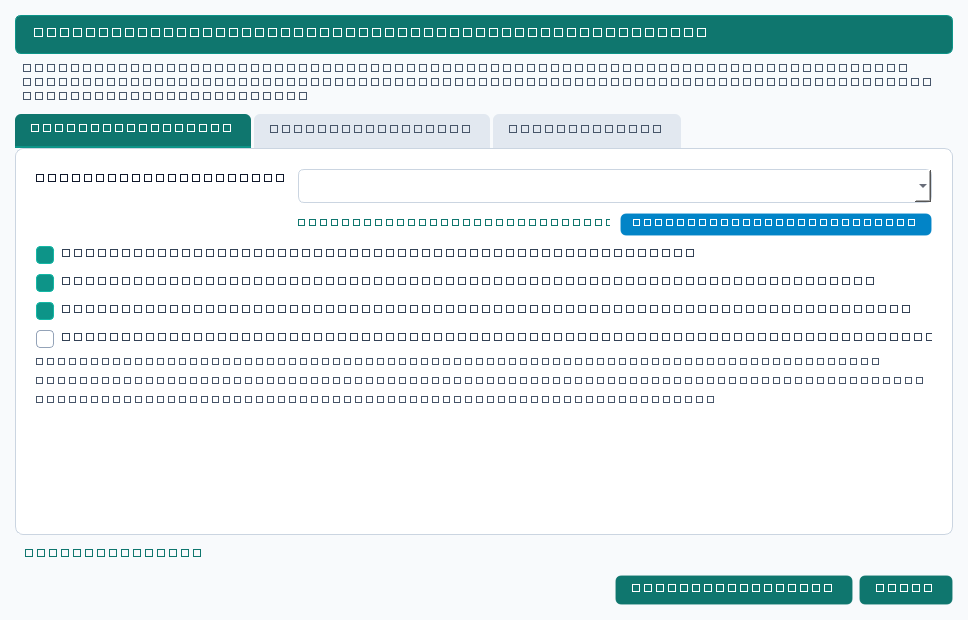
Open QGIS, load your parcel or urban block polygon layer (in any projected metric CRS such as UTM or Web Mercator), and click the PlanX Urban Procedural 3D toolbar icon. The launcher dialog appears with three tabs: Main Studio, Options & Sync, and Server Log.
Select your active parcel layer from the dropdown. If you wish to study a specific precinct, select the features on the map canvas first; the launcher will automatically detect the selection count. Choose your local port (default 8090, with automatic 20-port forward fallback if busy), and click Start 3D Cockpit. A built-in Generate Sample Urban Block (12 Parcels) button is also available for instant evaluation.
ExploreExplore the 3D Urban Fabric
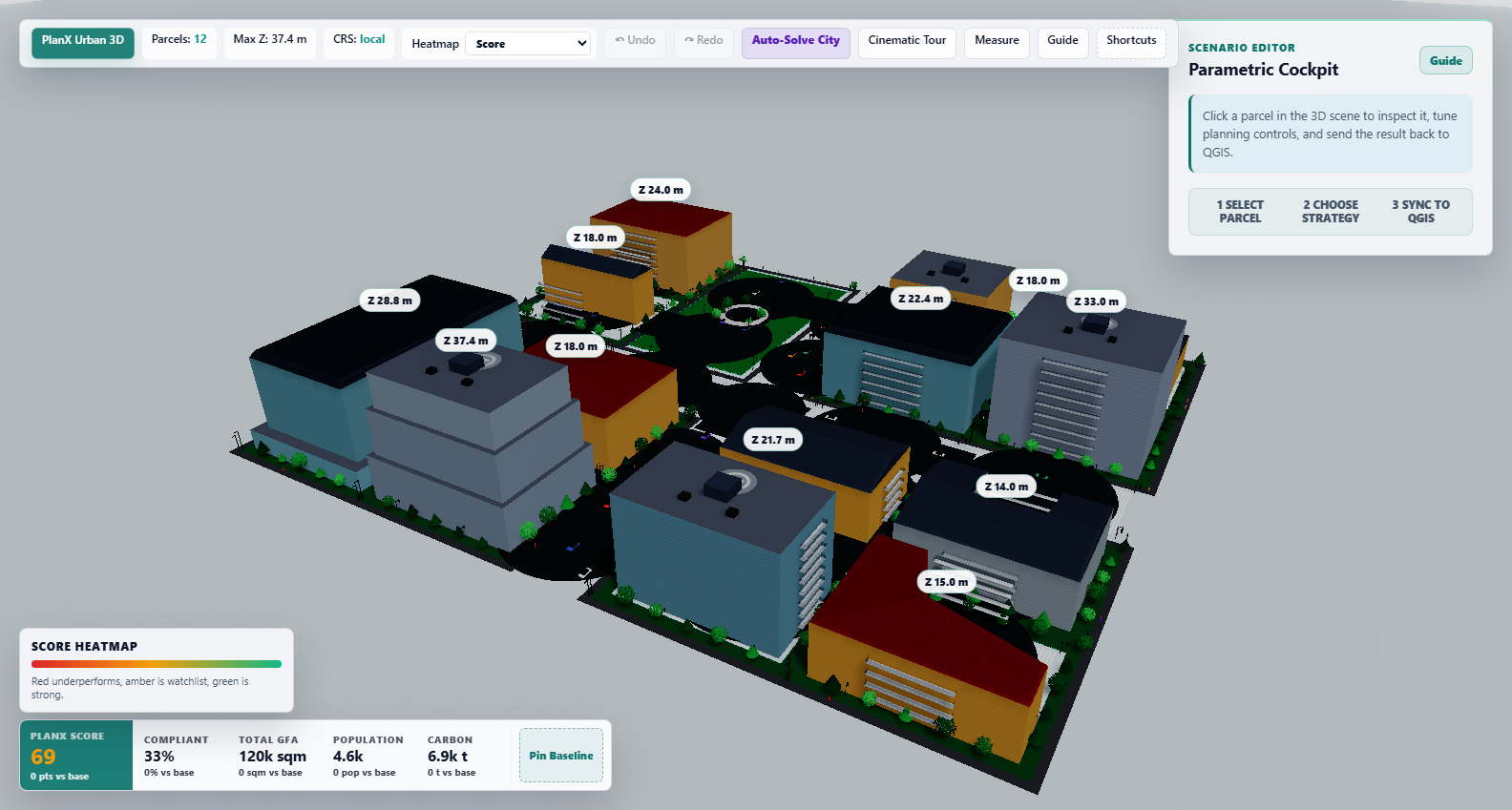
The cockpit opens instantly in your default web browser. The high-performance Three.js engine constructs 3D massing envelopes from the cadastral polygons, adds setbacks, procedural street networks, sidewalk buffers, and low-poly trees. The top HUD displays real-time city stats: total parcels, maximum building height ($), coordinate reference system, and the current overall PlanX Score (bash–100$).
Navigate the scene using intuitive orbit controls: left-click and drag to orbit, right-click and drag to pan, and scroll to zoom. Keyboard shortcuts like R (reset camera), F (focus selected parcel), and N (toggle day/night) enable rapid navigation.
SelectSelect and Inspect Parcels
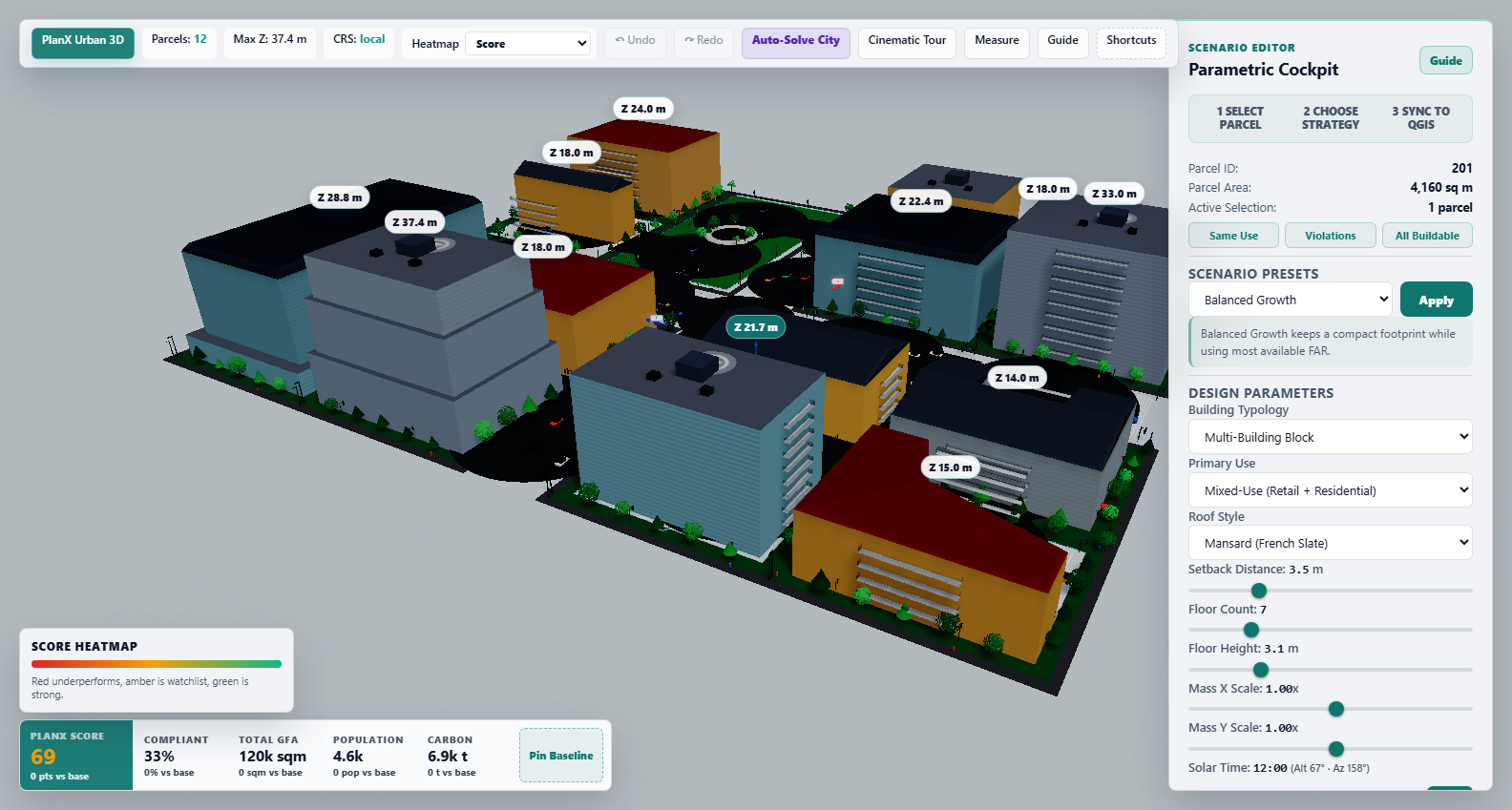
Click directly on any building or parcel in the 3D scene. The selected parcel is highlighted with a glowing boundary, a 3D height handle appears above the roof, and the Inspector Dock opens on the right. The inspector displays parcel area, calculated Gross Floor Area (GFA), Building Coverage Ratio (BCR), Floor Area Ratio (FAR), estimated resident/worker population, operational carbon, stormwater runoff, and open space ratio.
Shift while clicking to select multiple parcels, or use the quick selection buttons: Same Use, Violations, or All Buildable.
Sculpt & ComplyParametric Sculpting and Real-Time Zoning Feedback
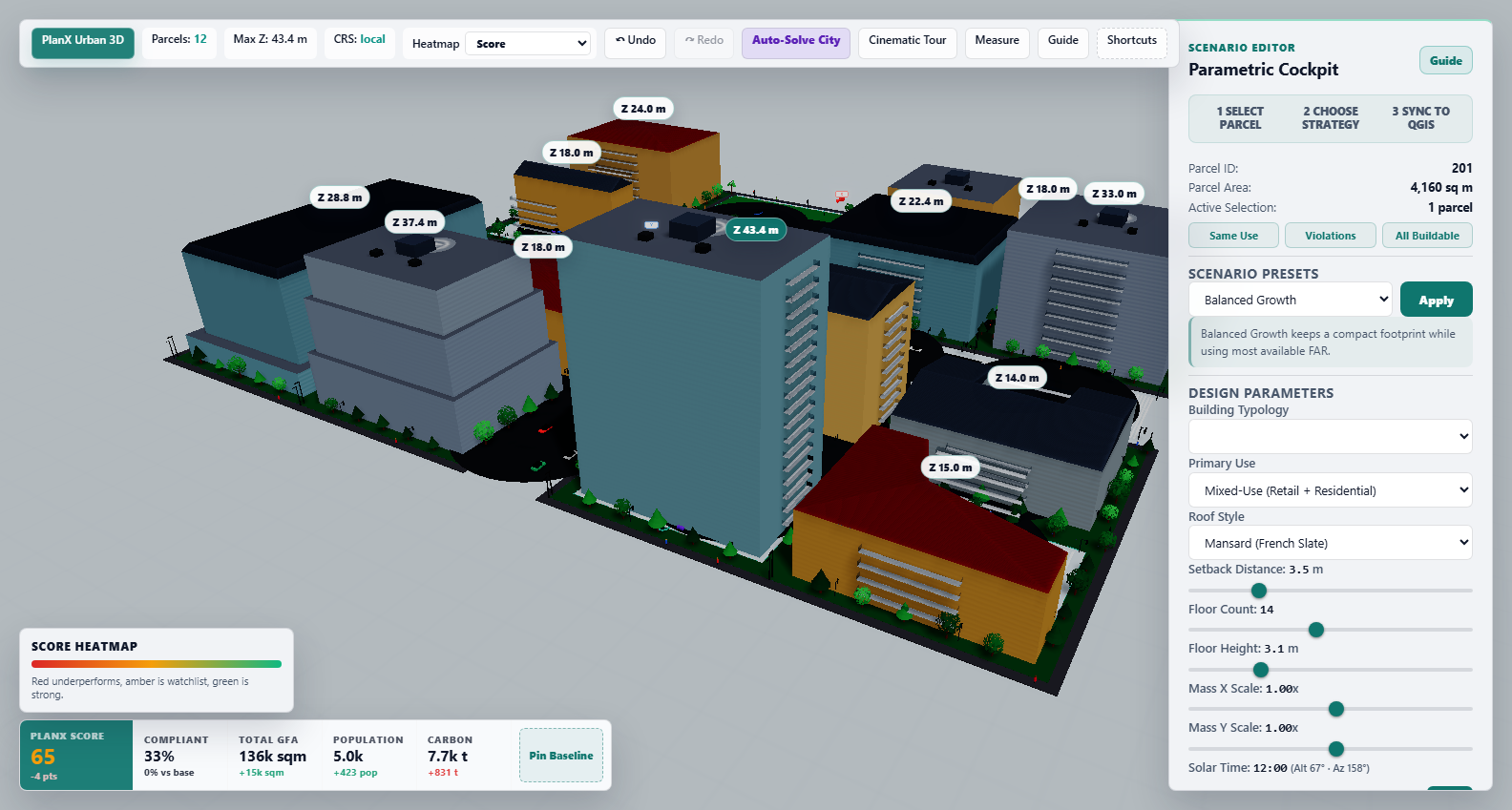
Adjust building parameters dynamically using the inspector sliders:
| Control | Range | Description |
|---|---|---|
Typology | 8 Options | Tower, Slab/Row, Courtyard, L-Shape, U-Shape, Podium Tower, Stepped Tower, Multi-Building Block. |
Setback | bash – 15 ext{ m}$ | Inward polygon buffer offsetting the building footprint from cadastral boundaries. |
Floors | – 60$ | Number of above-ground habitable storeys. |
Floor Height | .8 – 6.0 ext{ m}$ | Floor-to-floor vertical distance (default .2 ext{ m}$ residential, .0 ext{ m}$ commercial). |
Roof Style | 4 Styles | Hipped (Clay tiles), Gable (Slanted), Mansard (French slate), or Flat (Helipad/HVAC). |
Stepback | Interval & Depth | Upper floor terrace stepbacks for solar light preservation and pedestrian wind comfort. |
As sliders move, the compliance engine recomputes BCR against $ ext{BCR}_{\max}$, FAR against $ ext{FAR}_{\max}$, and height against {\max}$ in sub-millisecond real time. The Compliance Pill immediately signals status: COMPLIANT or VIOLATION.
AnalyzeSpatial Analytics and Thematic Heatmap Modes
Switch the Heatmap selector in the top HUD to visualize city-wide performance across 6 distinct thematic layers:
- PlanX Score: Composite urban quality and compliance rating (bash–100$, red to green).
- Zoning Compliance: Binary/continuous constraint load highlighting over-development hot spots.
- FAR Utilization: Percentage of permitted floor area envelope consumed.
- Population Density: Estimated resident and commercial workforce distribution.
- Carbon Intensity: Embodied and operational annual $ ext{kg CO}_2 ext{e}$ estimations.
- Primary Land Use: Color-coded categorization (Residential, Commercial, Mixed-Use, Civic, Park).
Optional building tinting applies the active heatmap color palette directly onto the 3D extruded masses for dramatic scenario presentations.
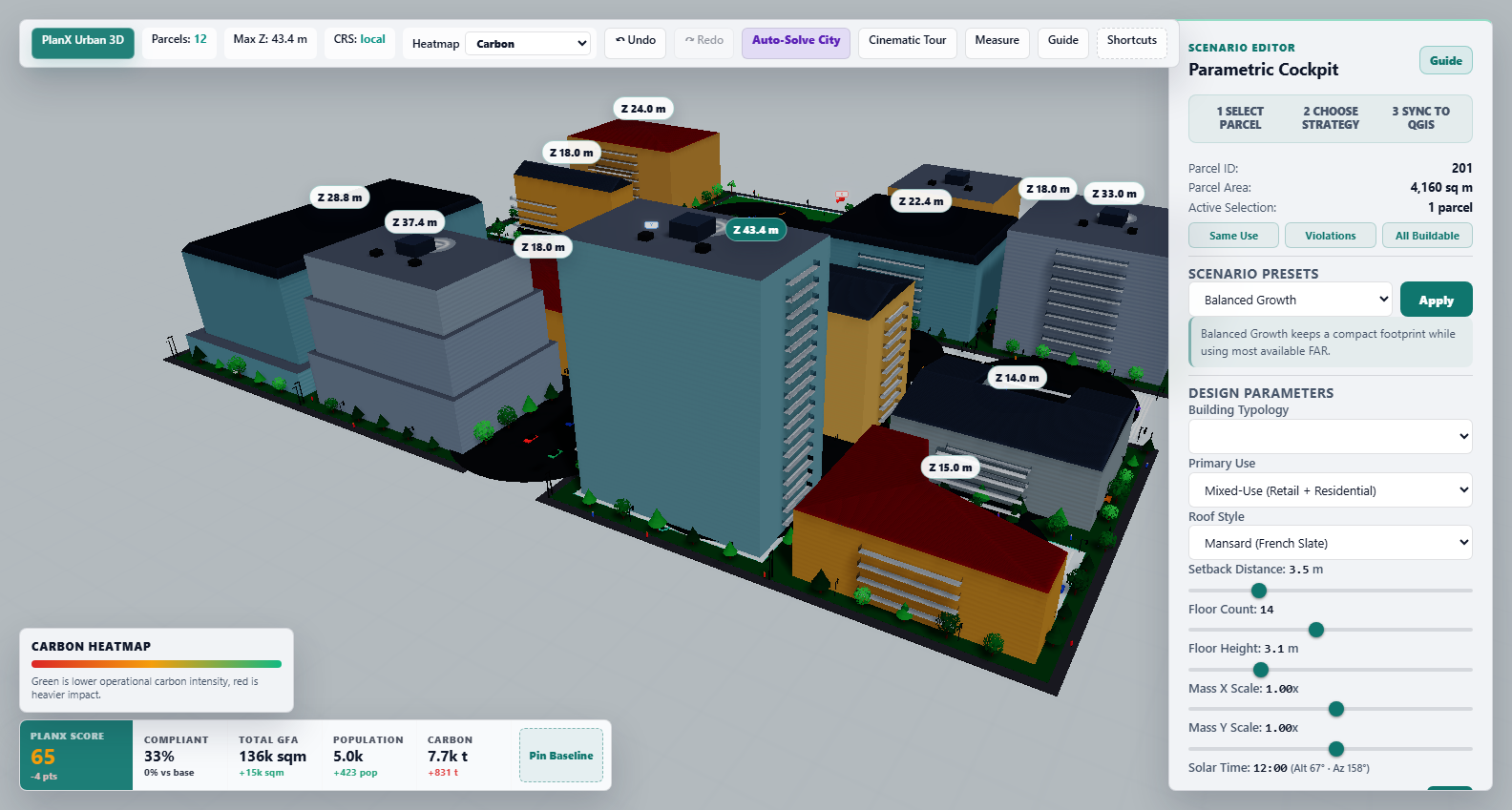
IlluminateSolar Physics and 24-Hour Day/Night Simulation
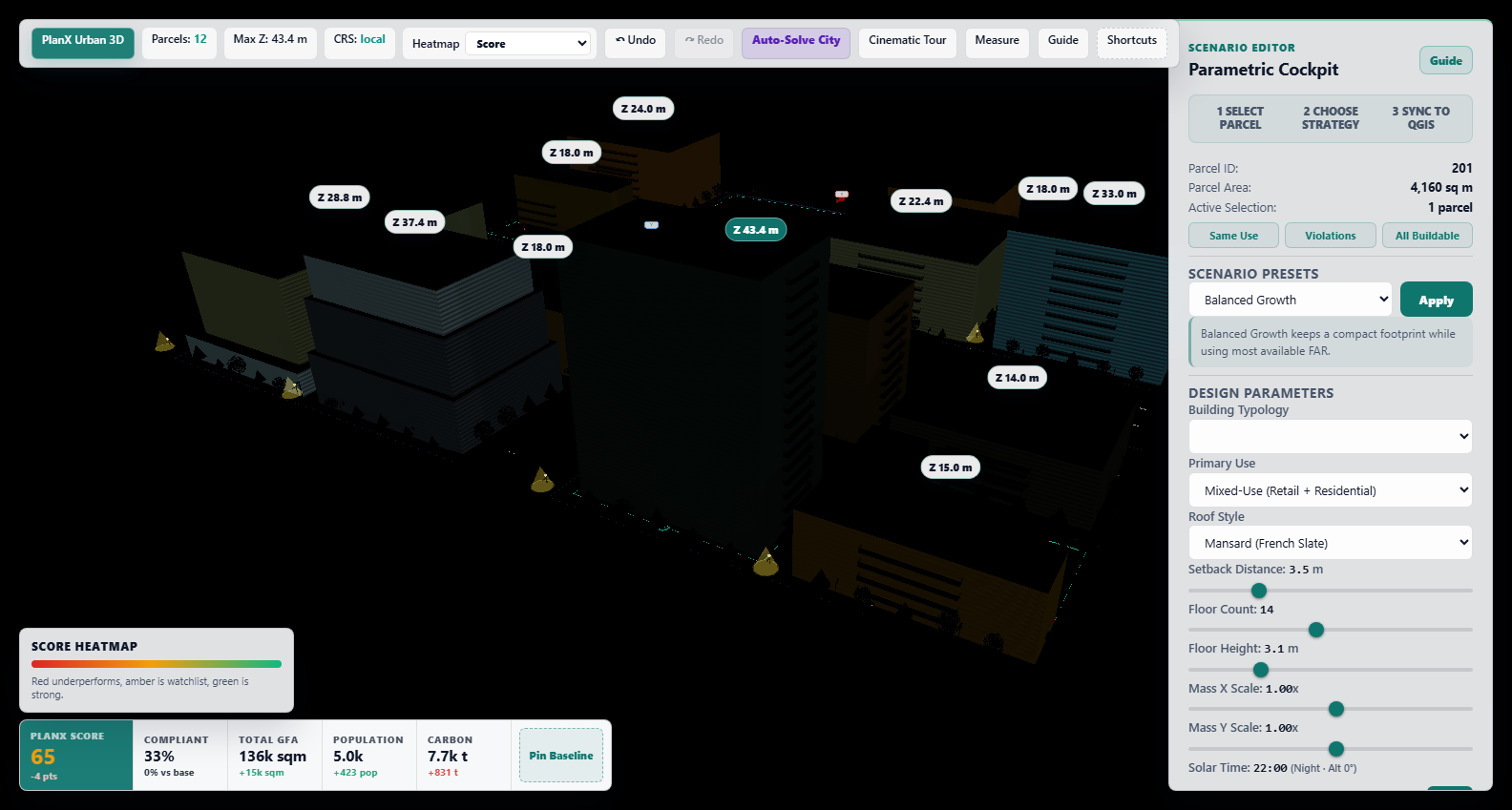
The time slider in the inspector allows continuous simulation of the 24-hour diurnal cycle. At any hour, the astronomical sun vector computes true solar altitude and azimuth angles, casting physically based soft directional shadows across adjoining blocks, courtyards, and pedestrian alleys.
At dusk and night (e.g., 22:00), the sun dips below the horizon, transitioning the atmosphere to deep twilight. Streetlights illuminate sidewalk networks with warm radial point lights, while building windows light up through procedurally generated emissive window maps.
AutomateScenario Archetypes and Auto-Solve Optimization
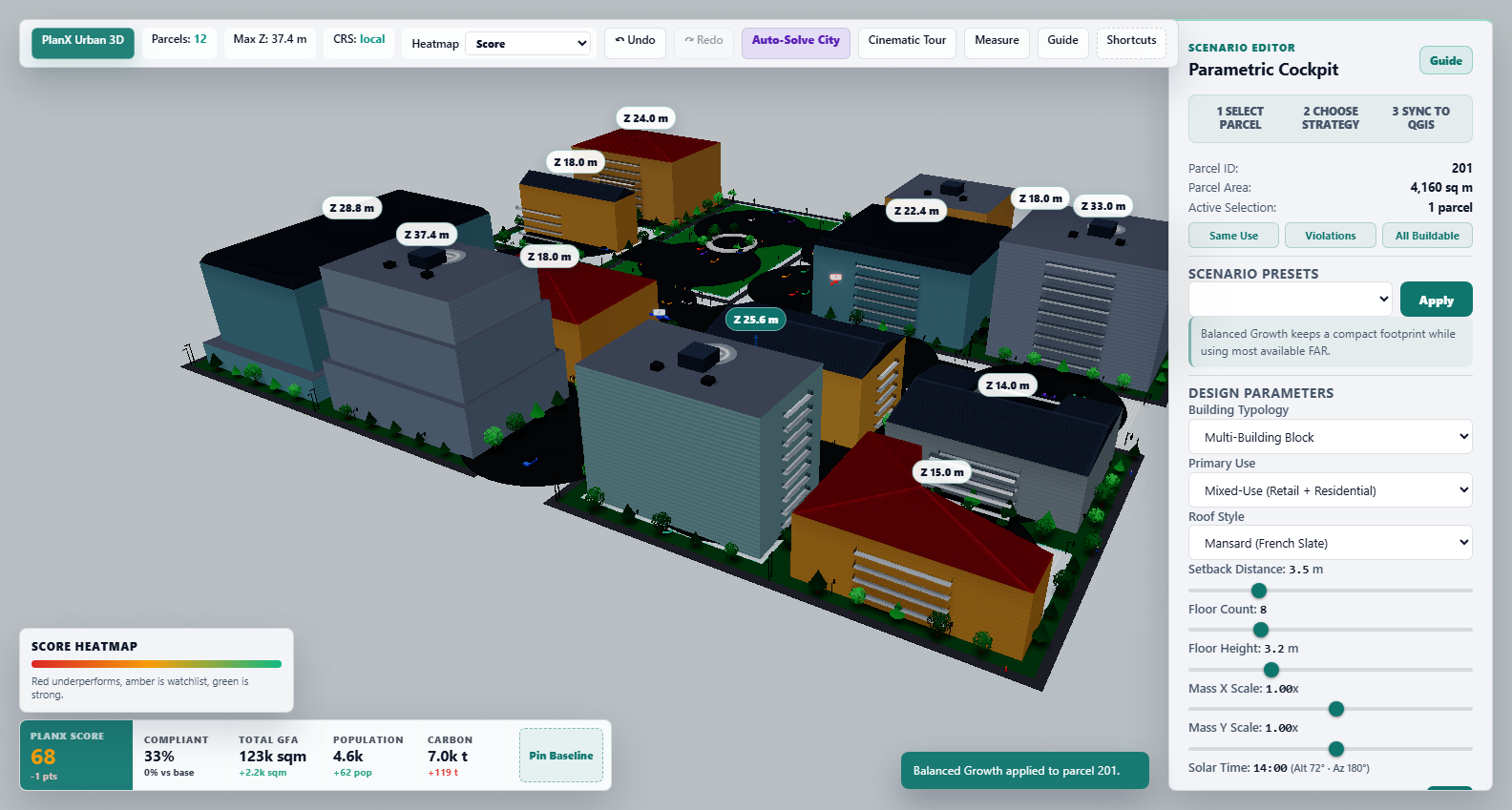
Rather than tweaking each parcel individually, choose one of seven curated urban design presets from the scenario dropdown:
- Balanced Growth: Mid-rise mix (–6$ storeys) balancing density with open space.
- Transit-Oriented Mix: High-density podium towers (0–18$ storeys) with active retail ground floors.
- Affordable Mid-Rise: Efficient row and slab blocks optimized for daylight and construction economy.
- Perimeter Courtyard Block: Continuous perimeter fabric with enclosed acoustic green courtyards.
- High-Rise CBD Core: Maximized commercial density with slender towers and progressive sky stepbacks.
- Low-Carbon Campus: Low BCR (bash.30$), wide tree canopy buffers, and strict carbon limits.
- Public Realm Upgrade: Generous front setbacks ( ext{ m}$) creating continuous pedestrian esplanades.
Click Apply Preset or Auto-Solve City to automatically optimize floor counts and setbacks for all parcels to reach the highest possible PlanX Score while strictly respecting all zoning limits.
SynchronizeMeasurement Tools and Two-Way QGIS Sync
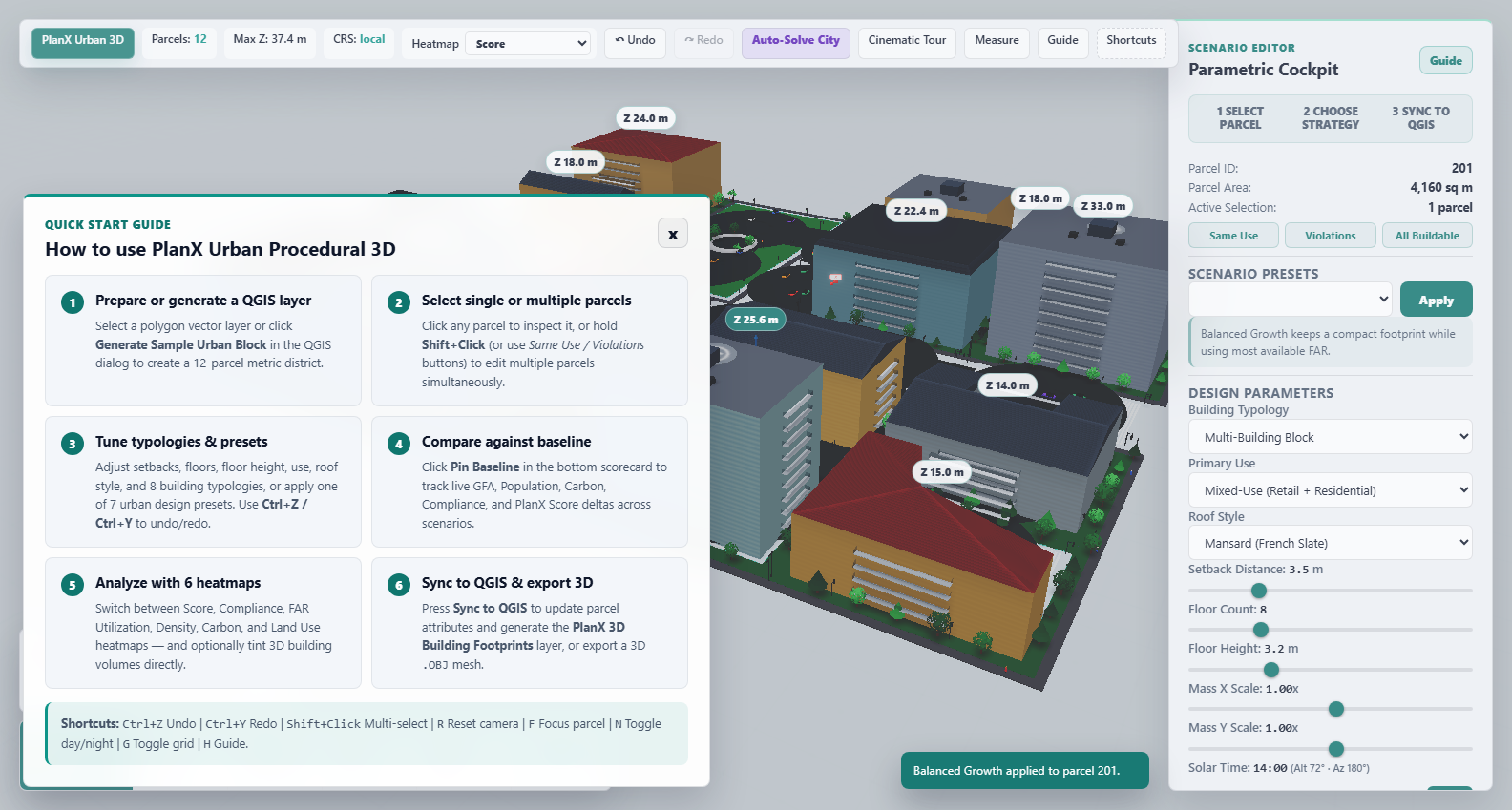
Click the Guide button or press H / ? to open the in-scene interactive reference card with all navigation shortcuts, scoring formulas, and tool guides. Activate the 3D ruler to measure street widths, building clearances, and cantilever projections directly in 3D space.
When satisfied with your scenario design, click Sync Parameters & 3D Footprints to QGIS. The plugin uses a transactional, thread-safe bridge to update the source layer with 27 planning fields (FAR, BCR, GFA, height, population, carbon, etc.) and automatically generates/updates a styled PlanX 3D Building Footprints vector layer with exact polygon geometries and 3D extrusion rules.
You can also click Export Planning Report (CSV) to produce a comprehensive spreadsheet, or Export 3D City Mesh (.OBJ) for downstream rendering in Blender, Rhino, or SketchUp.
19. Technical Notes
- Polygon operations (pure JavaScript): Offset polygon ring (corner-bisector method with degeneracy check), oriented bounding box (longest-edge projection), shoelace area formula, convex polygon clipping, line intersection, ring normalisation—no external geometry libraries.
- Graceful degradation: Building construction failure falls back to Tower, then to parcel footprint only. Setback consuming the entire parcel progressively rolls back and ultimately uses OBB shrink.
- Procedural textures: Facade window textures are canvas-drawn at runtime (256x512 pixels, 4 columns windows per floor, usage-dependent colours). Emissive maps enable night glow. Roof textures include 17 procedural variants.
- Low-poly trees: Three styles—conifer (stacked cones), deciduous (icosahedron canopy with vertex noise, 4 green shades), palm (fan leaves). Sidewalk placement alternates trees with streetlights.
- WebGL cleanup: Full texture, material, and geometry disposal on scene rebuild. Scene rebuild tokens abort stale rebuilds.
- Settings persistence: Viewer settings persist in localStorage (schema v13) with migration logic.
- Keyboard shortcuts: R (reset camera), F (focus selected), N (night toggle), G (grid toggle), H/? (guide), Escape (close guide).
- CSV export: BOM-prefixed CSV with 28 columns. Cinematic tour with auto-orbit camera. 3D ruler with screen-space labels.
- QGIS compatibility: 3.28 through 4.99. Cross-version field creation via QMetaType/QVariant fallback. Scoped enum handling for Qt5/Qt6.
20. Literature
- Batty, M. (2013). The New Science of Cities. MIT Press. DOI: 10.7551/mitpress/9399.001.0001
- Berghauser Pont, M. & Haupt, P. (2010). Spacematrix: Space, Density and Urban Form. NAi Publishers.
- Martin, L. & March, L. (Eds.). (1972). Urban Space and Structures. Cambridge University Press.
- Muller, P., Wonka, P., Haegler, S., Ulmer, A., & Van Gool, L. (2006). Procedural modeling of buildings. ACM Transactions on Graphics, 25(3), 614–623. DOI: 10.1145/1141911.1141931
- Ewing, R. & Cervero, R. (2010). Travel and the built environment: A meta-analysis. Journal of the American Planning Association, 76(3), 265–294. DOI: 10.1080/01944361003766766
- Lehner, A. & Blaschke, T. (2019). A generic classification scheme for urban structure types. Remote Sensing, 11(2), 173. DOI: 10.3390/rs11020173
- U.S. Environmental Protection Agency. (1983). Results of the Nationwide Urban Runoff Program (Vol. 1). Water Planning Division, NTIS PB84-185552.
- Parish, Y. I. H. & Muller, P. (2001). Procedural modeling of cities. Proceedings of SIGGRAPH 2001, 301–308. DOI: 10.1145/383259.383292
- Kolbe, T. H. (2009). Representing and exchanging 3D city models with CityGML. In J. Lee & S. Zlatanova (Eds.), 3D Geo-Information Sciences (pp. 15–31). Springer. DOI: 10.1007/978-3-540-87395-2_2
- Alexander, C., Ishikawa, S., & Silverstein, M. (1977). A Pattern Language: Towns, Buildings, Construction. Oxford University Press.